Context Engineering for Coding Agents Interview Prep
Context engineering for coding agents: file selection tiers, prompt caching strategy, MCP-based live codebase access, bounded agent loops, and context pollution pitfalls.
Quick answer
Context engineering for coding agents is the discipline of selecting, formatting, and delivering the right information to an AI agent so it can complete a coding task accurately and within appropriate scope.
Context engineering is the canonical insight that separates engineers who understand AI-assisted development from engineers who only know how to call an LLM API.
Editorial review
Written by
CompoundLearn editorial team
Wireless / RF / hardware engineering
Reviewed by
CompoundLearn editorial team
Wireless / RF / hardware engineering
Last reviewed
Built from curated topic maps, editorial validation, and subject-matter review so the page stays aligned with the interview intent and the current content pipeline.
Key points
- Context engineering is selecting, formatting, and delivering the right information to a coding agent — distinct from prompting, which is just the instruction you write.
- A well-prompted agent with wrong or missing context produces plausible code that misunderstands the problem; context quality is the primary quality lever once the loop works.
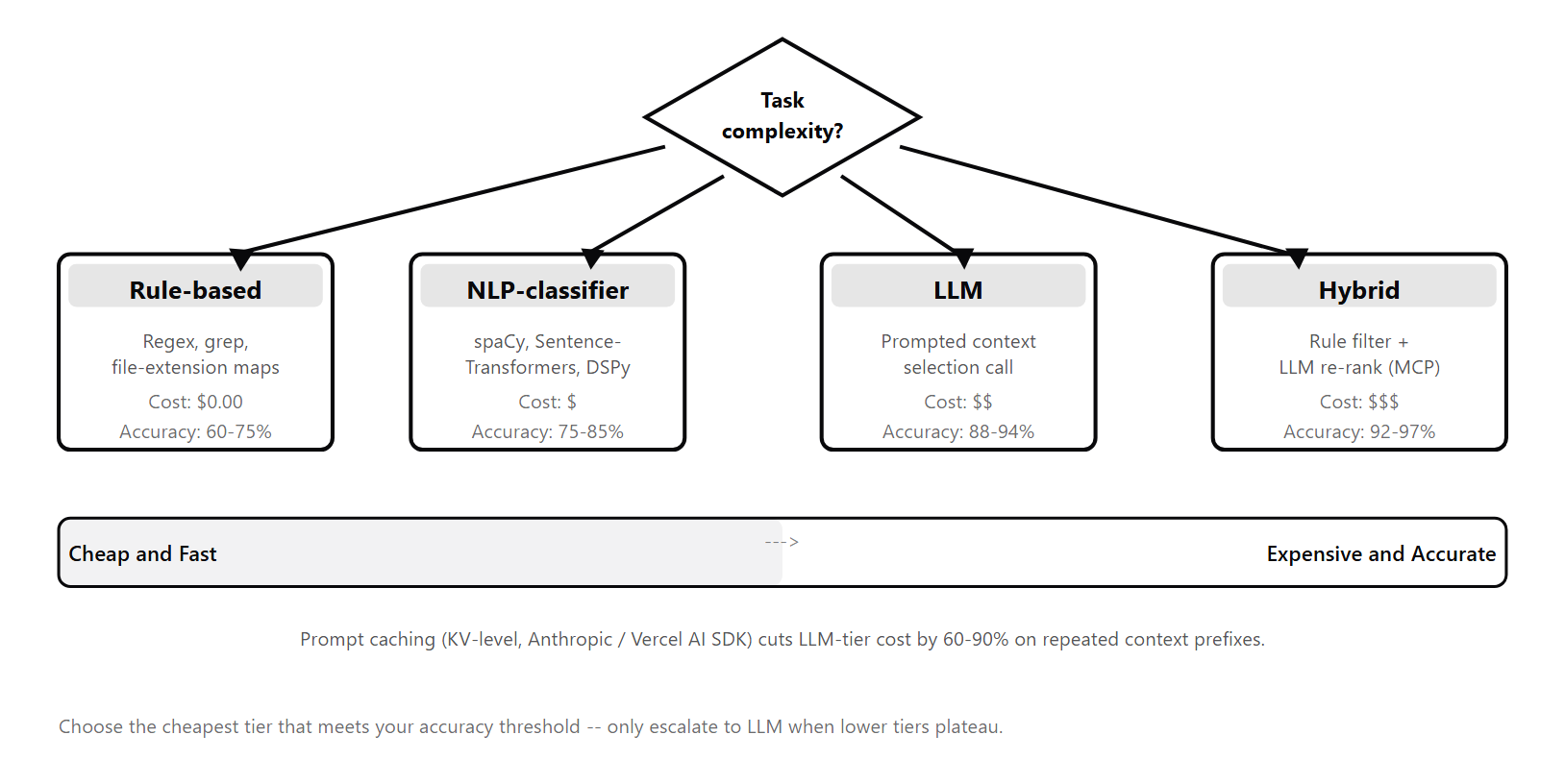
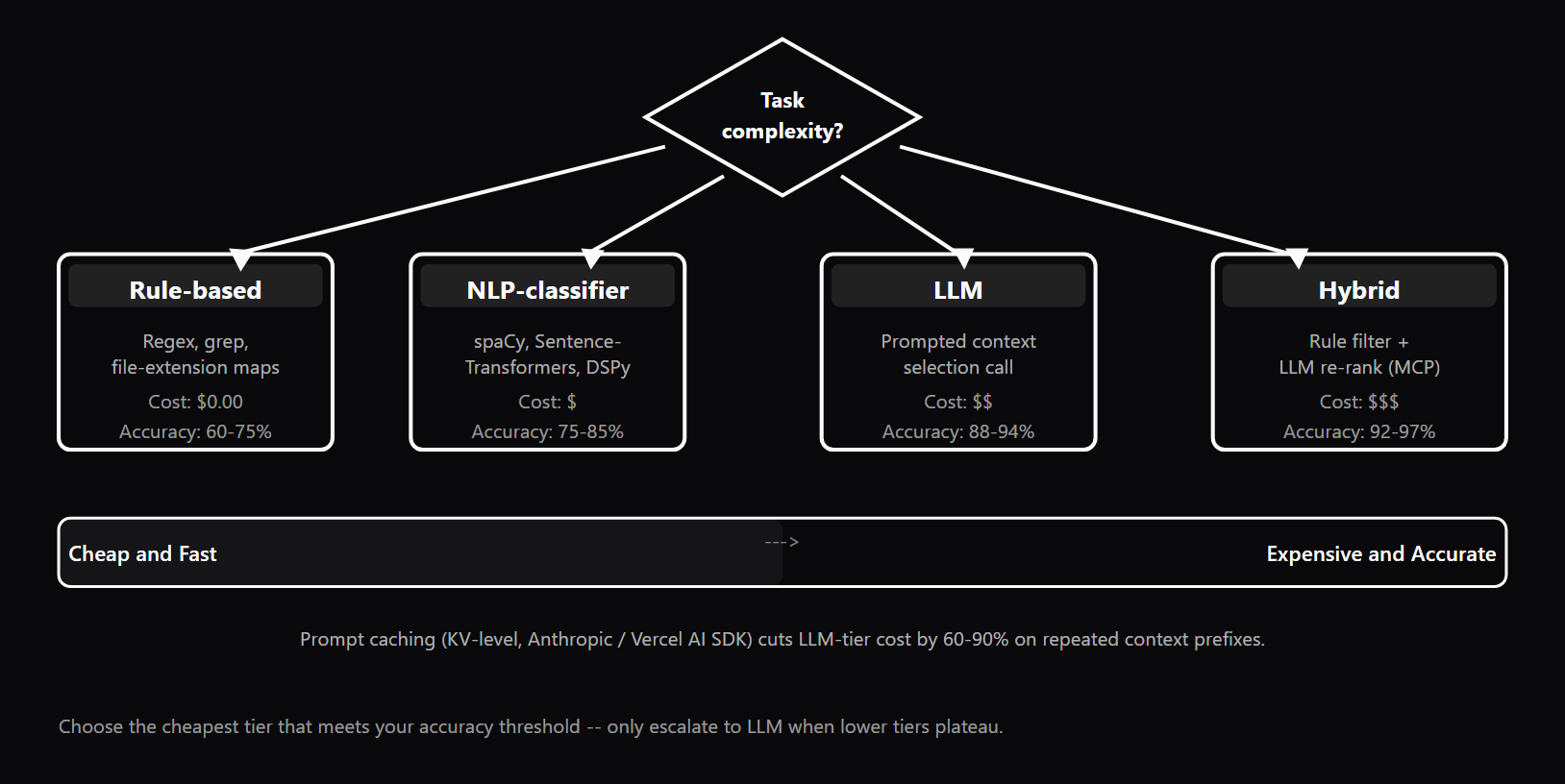
- Context-selection methods fall on a cost-accuracy curve: rule-based, NLP-classifier, LLM-based, and hybrid — each tier earns its cost when the one below leaves too many errors.
- Provider prompt caching (Anthropic, OpenAI, Gemini) reuses a stable prompt prefix at 50-90% cost reduction, shifting the strategy to a large cached prefix plus a small per-step injection.
What it is
Context engineering for coding agents is the discipline of selecting, formatting, and delivering the right information to an AI agent so it can complete a coding task accurately and within appropriate scope. It is distinct from prompting: prompting is the instruction you write; context engineering is the broader system that determines what the model sees — which files, logs, test cases, constraints, architecture notes, and tool outputs are assembled into the context window, in what order, at what granularity, and with what caching strategy applied to the stable portions. The distinction matters because the agent loop (see /topics/agentic-ai-engineering-fundamentals) — the cycle of LLM-decides, tool-runs, LLM-observes that drives any coding agent — depends critically on context quality at each decision step. A well-prompted agent with incorrect or missing context produces plausible-looking code that misunderstands the actual problem. A simple instruction with precisely scoped context often works correctly on the first loop iteration. Context quality is therefore the primary quality lever for coding agents once the basic loop is functional. Context selection methods fall on a cost-accuracy curve with four tiers. Tier 1 (Rule-based) uses hardcoded heuristics — always include the test file adjacent to the source, match files by filename pattern — and is fast and free but brittle on novel task types. Tier 2 (NLP-classifier) uses a lightweight embedding model to rank files by semantic relevance to the task description — better recall than rules at low cost. Tier 3 (LLM-based selection) uses a model to understand task intent and select files accordingly — highest accuracy, meaningful latency and cost. Tier 4 (Hybrid) chains the tiers: rules for obvious inclusions, classifier for candidate narrowing, LLM for final ranking. Each tier earns its cost when the tier below leaves too many errors for the task class in production. Provider-native prompt caching fundamentally changes the economics of context engineering. Anthropic's API (via cache_control markers), OpenAI's automatic prompt caching, and Google Gemini's implicit caching all store KV representations of a stable prompt prefix and re-use them across requests — typically at 50–90% cost reduction on the cached segment. For a coding agent session, this means architecture docs, style guides, and core source files placed in the cached prefix can be included unconditionally at amortized cost. The strategy shifts from "include only what this step needs" to "maintain a large stable cached prefix plus a small dynamic per-step injection." The Model Context Protocol (MCP) (see /topics/mcp-model-context-protocol), originated by Anthropic and now adopted broadly by Claude Code, Cursor, Windsurf, ChatGPT, and major agent frameworks, standardizes how tools supply context dynamically. Instead of pre-loading a static file bundle that goes stale as the session progresses, an MCP-enabled agent requests current file content on demand during the agent loop — always reading from the live codebase, not a cached snapshot. MCP is now the settled standard for tool-supplied context in production coding agents. Case study: a production refactoring agent that pre-loaded only the definition file and direct callers (Tier 1 rule-based selection) was generating incomplete renames. Switching to a Hybrid (Tier 4) selection that added LSP-based transitive caller resolution, combined with prompt caching for the stable architecture prefix, reduced the rename failure rate by over 80% while keeping per-session token cost within the original budget.
Why interviewers ask
Context engineering is the canonical insight that separates engineers who understand AI-assisted development from engineers who only know how to call an LLM API. Interviewers at teams building coding agents — at companies deploying GitHub Copilot-style assistants, internal developer tooling, or autonomous refactoring pipelines — probe for this distinction explicitly, because hiring someone who conflates context engineering with prompting leads to agents that fail in systematic, hard-to-diagnose ways. The hiring signal is specific. Strong candidates know the four context selection tiers and can articulate when each earns its cost over the one below it. They understand how provider-native prompt caching changes the viable strategy for long-horizon sessions — moving from per-step minimization to a stable cached prefix model. They can explain the difference between what belongs in the system prompt (stable, cached, universal) and what belongs in the dynamic injected context (per-step, variable, task-specific). They know how MCP changes context assembly for sessions where files change mid-execution. They can describe how to scope context for a task that exceeds a single context window using Plan-and-Execute decomposition and on-demand MCP retrieval. Strong candidates also know what context failures look like in production: context pollution (the agent edits files that were in context but not in scope), stale context (files pre-loaded at session start that changed mid-session), missing acceptance criteria (the agent produces output it considers complete but that fails the actual test), and prompt structure that defeats caching (variable content placed before stable content so the provider never finds a matching prefix). Weak candidates conflate context engineering with prompting and answer every context question by describing how they would rewrite the instruction. They do not distinguish between static pre-loaded context and MCP-driven dynamic context. They have not reasoned about the economics of context window size or the value of prompt caching for amortizing stable content. They cannot explain why over-including context is as harmful as under-including it — a 100,000-token context where only 2,000 tokens are relevant leaves the model searching for signal in noise.
Common mistakes
The most common mistake is dumping the full repository into the context window. This creates a context where the relevant signal — the 5–10 files directly involved in the task — is diluted across hundreds of unrelated files. The model follows irrelevant patterns, misses the correct interface, and produces code that does not integrate with the actual codebase. Focused context consistently outperforms unfocused context for coding tasks, and context pollution — where out-of-scope files cause the agent to make unsolicited edits — is the direct consequence of over-broad selection. The second common mistake is not including an acceptance criterion. Without an explicit "done" definition — the test that must pass, the error that must disappear, the API contract that must be satisfied — the agent produces output it considers complete but which fails the actual requirement. The acceptance criterion should be part of the context, not implied. For coding agents this usually means including the relevant test file, not just the source file. Prompt structure that defeats caching is the third gap. Placing variable content (the user query, the current diff) before stable content (system prompt, architecture docs, pre-loaded files) means the provider can never find a matching prefix, so every request pays full token cost on the stable content. A one-time prompt restructuring — stable content first, variable content last — produces permanent savings of 50–90% on the cached segment. Not using MCP for live codebase state is the fourth mistake. Pre-loading files at session start and not refreshing them via MCP as they change during the session means the agent's context drifts from the actual codebase state. An agent that was accurate at session start becomes increasingly wrong as the session progresses because the files it cached at load time have since been edited. MCP solves this by fetching current content on demand during the agent loop. Finally, omitting bounded loop caps (iteration, token, and wall-clock limits) is not a context engineering mistake per se, but it converts any context engineering bug into an expensive runaway loop. The three independent budgets are the first production safeguard any agent loop needs.
Rule-based vs NLP-classifier vs LLM vs Hybrid Context Selection — Tier Trade-offs
| Tier | Accuracy | Cost | Latency | Interpretability | Maintenance |
|---|---|---|---|---|---|
| Rule-based (Tier 1) | Low — misses relevant files that do not match the rule; high false-negative rate on novel or cross-cutting task types | Free — no model inference required | Sub-millisecond — pure string matching or glob patterns | Highest — rules are readable and auditable by any engineer | Brittle — rules must be hand-maintained as the codebase evolves; breaks silently on new file naming conventions |
| NLP-classifier (Tier 2) | Medium — better recall than rules; misses semantic relevance that requires understanding task intent across file boundaries | Low — a small embedding model (e.g., Sentence-Transformers or BGE running locally); no LLM API call | Low (10–50 ms) — fast embedding inference, no network round trip to an LLM provider | Medium — similarity scores are inspectable but the embedding space is opaque; ranking rationale is not natural language | Moderate — embedding model may need replacement when codebase vocabulary shifts significantly |
| LLM-based selection (Tier 3) | High — understands task intent and codebase semantics; best recall on novel, ambiguous, or cross-cutting changes | High — requires a model API call per context assembly; adds meaningful token cost at scale | High (500 ms–2 s) — round trip to LLM provider; unsuitable for sub-second interactive latency requirements | Low to medium — the selection rationale can be requested in the output but is not inherently auditable | Low maintenance — the LLM generalizes to new task types; no retraining as the codebase evolves |
| Hybrid (Tier 4) | Highest — rule inclusions + classifier candidate narrowing + LLM final ranking; best precision and recall combination | Medium — LLM call only on the narrowed candidate set, not the full file tree; prompt caching reduces per-call cost | Medium (200–800 ms) — LLM operates on a pre-filtered small set, reducing tokens and latency vs Tier 3 alone | Medium — rule and classifier steps are interpretable; LLM ranking step is less so but can be asked to explain | Moderate — rules and classifier need periodic maintenance; LLM component self-maintains as codebase evolves |
Sample interview questions
- What is the primary distinction between prompting and context engineering for coding agents?
- A. Prompting uses system messages; context engineering uses user messages.
- B. Prompting is crafting the instruction text; context engineering is deciding what information the agent receives — which files, symbols, tool outputs, and conversation history are in the context window when that instruction executes. ✓
- C. Context engineering is a synonym for retrieval-augmented generation (RAG) and applies only to search-style tasks.
- D. Prompting is a one-time activity; context engineering is fully automated and requires no human judgment once configured.
Option B is correct. The agent loop (the while-loop of LLM-decides → tool-runs → LLM-observes) depends on two things: what it is asked to do (the prompt) and what it can see when it makes each decision (the context window). Prompting shapes the instruction; context engineering is the broader discipline of curating the information environment — selecting which source files are in scope, which symbols from the codebase are retrieved, what conversation history is included, and what tool results are injected. For coding agents this is typically the higher-leverage lever: a precisely scoped context with the right files usually produces correct output even with a minimal prompt, while a polished prompt combined with wrong or missing context produces plausible-looking code that misunderstands the actual problem. Option A is wrong. System messages and user messages are message-role distinctions, not a prompting-vs-context-engineering boundary. Context engineering operates across all message roles — stable architecture docs in the system prompt, dynamically retrieved snippets injected as user-role content, and tool results appended to the conversation history all count. Option C is wrong. RAG (retrieval-augmented generation) is one specific technique for retrieving and injecting context. Context engineering also includes rule-based file selection, LSP-driven reference graphs, MCP-based live codebase access, prompt caching for stable prefixes, and in-context memory management across multi-step tasks. Option D is wrong. Context engineering requires significant human judgment — choosing the right context selection tier for a given task class, deciding which stable content should be cached versus fetched dynamically per step, and maintaining the scope discipline that prevents context pollution. Production reality: in production coding agents (GitHub Copilot, Cursor, custom coding assistants), context engineering — selecting the right files, symbols, and reference docs — is typically where the largest quality improvement opportunity lives once the basic agent loop is functional.
- A coding agent must rename a method across a codebase. Which context should be pre-loaded before the agent loop begins?
- A. Only the file where the method is defined, to keep the context window small.
- B. The method definition file, all files that call the method (from a static reference graph), the test files covering those call sites, and any interface or type files that reference the method signature. ✓
- C. The entire codebase, because any file could theoretically reference the method.
- D. Only the task description and the method name — the agent should search for relevant files itself using MCP tool calls.
Option B is correct. A method rename has a well-defined reference graph: the definition file, all callers, tests covering those callers, and any interface files that expose the method signature. Pre-loading exactly these files — retrieved deterministically from a Language Server Protocol query or static call-graph analysis — gives the agent the complete picture needed to perform the rename correctly without hallucinating missed call sites or inventing non-existent dependencies. This is the structured, task-scoped context selection pattern that separates reliable coding agents from unreliable ones. Option A is wrong. Including only the definition file means the agent has no visibility into call sites. It will produce a partial rename that breaks all callers — worse than no change. Option C is wrong. Including the entire codebase fills the context window with irrelevant files, diluting the signal and forcing the agent to decide which patterns to follow from a noisy input. Most large codebases contain thousands of files; only a small subset is relevant to any given rename. Option D is wrong. While an MCP-equipped agent can discover callers via tool calls, starting with an empty context forces it to spend multiple tool-call iterations on discovery that a static analysis query could answer in one deterministic step. For a production coding agent, pre-loading the reference graph is both faster and more reliable than search-driven discovery. Production reality: Language Server Protocol (LSP) queries, Tree-sitter analysis, and static call-graph tools can generate the reference graph deterministically. Wiring these into the context injection pipeline — so the graph is pre-loaded before the agent loop starts — is one of the highest-value improvements for refactoring agents.
- When does the LLM tier of context selection justify its cost over a rule-based or NLP-classifier tier?
- A. Always — LLMs are always more accurate at selecting relevant context than rules or classifiers.
- B. When task intent is ambiguous, requires cross-file semantic reasoning, or the context selection decision needs to be explained to the user — scenarios where rules and classifiers plateau. ✓
- C. Only for multi-agent pipelines; single coding agents should always use rule-based selection.
- D. When the codebase has fewer than 1,000 files, because LLM context selection does not scale to large codebases.
Option B is correct. The LLM tier earns its latency and token cost in three specific conditions: (1) ambiguous task intent where a rule or classifier cannot resolve which files are relevant — "fix the bug causing login to fail" requires understanding the login flow semantically, not just matching filename patterns; (2) cross-file semantic reasoning, where relevance is determined by conceptual relationships not captured in syntax; (3) explainability requirements, where the context selection rationale needs to be surfaced to the user. For deterministic, well-scoped tasks the rule-based tier is faster, cheaper, and equally accurate. Option A is wrong. LLMs add cost and latency without accuracy gain for deterministic pattern-matching tasks. A glob rule for "all TypeScript files in /api" is 100% accurate and the LLM tier adds nothing. Option C is wrong. The tier selection decision is independent of single-agent vs multi-agent architecture. A single coding agent benefits from LLM-tier context selection for ambiguous tasks just as much as a multi-agent setup. Option D is wrong. LLM context selection scales to large codebases when combined with a pre-filter — embedding-based retrieval narrows to a candidate set, then the LLM re-ranks. File count is not the primary gating factor; task ambiguity is. Production reality: the standard production pattern is a rule-based pre-filter plus NLP or LLM re-ranking for ambiguous queries. Prompt caching (provider-native KV-cache reuse of the stable code prefix) cuts LLM-tier context selection cost by 50–90% for repeated session starts on the same codebase.
- How does provider-native prompt caching change the context engineering strategy for a long-horizon coding agent session?
- A. Prompt caching has no effect on context engineering — it only reduces API latency, not token cost.
- B. With prompt caching, the stable context prefix (architecture docs, style guides, large file contents) can be included unconditionally, because the KV cache amortizes its cost across all requests in the session. ✓
- C. Prompt caching forces smaller context windows because cached tokens cannot be evicted.
- D. Prompt caching replaces the need for context engineering — the cache handles all retrieval automatically.
Option B is correct. Provider-native prompt caching (available in the Anthropic API via cache_control markers, in OpenAI via automatic prompt caching, and in Google Gemini via implicit caching) re-uses the KV-cache representations of a stable prompt prefix so that subsequent requests with the same prefix do not recompute or re-charge for those tokens at full rate — typically 50–90% cheaper on the cached segment. This fundamentally changes the cost-benefit calculation for context inclusion: architecture documentation, style guides, and core source files placed in the cached prefix can be included in every request in the session at a fraction of the per-call cost. The strategy shifts from "include only what you need for this specific step" (minimizing context to save cost) to "include the stable high-value context permanently" (amortizing cost across the session via the cache). Option A is wrong. Prompt caching reduces both cost and latency. For long-horizon sessions, the cost reduction is the more strategically impactful effect — it makes large stable contexts economically viable. Option C is wrong. Cached tokens do not reduce the available context window. The context window limit still applies and cached tokens count toward it at the same rate as uncached tokens. The cache affects cost and latency, not window size. Option D is wrong. Prompt caching is a cost optimization for repeated inclusion of stable content, not an automatic retrieval system. The engineer still decides what belongs in the cached prefix versus what is fetched dynamically per step. Production reality: the correct architecture for a long-horizon coding agent session is a two-layer context: a large, stable cached prefix (architecture docs, style guides, core files) that persists across all steps at amortized cost, plus a small dynamic per-step injection (current diff, tool results, the specific function under edit).
- A coding agent is making unsolicited edits to files not mentioned in the user's task. Which context engineering failure most likely caused this?
- A. The model version is too old and does not understand the task.
- B. Context pollution: the context window included files that were not in scope for the task, and the agent treated their presence as implicit permission to modify them. ✓
- C. The system prompt was too short and did not specify the task clearly enough.
- D. The tool schema for the file-write tool was missing the file path parameter.
Option B is correct. The failure mode of "editing files not mentioned in the task" is characteristic of context pollution: the context window contains out-of-scope files, and the model treats their presence as implicit scope. This commonly occurs when context selection is too broad (e.g., loading the entire repository rather than task-relevant files), when adjacent tool results from a previous agent loop iteration contaminate the current step's context, or when the context does not clearly delineate which files are read-only reference versus in-scope for editing. The model follows what it sees in context, so polluted context produces polluted edits. Option A is wrong. Model version is rarely the root cause of scope creep. The same model produces correctly scoped edits when context is precise and incorrectly scoped edits when context is broad. The failure is in context composition, not model capability. Option C is wrong. While a clearer system prompt can help with scope delineation, the described failure — editing out-of-scope files — is primarily a context scope problem. The model is responding to what it can see in context, not misunderstanding the instruction. Option D is wrong. A missing file path parameter in the tool schema would cause a tool call error or a missing-required-argument validation failure, not unsolicited edits to unrelated files. Production reality: production coding agents need explicit scope delineation — either an allow-list of editable files passed in the system prompt, or a tool permission model that restricts file-write access to a defined path subset. Context engineering alone is insufficient without enforcement at the tool layer.
- How does MCP (Model Context Protocol) enable a coding agent to access codebase state that stays current as files change during the session?
- A. MCP is only for static configuration files; live codebase access requires a separate file-watching daemon.
- B. An MCP server exposes the codebase as Resources (URI-addressed file access) and Tools (file read, symbol search, definition lookup); the agent negotiates capabilities at session start and fetches current content on demand. ✓
- C. Prompt caching handles live codebase context automatically; MCP is not needed.
- D. MCP requires the codebase to be pre-indexed in a vector database before the agent can access it.
Option B is correct. MCP (Model Context Protocol, modelcontextprotocol.io) defines the standard interface for exposing live data sources to agents. For a coding agent, the correct pattern is: implement an MCP server that exposes the codebase as Resources (each file is a Resource with a URI like file:///src/components/Button.tsx, readable on demand) and Tools (functions like read_file, search_symbol, get_definition that the agent invokes during its loop). At session start, the MCP client (the agent runtime) negotiates available capabilities with the server. When the agent needs to read a file, it calls the MCP Resource or Tool, which reads current content from disk — not a cached snapshot — so edits made during the session are immediately visible to subsequent loop iterations. Option A is wrong. MCP Resources can expose dynamic, live data. A file-watching daemon is not required; the MCP server reads from disk on each request. Option C is wrong. Prompt caching caches what was already in the prompt at session start, not what is on disk afterward. A file edited mid-session would not be in the cache; the agent would read an outdated version. MCP solves this by fetching current content on demand during the agent loop. Option D is wrong. MCP does not require a vector database. Resources can be served directly from the filesystem, a version control system, or any data source. Vector search is one optional retrieval strategy available as an MCP tool, not a prerequisite. Production reality: MCP is the settled standard for tool-context integration, adopted by Claude Code, Cursor, Windsurf, Claude Desktop, and ChatGPT Custom Connectors. The Anthropic SDK, Vercel AI SDK, and LangChain all have MCP client implementations. Building an MCP server for your codebase lets any MCP-compatible agent access it without custom per-agent integration.
- Which planning pattern is most appropriate when a coding agent must execute a long multi-file refactor with clearly decomposable sub-tasks?
- A. ReAct (Reason + Act) — always the default because it handles any task type.
- B. Plan-and-Execute — the agent generates an explicit plan of sub-tasks first, then executes each, re-planning only when a step fails or new information requires it. ✓
- C. Tree of Thoughts — the agent explores multiple refactoring branches in parallel and prunes bad ones.
- D. Reflexion — the agent attempts the full refactor, reflects on what went wrong, and retries from scratch.
Option B is correct. Plan-and-Execute is the right pattern when a task has measurable sub-goals and benefits from upfront ordering — both of which apply to a multi-file refactor. The agent first generates an explicit plan (a list of steps such as "rename method X in definition file → update callers in module A → update callers in module B → update test files → verify type-check passes"), then executes the steps. If a step fails or new information arrives (e.g., an unexpected call site), the agent re-plans. LangGraph's plan_and_execute and LlamaIndex's planning agents implement this pattern. It produces a traceable audit trail of intended actions and is more cost-efficient than ReAct for tasks where the sub-goal structure is clear upfront. Option A is wrong. ReAct (Reason + Act, Yao et al. 2022) is the right default for reactive tasks but wastes tokens on tasks with clear sub-goal structure, because it re-reasons from scratch at each step rather than following a plan. Option C is wrong. Tree of Thoughts explores multiple reasoning branches in parallel — closer to game-tree search than execution. It is compute-intensive and suited for search-style problems, not sequential multi-file refactors. Option D is wrong. Reflexion is appropriate when the task can be re-attempted cheaply with feedback (coding problems with automated test suites). For a large refactor, retrying from scratch after failure is expensive; Plan-and-Execute with step-level error recovery is more efficient. Production reality: most production coding agents use ReAct as the inner loop for simple tasks and layer Plan-and-Execute on top for multi-step refactors, feature additions, or tasks with clear sub-goals. Reflexion is added when automated acceptance tests provide cheap retry signal.
- A coding agent's loop runs for 40 iterations on a simple bug-fix task, spending $12 in API calls before being manually stopped. What production safeguard was missing?
- A. The agent should have used a stronger model with fewer iterations.
- B. A bounded loop with iteration, token, and wall-clock caps — the three independent budgets every production agent loop must enforce. ✓
- C. The agent should have cached more context so fewer LLM calls were needed.
- D. The system prompt was missing a stop-condition instruction.
Option B is correct. The bounded loop is the cheapest reliability investment in any agent runtime. A production agent loop must enforce three independent budgets: (1) a maximum iteration count (the loop stops after N iterations regardless of state); (2) a maximum token budget (the loop stops when cumulative input + output tokens cross a threshold); (3) a wall-clock time limit (the loop stops after a fixed duration). Each cap catches a different failure mode — an iteration cap catches reasoning loops, a token cap catches context explosion, a wall-clock cap catches external API hangs. All three must be present; the loop stops whenever any one fires. Without these, an agent with a subtle reasoning bug or a stuck tool call costs as much as the API budget allows. Option A is wrong. Model strength does not address runaway loops. A stronger model on a broken loop runs the same number of iterations at higher cost per iteration. Option C is wrong. Prompt caching reduces cost per call but does not limit the number of calls. A cached loop still runs indefinitely without an iteration cap. Option D is wrong. System prompt stop-condition instructions can influence the LLM's self-termination behavior but are not enforced by the runtime. A reliable stop mechanism is a hard cap in the agent loop code, not a soft instruction in the prompt. Production reality: iteration cap, token cap, and wall-clock cap are the first three lines of production agent code in the Claude Agent SDK, Vercel AI SDK, and LangGraph examples. Omitting them is the canonical production incident in agent deployments — detected first via the bill, not via monitoring.
- What is the correct prompt structure to maximize provider-native prompt cache hit rate for a coding agent?
- A. User query first, then the system prompt, then any retrieved code context.
- B. System prompt → tool definitions → stable architecture docs and retrieved code files → variable per-step content (current diff, task description, specific function under edit). ✓
- C. All content in a single long user-role message to minimize message-role overhead.
- D. Tool definitions last so the model focuses on the instruction before considering available tools.
Option B is correct. Provider-native prompt caching (Anthropic, OpenAI, Google) keys on prefix match: the provider re-uses the KV-cache for the longest stable prefix of the prompt. This means the cacheable content must come first. The correct ordering is: system prompt (stable, universal instructions) → tool definitions (stable for a given agent configuration) → stable architecture docs and pre-loaded code files (stable for a session) → variable per-step content (the current diff, the specific function being edited, the task description for this iteration). The first call pays full price; every subsequent call with the same prefix hits the cache at 50–90% discount on those tokens. Reversing the order — variable content first — defeats the cache entirely because the prefix is never stable. Option A is wrong. User query first means the very first tokens vary per request, so the prefix never matches across requests and the cache never hits. Option C is wrong. A single long user-role message does not change the caching outcome; what matters is prefix stability, not message role. And mixing stable and variable content without ordering them correctly still defeats caching. Option D is wrong. Tool definitions should come early in the stable prefix so they are cached. Placing them last puts them after the variable content (if that is first), defeating the cache. Production reality: prompt structure is a one-time refactor with permanent savings. For a coding agent with a 50,000-token system context and a high call rate, structuring the prompt correctly for caching is often the single highest-leverage cost optimization available.
- When should a coding agent use agentic RAG (retrieval controlled by the agent loop) rather than pre-loading a static set of files?
- A. Always — agentic RAG is strictly better than static pre-loading for all coding tasks.
- B. When the relevant context cannot be determined before the loop starts — for example, multi-hop tasks where the next file to retrieve depends on what was found in the previous retrieval. ✓
- C. Only for documentation tasks; code tasks should always use static pre-loading.
- D. When the codebase is smaller than 500 files, because agentic RAG does not scale beyond that.
Option B is correct. Agentic RAG — where the LLM controls when and what to retrieve during the agent loop — earns its overhead when the relevant context cannot be determined before execution starts. The canonical coding-agent case is multi-hop reasoning: "find the interface that defines this method, then find all classes that implement that interface, then find the tests that cover those classes." Each retrieval depends on the result of the previous one; no static analysis query can compute the full set upfront. Agentic RAG is also appropriate when retrieval quality varies by query and the LLM should decide whether retrieved results are sufficient (Self-RAG / CRAG pattern) before proceeding. Option A is wrong. Agentic RAG adds latency (multiple tool-call iterations for discovery) and cost (more LLM calls and token usage for retrieval control). For tasks with a well-defined, deterministically computable reference graph, static pre-loading is faster, cheaper, and equally accurate. Option C is wrong. The pre-loading vs agentic decision is not tied to documentation vs code. It depends on whether the task's reference graph can be computed statically before the loop starts. Option D is wrong. Codebase size does not directly determine the right strategy. Agentic RAG scales to large codebases when used with appropriate pre-filters (embedding-based candidate narrowing before LLM-driven selection). File count is not the primary factor; task topology is. Production reality: most production coding agents use a hybrid: deterministic pre-loading for the known reference graph (definition, callers, tests) plus agentic retrieval via MCP tools for the portions the agent discovers mid-task. Single-pass pre-loading handles the predictable 80%; agentic retrieval handles the multi-hop 20%.
Frequently asked questions
- What is context engineering for coding agents?
- Context engineering is the discipline of selecting, formatting, and delivering the right information to a coding agent so it can complete a task accurately within appropriate scope. It goes beyond writing a prompt: it covers which files to include, which symbols to retrieve from the codebase, what conversation history to retain, how to scope the task boundary, what acceptance criterion to encode, and how to structure the prompt so stable content is cached across requests. Context quality directly determines output quality — a well-scoped context with the right files and constraints outperforms a larger, noisier context on every coding task class.
- What are the four context selection tiers and when does each earn its cost?
- Context selection methods fall on a cost-accuracy curve with four tiers. Tier 1 (Rule-based): hardcoded heuristics — include files matching a filename pattern, always include the test file adjacent to the source file. Fast and free but brittle on novel task types. Tier 2 (NLP-classifier): a lightweight embedding model ranks files by semantic relevance to the task description — better recall than rules at low cost. Tier 3 (LLM-based selection): a model reads the task and the file tree and selects relevant files — highest accuracy, meaningful latency and token cost. Tier 4 (Hybrid): chain the tiers — rules for obvious inclusions, classifier for candidate narrowing, LLM for final ranking. Each tier earns its cost when the tier below it leaves too many errors for the task class.
- Why does context matter more than prompting for AI coding tasks?
- Coding agents fail when context is wrong, not when prompts are wrong. A well-prompted agent with an incorrect or incomplete context window produces plausible-looking code that misunderstands the actual problem — inventing an interface because the real one was not included, following the wrong pattern because an unrelated file dominated the context, or omitting a critical constraint because it was not stated explicitly. The model generates based on what it can see; if what it sees is wrong, the output is wrong regardless of how carefully the instruction was worded. Fixing context is higher leverage than iterating on prompt wording for coding tasks.
- What should be included in context for a coding agent task?
- The task goal (what the agent must produce or change), the directly affected source files, the interface or type definitions the changed code must satisfy, the test file or test cases that define the acceptance criterion (see /topics/test-driven-ai-coding), any error logs or stack traces that motivate the change, and explicit constraints (do not change file X, preserve the existing API signature, stay within N lines). Omit files that are not on the change path — they add tokens without adding signal, dilute the relevant patterns, and can cause context pollution where the agent edits files it should not touch.
- How does prompt caching change context engineering for long-horizon coding sessions?
- Provider-native prompt caching (Anthropic via cache_control markers, OpenAI via automatic caching, Google Gemini via implicit caching) stores the KV representations of a stable prompt prefix so subsequent requests with the same prefix pay 50–90% less on those tokens. For coding agents, this means stable high-value content — system prompt, architecture docs, style guides, core source files — can be placed in the cached prefix and included in every step of the session at amortized cost. The strategy shifts from minimizing context per step to maintaining a large stable cached prefix plus a small dynamic per-step injection. The cached prefix is paid once; the variable suffix (current diff, tool results, specific function under edit) is paid per step.
- What is MCP's role in coding agent context management?
- The Model Context Protocol (MCP), originated by Anthropic and now adopted by OpenAI, Google, and major editor platforms, standardizes how tools supply context to agents. An MCP server exposes the codebase as Resources (URI-addressed files readable on demand) and Tools (search, read, write, symbol lookup). The agent runtime negotiates available capabilities at session start, then requests context on demand during the agent loop — always fetching current content from disk rather than a cached snapshot. This is critical for long-horizon coding tasks: instead of pre-loading a static file list that goes stale as the session progresses, the agent requests current content each time it needs to read a file. MCP is the settled standard for tool-supplied context, used by Claude Code, Cursor, Windsurf, Claude Desktop, and ChatGPT.
- How do you scope context for a task that exceeds a single context window?
- Long-horizon tasks — multi-file refactors, feature additions spanning many modules — exceed what fits in one context window. Scoping strategies: decompose the task using Plan-and-Execute (the agent generates an explicit plan of sub-tasks, each fitting one context window, then executes them); use MCP to retrieve relevant files on demand per sub-task rather than pre-loading the full set; maintain an external memory file the agent reads and writes across steps (an in-progress notes file or structured state object) to avoid reloading accumulated reasoning on every iteration; and use prompt caching for the stable prefix (architecture notes, conventions) so per-step cost is bounded to the dynamic suffix only.
- What is the difference between system prompt context and dynamically injected context?
- The system prompt is sent once per session and defines the agent's persona, policies, constraints, and response format. It is stable across all iterations of the agent loop and is the prime candidate for prompt caching — the provider caches its KV representation and re-uses it on subsequent calls. Injected context is dynamic: it is constructed per iteration from retrieved files, tool results, conversation history, and task-specific instructions. The distinction matters for cost and for maintainability: system prompt tokens are cached and amortized; injected context tokens are paid per iteration. Confusing the two leads to expensive repetition (re-sending stable instructions as dynamic context) or brittle agents (hardcoding task-specific details in the system prompt, making it uncacheable and hard to update).
- What are the most common context engineering failures in production coding agents?
- Context pollution is the most common — loading too many files so the model edits out-of-scope content or follows the wrong patterns. Missing the acceptance criterion is the second most common — without an explicit test or output definition in context, the agent produces output it considers complete but that fails the actual requirement. Prompt structure that defeats caching is the third — placing variable content (the user query or current diff) before the stable content (system prompt, architecture docs) so the provider can never find a matching prefix. And stale context in long sessions — pre-loading files at session start and not refreshing them via MCP as they change during the session.
Related topics
Siblings
- AI Upskilling for Engineers: Tools, Workflows & Foundations
- UI Design Best Practices for Engineers
- GitHub Actions for Engineers
- AI Coding Best Practices for Software Engineers
- AI-Native Debugging Best Practices
- AI Code Review Best Practices
- Test-Driven AI Coding
- GitHub Best Practices for Beginners
- Backend Architecture Best Practices
- Frontend Debugging Best Practices
- How to Avoid Spaghetti Code with AI Coding
Essential AI-Native Skills for Context Engineering for Coding Agents
Modern engineering work increasingly uses AI tools for design and code review, debugging, documentation, test and testbench generation, and workflow automation. The goal is not to let AI replace engineering judgment — it is to move faster while keeping verification discipline.
- Use AI to explain unfamiliar code, logs, waveforms, datasheets, or test failures.
- Break large problems into small, reviewable steps you can verify independently.
- Ask AI for hypotheses, then validate them against tests, measurements, simulations, or lab data.
- Version-control your analysis scripts, testbenches, and configs — keep changes small and reviewable.
- Document your assumptions, design tradeoffs, and debugging decisions.
- Verify AI output before trusting it: run the checks that fit the domain — unit tests, linters, simulations, or bench/lab measurements.
- Review AI output for correctness, edge cases, and real-world consequences.
Next up: Context Engineering for Coding Agents practice
The adaptive practice engine is already live for core wireless, RF, and ML domains. Context Engineering for Coding Agents questions — covering production realities, not just framework syntax — are in active development. Join the early-access list to get them first.