AI Agent Control Loops and Planning Interview Prep
Production AI agent control loops — ReAct, Plan-and-Execute, Tree of Thoughts, Reflexion, parallel tool dispatch, durable execution, sandboxing, MCP and A2A protocols.
Quick answer
The agent loop — also called the control loop in the broader literature — is the `while` loop that drives the LLM-decides-then-tool-runs cycle at the heart of every AI agent.
The agent loop is where AI agents earn their name — any system can call an LLM once, but agents call it repeatedly, adapting to what they observe.
Editorial review
Written by
CompoundLearn editorial team
Wireless / RF / hardware engineering
Reviewed by
CompoundLearn editorial team
Wireless / RF / hardware engineering
Last reviewed
Built from curated topic maps, editorial validation, and subject-matter review so the page stays aligned with the interview intent and the current content pipeline.
Key points
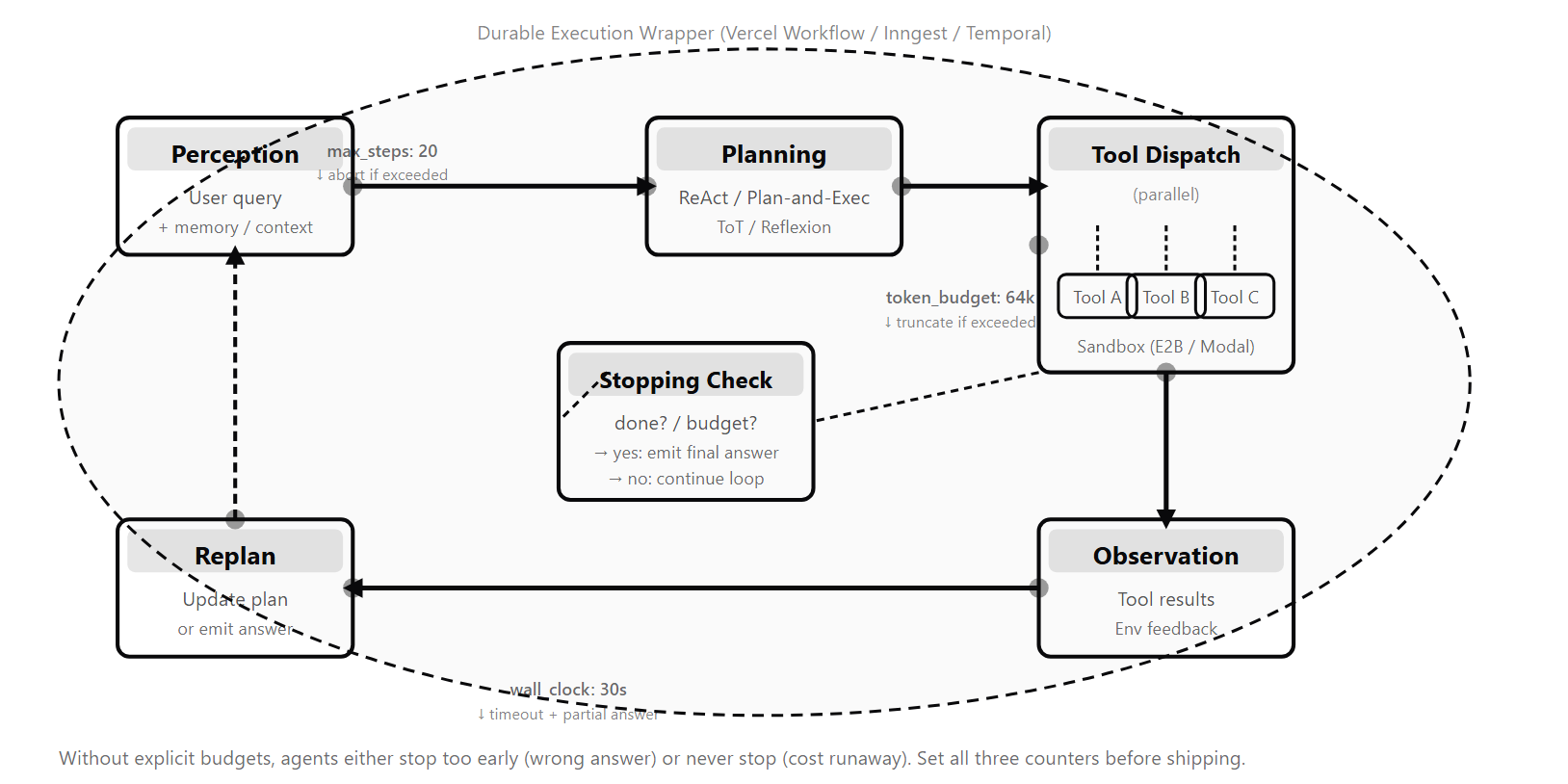
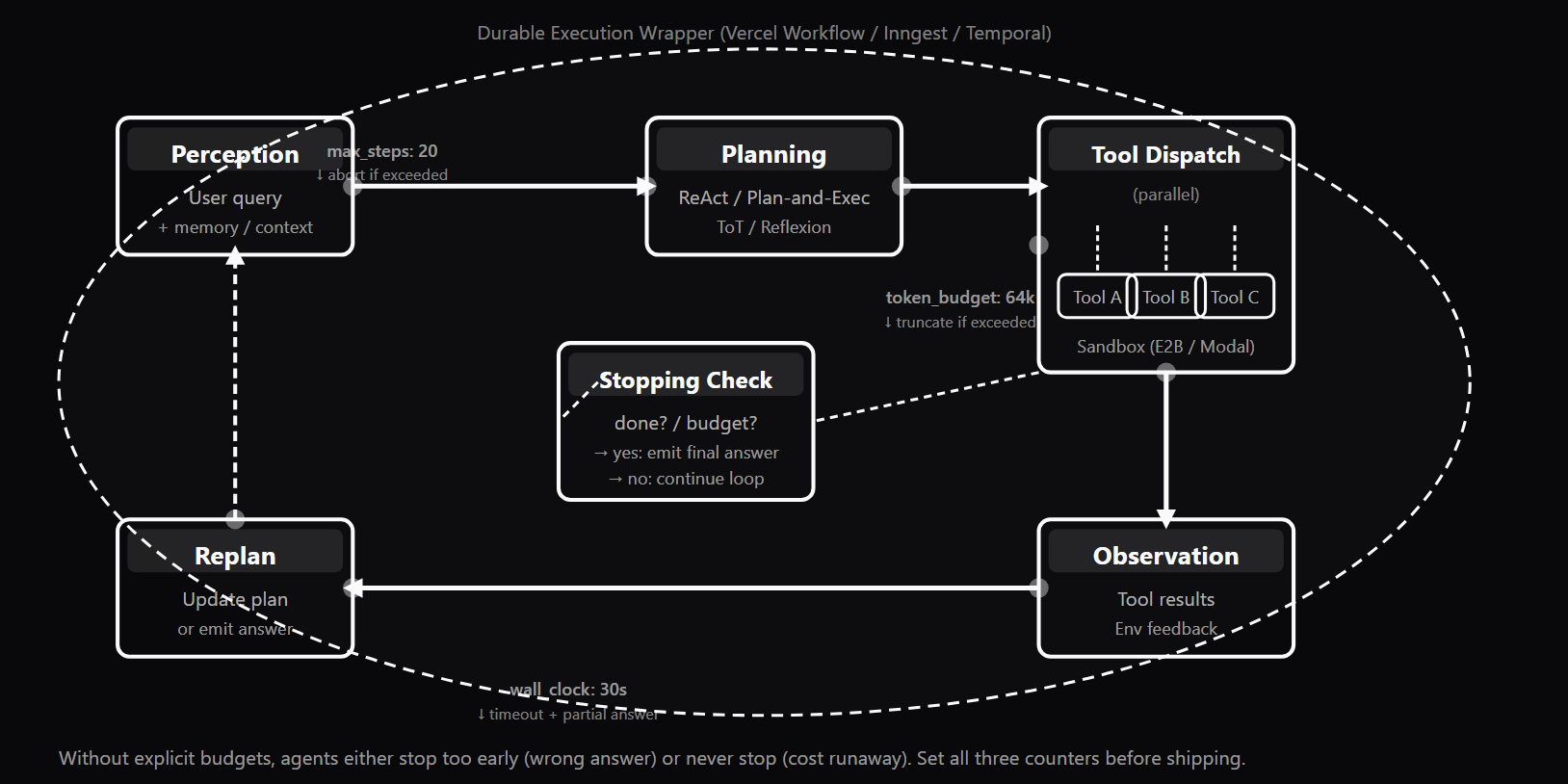
- The agent control loop is a while-loop with four stages: the LLM decides the next action, tools dispatch (concurrently when independent), results are observed and appended to state, then budgets and stopping conditions are checked before repeating.
- Every production agent loop enforces three independent budget caps — max_iterations, max_tokens, and max_seconds — because each catches a failure mode the other two cannot.
- Five planning patterns cover most needs: ReAct (default greedy inner loop), Plan-and-Execute (explicit upfront plan for stable sub-goals), Tree of Thoughts (branch search for math and strategy), Reflexion (self-critique and retry for re-runnable tasks), and native extended-thinking reasoning models.
- Tool-error recovery returns a structured error result to the LLM instead of crashing the loop, letting the agent retry with new arguments, switch tools, or degrade gracefully.
- AI-generated code must run in a Firecracker microVM sandbox such as Vercel Sandbox, E2B, or Modal; process-level isolation is insufficient because it shares the host kernel.
- MCP (Model Context Protocol) is the settled standard for LLM-to-tool calls, while A2A protocols such as Google A2A handle agent-to-agent task handoff — orthogonal problems.
- Use durable execution (Vercel Workflow DevKit, Inngest, Temporal) when a task may exceed the host timeout, makes irreversible side effects, or must survive restarts; it is overkill under 30 seconds.
What it is
The agent loop — also called the control loop in the broader literature — is the `while` loop that drives the LLM-decides-then-tool-runs cycle at the heart of every AI agent. The minimum loop from foundational agent work is simple: ask the LLM what to do, run any tool calls it requests, show it the results, repeat until done. Production agents need the same cycle upgraded with bounded iterations, bounded token spend, bounded wall-clock time, parallel tool dispatch, structured error recovery, sandbox isolation, and durable execution for long-running tasks. The production loop shape has four components layered on top of the minimum: (1) three independent budget caps — max_iterations, max_tokens, max_seconds — each enforced before every loop iteration; (2) parallel tool dispatch — when the LLM returns multiple tool_use blocks in a single turn, run them concurrently (asyncio.gather / Promise.all) and return all results before replanning; (3) tool-error recovery — when a tool raises an exception, catch it and return a structured {"error": "...", "type": "..."} result to the LLM rather than crashing the loop; (4) checkpoint / resume — for tasks whose execution time may exceed the host's function timeout, persist state to a durable store after each step. Five planning patterns govern how the agent sequences its actions. ReAct (Yao et al. 2022) interleaves reasoning and acting with no upfront plan — the default inner loop for most production agents. Plan-and-Execute generates an explicit multi-step plan first, then executes it, re-planning only when a step fails — appropriate when tasks have clear, stable sub-goals. Tree of Thoughts (Yao et al. 2023) explores multiple reasoning branches in parallel and selects the best path — the right choice for search-style problems like math reasoning, at the cost of exponentially higher token usage. Reflexion (Shinn et al. 2023) adds a self-critique loop after a completed trajectory — the agent generates a verbal lesson and retries, improving quality on re-runnable tasks like code generation. Native extended thinking (Claude extended thinking, OpenAI o-series, Gemini reasoning modes) bakes the deliberation inside the model itself — not a runtime architecture change, but a model capability that can reduce or eliminate the need for explicit planning prompts on hard reasoning tasks. Tool calling in production adds schema-strict arguments (Pydantic / Zod substrate, provider strict-mode to prevent malformed JSON), parallel dispatch, and structured error feedback to the LLM on failure. Sandboxing wraps code execution in Firecracker microVM isolation (Vercel Sandbox, E2B, Modal) so that AI-generated code cannot access host resources or production credentials. MCP (Model Context Protocol) is the settled multi-vendor standard for LLM-to-tool communication; A2A protocols (Google A2A, AGNTCY) are the emerging standard for agent-to-agent task handoff. Case study: a research agent that processes 20 documents, each requiring a web fetch and LLM summarization, needs all four production additions — parallel dispatch to fetch documents concurrently, tool-error recovery to handle network timeouts gracefully, budget caps to bound cost, and durable execution (Vercel Workflow DevKit or Inngest) to survive the serverless function timeout window.
Why interviewers ask
The agent loop is where AI agents earn their name — any system can call an LLM once, but agents call it repeatedly, adapting to what they observe. Interviewers at companies building production AI systems ask about control loops and planning to find candidates who have shipped and debugged agents at scale rather than prototyped them in a notebook. The primary hiring signal is budget awareness. Candidates who enumerate the three independent budget caps — iteration, token, and wall-clock — and explain why all three are necessary demonstrate operational maturity. Candidates who cannot explain why a stopping condition matters reveal that they have only seen agents succeed in demos, not fail in production. The follow-up interviewers use: "your agent is stuck in a loop retrieving the same information on every iteration — what are the first three things you check?" Strong answers go straight to: stopping conditions, novelty detection, and max_iterations cap. The secondary signal is planning pattern fluency. The weak answer is "always use ReAct" or "always plan upfront." The strong answer names the escalation ladder — ReAct as default, Plan-and-Execute when sub-goals are stable, Tree of Thoughts when correctness justifies token cost, Reflexion for re-runnable failures, reasoning models when the task is hard enough that model-internal deliberation replaces prompt engineering. The ability to pick the right pattern for a given task and articulate the cost trade-off distinguishes engineering judgment from pattern-matching. The third signal is distributed systems awareness. Mentioning Firecracker microVMs, durable execution frameworks (Vercel Workflow DevKit, Inngest, Temporal), MCP as the tool protocol standard, and A2A for agent-to-agent communication immediately differentiates candidates who have shipped production agents from those who have only run tutorial examples. The question "when does an agent need durable execution?" reveals whether the candidate has thought about serverless timeout windows and exactly-once semantics for irreversible side effects.
Common mistakes
The most common mistake is building an agent without explicit stopping conditions. Without a goal-achieved stopping condition, the agent iterates until max_iterations is exhausted — and if max_iterations is not set, it iterates until the API budget runs out or the process is killed. In production, this means research agents that retrieve the same information on every step, coding agents that make the same failing test run indefinitely, and customer-support agents that never close a ticket. The fix is always two-part: write an explicit stopping condition in the system prompt ("stop when you have gathered 3 independent confirming sources or when new sources repeat content already in context") AND enforce it in the loop logic with a goal-state check. The second major mistake is serial tool dispatch when parallel is safe. A ReAct agent that makes 5 independent web searches serially takes 5× the latency of parallel dispatch. Most candidates understand that parallelization is possible but fail to identify which tools are safe to run concurrently. The rule: read-only tools with no shared mutable state are always safe to parallelize; write tools require dependency analysis. Anthropic, OpenAI, and Gemini all emit multiple tool_use blocks per assistant turn specifically to enable parallel dispatch — not using it wastes latency. The third mistake is missing durable execution for long-running agents. Agents deployed to Vercel or AWS Lambda without durable execution will silently die for any task taking more than 60–300 seconds. The process terminates, the agent's state is lost, and the caller gets a timeout error with no checkpoint for debugging. Production agent systems must be designed for durable execution from the start when execution time may exceed the platform's function timeout. The fourth mistake is unsandboxed code execution. An agent with a Python REPL tool and no sandbox can be directed via prompt injection in a retrieved document to execute host commands — deleting files, reading environment variables, or making unauthorized API calls. Every code path the agent can influence must run in a Firecracker microVM or equivalent container (Vercel Sandbox, E2B, Modal). There is no "secure enough" process-level isolation for untrusted AI-generated code. Finally, multi-agent before single-agent: teams reach for AutoGen or CrewAI before they have a working single-agent system. Multi-agent adds coordination overhead, failure modes, and debugging complexity. Always ship a working single-agent system first, measure its failure modes, and add agents only when distinct specialist roles demonstrably improve output quality or throughput.
Five Planning Patterns — When to Use Each and Key Trade-offs
| Pattern | Plans Upfront | Re-plans | Parallel Branches | Token Cost | Best Use Cases |
|---|---|---|---|---|---|
| ReAct | No | Per-step (greedy) | No | Low — one reasoning step per action | Default inner loop: QA, research, chatbots, data retrieval |
| Plan-and-Execute | Yes | On step failure | No | Medium — planner + executor calls | Clear sub-goal tasks: pipelines, batch jobs, sequential workflows |
| Tree of Thoughts | Yes | Yes (branch pruning) | Yes | High — grows with branching factor × depth | Search-style problems: math reasoning, complex strategy, multi-step planning |
| Reflexion | No | After full trajectory | No | Medium — self-critique adds tokens per retry | Re-runnable tasks: code generation, math, iterative retrieval |
| Native extended thinking | Implicit (internal) | Implicit (internal) | Implicit (internal) | Depends on thinking-token budget | Hard reasoning tasks where the model's internal deliberation replaces explicit planning prompts |
Sample interview questions
- Which statement best describes the difference between the ReAct and Plan-and-Execute planning patterns?
- A. Both patterns generate an upfront multi-step plan; they differ only in how many parallel branches they explore
- B. ReAct interleaves reasoning and acting in a single step with no upfront plan, adapting after every observation. Plan-and-Execute first generates an explicit plan, then executes it step by step, re-planning only when a step fails or returns unexpected results ✓
- C. ReAct is exclusively for coding tasks; Plan-and-Execute is for research and retrieval tasks
- D. Plan-and-Execute always produces higher-quality output than ReAct regardless of task type
Option B correctly captures the structural difference between the two patterns. ReAct (Reason + Act, Yao et al. 2022) generates a thought-action-observation cycle at each loop iteration with no upfront plan. The agent reasons about what to do next, executes one tool call, observes the result, then reasons again. Because every decision is made with the latest observation in context, ReAct adapts fluidly to unexpected tool results — a new search result can change what the agent looks for next. The tradeoff: ReAct can fall into local optima because there is no backtracking; a wrong action at step 3 propagates forward. Plan-and-Execute separates planning from execution into two phases: a planner LLM generates a list of explicit steps upfront, then an executor agent carries out each step in sequence. This reduces per-step reasoning cost (the executor does not re-reason from scratch each time) and produces an auditable plan visible before execution starts. The tradeoff: if early steps return unexpected data, the remaining steps may be based on stale assumptions. Mitigation is a re-planning trigger when tool outputs deviate significantly from the plan's expectations. The practical rule: use ReAct as the default inner loop. Reach for Plan-and-Execute when the task has clear, stable sub-goals whose execution order can be determined upfront. Do not add planning ceremony to a task that is three tool calls long — the planning step can easily take longer than the task itself. Option A is wrong: neither pattern requires parallel branches (that is Tree of Thoughts). Options C and D are false generalizations. Production reality: most production systems use ReAct as the inner loop with Plan-and-Execute layered on for complex multi-stage tasks. LangGraph supports both as explicit graph topologies.
- What are the three independent budget dimensions that every production agent loop must enforce, and what does each prevent?
- A. CPU budget, RAM budget, and disk budget — each prevents OS-level resource exhaustion
- B. Iteration cap (max_iterations), token budget (max_tokens), and wall-clock cap (max_seconds) — each catches a distinct failure mode that the other two do not ✓
- C. Cost budget only — when LLM API cost exceeds a threshold the loop stops; no other budgets are needed
- D. Budgets are optional in production; frameworks like LangGraph handle termination automatically
Option B identifies the three budget dimensions from the production agent loop architecture. max_iterations (iteration cap): limits how many times the loop runs through the LLM-decide → tool-run → observe cycle. Without this cap, a stuck agent loops forever — consuming tokens and cost without converging. When exhausted, the agent should emit its best partial answer and surface the stop reason to the caller. max_tokens (token budget): caps the cumulative token count across all LLM calls in the agent's trajectory. Without this cap, a long-running research agent can consume thousands of dollars in a single session. When exhausted, the agent must decide whether to truncate context or terminate with a partial answer. The Anthropic SDK exposes usage fields per response; the running total must be tracked in the loop. max_seconds (wall-clock cap): limits total elapsed time. Without this cap, an agent waiting on a slow external tool (a rate-limited API, a database query) can run for hours and block the calling system. When expired, the agent should checkpoint state to a durable store (Vercel Workflow DevKit, Inngest, Temporal) and emit a timeout signal. All three budgets are necessary because they catch orthogonal failure modes. An agent could satisfy max_iterations while still running for hours (if iterations are slow), exhaust max_tokens before reaching max_iterations (if steps produce verbose output), or expire max_seconds before either (if blocked on I/O). Setting only one of the three leaves two failure modes open. Production reality: the minimal production loop shape is "while (stop_reason = budget.check()) is None: …" — the budget check fires before every iteration.
- When is Tree of Thoughts the right planning pattern choice, and what is its key cost tradeoff?
- A. Tree of Thoughts is the default choice for all production agents because it always finds the globally optimal answer
- B. Tree of Thoughts is appropriate for search-style problems (math reasoning, complex strategy, multi-step planning) where exploring multiple reasoning branches improves solution quality. Its cost tradeoff is that token consumption grows with branching factor and depth — a tree of branching factor 3 and depth 4 requires evaluating up to 81 branches ✓
- C. Tree of Thoughts is only for creative writing tasks and should never be used for technical reasoning
- D. Tree of Thoughts is cheaper than ReAct because it prunes bad branches early, reducing total token usage
Option B correctly identifies the task fit and the cost tradeoff for Tree of Thoughts (ToT). Tree of Thoughts (Yao et al. 2023) treats reasoning as a search problem. At each step, the agent generates multiple candidate reasoning steps (the "branches"), evaluates each with a value function or verifier, and continues expanding only the most promising branch. This is best-first search over the reasoning space rather than a greedy one-step-at-a-time walk. Task fit: ToT shines on problems where the optimal path is hard to find greedily but easy to verify — mathematical proofs, complex multi-step planning, game-playing strategy, and any task where a wrong intermediate step is recoverable by trying a different branch. On simple retrieval or QA tasks, ToT's overhead is unjustified; ReAct at a fraction of the cost produces equivalent output. Cost tradeoff: branching factor b and depth d require O(b^d) branch evaluations in the worst case. A tree of branching factor 3 and depth 4 requires up to 81 path evaluations; at depth 5, up to 243. In practice, aggressive pruning reduces this, but ToT is still significantly more expensive than ReAct or Plan-and-Execute for the same task. Use it only when answer quality is paramount and you can afford the token cost. Option A is wrong: ToT is a specialized pattern, not a default. Option C is false. Option D has the cost direction backwards — ToT is more expensive than ReAct, not cheaper. Production reality: most production agents never use ToT. It appears primarily in research systems, code synthesis agents where correctness is verifiable, and math reasoning pipelines.
- An agent returns a structured error from a tool call instead of raising an exception. What production pattern does this implement, and why does it matter?
- A. This is an anti-pattern — all tool errors should raise exceptions so the loop terminates immediately and the user can retry
- B. This implements tool-error recovery: returning a structured {"error": "...", "type": "..."} result to the LLM lets the agent decide whether to retry with different arguments, try an alternative tool, or give up gracefully — without terminating the entire loop on a transient failure ✓
- C. This is only necessary for rate-limit errors (HTTP 429); all other errors should be raised as exceptions
- D. Structured error results are only useful in multi-agent systems; single-agent loops should always raise exceptions
Option B describes the tool-error recovery pattern from the production agent loop. The default "raise on every tool error" approach terminates the agent run on the first failure. In production, tool failures are common: network timeouts, rate limits, malformed arguments, temporary unavailability. An agent that crashes on the first tool failure is not a production agent. Tool-error recovery changes the contract: when a tool raises an exception, the loop catches it and returns a structured result — {"error": "Connection timeout", "type": "TimeoutError", "hint": "Try again or use a different data source"} — as the tool_result back to the LLM. The LLM sees the error in the next turn and decides next steps. This discipline enables three recovery behaviors: (1) retry with different arguments ("let me search with a narrower query since the broad one timed out"), (2) switch to an alternative tool ("the web search failed; let me use the cached knowledge base instead"), (3) graceful degradation ("I could not retrieve the latest data; here is what I know from prior steps"). The key distinction is between transient failures (HTTP 429 rate limit, 500 server error, 502/503) — which should be retried with exponential backoff at the tool dispatcher level before surfacing to the LLM — and permanent failures (401 auth error, 404 not found, malformed arguments) — which should immediately surface as structured errors so the LLM can change strategy. Production reality: agents that implement tool-error recovery gracefully handle a substantial share of transient failures (commonly cited around 30–50%, workload-dependent) without any user-visible degradation. The discipline is in the dispatcher, not the LLM prompt.
- A research agent consistently makes 40 tool calls when 8 would suffice. What is the most likely root cause and how do you fix it?
- A. The agent is using too many parallel tool calls simultaneously, causing redundant results that require additional calls to resolve
- B. The most likely cause is an absent or under-specified stopping condition combined with no novelty detection. Without a goal-achieved stopping condition, the agent iterates until max_iterations is exhausted. Without novelty detection, it retrieves previously seen information indefinitely. Fix: add an explicit stopping condition in the system prompt, implement a seen-URL or embedding-based deduplication set, and lower max_iterations to force efficiency ✓
- C. The model is too small and cannot plan efficiently; upgrading to a larger model will reduce tool call count automatically
- D. Parallel tool dispatch is required — calling all tools simultaneously will reduce the step count from 40 to 8
Option B correctly diagnoses the root cause: missing or weak stopping conditions combined with no diminishing-returns detection. A well-designed agent control loop has two termination signals: (1) goal achieved — the agent has gathered sufficient information to answer the question, (2) resource exhausted — max_iterations, max_tokens, or max_seconds is depleted. Without signal (1), the agent only terminates via signal (2), producing wasted work. The specific failure pattern "40 steps when 8 would suffice" indicates the agent is retreading the same ground. Common sub-patterns: a) Search without novelty detection: the agent runs 15 web searches with slightly different queries, retrieving the same sources. Without a retrieved-URL deduplication set or embedding-based novelty checker ("this document is >90% similar to content already in context"), the agent treats each result as new. b) No depth-vs-breadth stopping: ReAct without explicit guidance explores every possible angle indefinitely. Adding "stop when you have found 3 independent sources that agree" to the system prompt cuts exploration early. c) Over-broad Plan-and-Execute plans: the planner generates 40 explicit steps where 8 higher-level steps would suffice. Constrain the planner with a maximum plan depth. Fix: (1) Add explicit stopping conditions in the system prompt — number of sources, novelty threshold, confidence level. (2) Track seen documents in a set and pass "sources already retrieved" to the agent context. (3) Lower max_iterations from 40 to 12 to force efficiency from the start. (4) Add a diminishing-returns check in the loop logic. Production reality: the stopping condition is the highest-leverage engineering decision in any agent. Write it first, not last.
- What is the correct approach to parallel tool dispatch in a production agent, and which tools are safe to dispatch concurrently?
- A. Parallel tool dispatch is inherently unsafe; always dispatch tools one at a time to prevent race conditions
- B. Safe parallel dispatch runs all tool_use blocks from a single assistant turn concurrently using asyncio.gather() or Promise.all(), waits for all results before replanning, and requires that tools accessing shared mutable state are either sequenced or protected by idempotency keys. Read-only tools are always safe to parallelize; write tools require dependency analysis ✓
- C. Use a mutex lock on every tool call regardless of whether it accesses shared state
- D. All LLM-called tools are automatically thread-safe because LLMs are stateless
Option B describes the correct parallel dispatch pattern from the production agent loop. The core principle: when a single assistant turn returns multiple tool_use blocks, run them concurrently and return all tool_results in a single user message. Anthropic, OpenAI, and Gemini all emit multiple tool_use blocks per assistant turn specifically to enable this. Serial dispatch costs N× wall-clock time for no quality gain. Safety analysis — read-only tools (web search, file read, database SELECT, API GET): trivially safe to parallelize. Five concurrent web searches have no shared mutable state. Run them all with asyncio.gather() (Python) or Promise.all() (TypeScript). Write tools require dependency analysis: two write tools are safe to run concurrently if and only if neither call's output depends on the other's side effects. "Send email to Alice" and "Send email to Bob" are independent and safe to parallelize. "Create order" and "deduct inventory" must be sequenced or wrapped in a transaction because partial execution of either would leave the system in an inconsistent state. LangGraph supports fan-out graph edges that dispatch multiple tool calls simultaneously and use join semantics to wait for all results before proceeding to the Observation node. Vercel AI SDK v6 supports parallel tool calling natively — the model can emit multiple tool calls in a single response, which the SDK dispatches concurrently. Option A is too conservative — it wastes 3× latency for no semantic benefit. Option C wastes resources on unnecessary locking. Option D is wrong — LLM statelessness does not imply tool statelessness. Production reality: dispatch tools in parallel by default. Serial dispatch is the exception, not the rule.
- When does a production agent require durable execution (Vercel Workflow DevKit, Inngest, Temporal), and when is it overkill?
- A. Durable execution is always required; all production agents must use it regardless of execution time
- B. Durable execution is required when agent execution time may exceed the host's timeout window (typically 60–300 seconds on serverless platforms), when the agent makes irreversible side effects requiring exactly-once delivery, or when the task must survive process restarts. It is overkill for interactive agents targeting sub-30-second completion times ✓
- C. Durable execution is only needed for workflows with more than 100 steps; step count, not time, is the trigger
- D. Durable execution is incompatible with LLM agents; use it only for traditional code pipelines
Option B identifies the three scenarios that justify durable execution and the boundary where it is overkill. Scenario 1 — execution time exceeds host timeout: a Vercel serverless function times out after 60–300 seconds depending on plan. An agent that must research 20 documents, each requiring a web fetch and LLM summarization, can easily take 5–10 minutes. Without durable execution, the process times out and the agent's progress is lost. Vercel Workflow DevKit, Inngest, and Temporal persist agent state after each step — each step is a separate function invocation that resumes from where the previous one completed. This extends effective agent runtime from minutes to hours or days. Scenario 2 — irreversible side effects with exactly-once requirements: if an agent's tool calls include actions like "send email," "charge credit card," or "create database record," naive retry on failure means the email is sent twice or the customer is charged twice. Durable execution frameworks provide idempotency keys and at-least-once delivery with deduplication, ensuring that even after a crash, completed steps are not re-executed. Scenario 3 — long-lived workflows: tasks that run for days (monitor an API endpoint and summarize daily reports for a week) require the runtime to sleep, wake, execute, and persist state between activations. Temporal and Inngest provide this natively. Overkill: for interactive chatbot agents targeting sub-30-second completion, durable execution adds setup cost for no operational benefit. The production rule: <30 seconds → skip durable execution; >30 seconds or irreversible side effects → use it. Production reality: retrofitting durable execution into an existing agent system is painful. Design for it from the start if any of the three scenarios apply.
- What is the correct sandboxing approach for an agent that generates and executes Python code, and why is process-level isolation insufficient?
- A. Running the agent in debug mode intercepts all code before execution, providing sufficient isolation
- B. Code generated by an agent must run in a Firecracker microVM or equivalent container-based sandbox (Vercel Sandbox, E2B, Modal) with no access to the host filesystem, host network, or production credentials. Process-level isolation (subprocess with ulimits) is insufficient because it shares the host kernel and can be escaped via OS-level vulnerabilities ✓
- C. Sandboxing is unnecessary if the LLM is fine-tuned on safe code generation only
- D. A firewall blocking all inbound traffic to the agent server provides adequate isolation for code execution
Option B describes the correct sandboxing approach based on the production agent loop architecture. The threat model: an agent with a code execution tool and no sandbox can be directed — via a carefully crafted user prompt or an adversarial tool result (indirect prompt injection in a retrieved RAG chunk) — to execute arbitrary host commands. Without sandboxing, this means access to the host filesystem, environment variables (including API keys and credentials), and network. Three isolation levels, in ascending strength: Process isolation (subprocess with restricted capabilities, ulimits, no network): fast and simple but insufficient for production AI-generated code. The subprocess shares the host kernel; kernel exploits can escape the process boundary. Appropriate only for low-stakes scripts where the input is trusted. Container sandboxes (Docker, Podman with restricted capabilities): the classic mid-tier. Better isolation than processes; container breakouts are rare but possible. Appropriate for moderately trusted code. Firecracker microVMs: true VM isolation with separate kernel instance. Cold start in milliseconds. The isolation standard for AI-generated code. Vercel Sandbox (GA since January 2026), E2B, and Modal build on Firecracker or equivalent microVM technology. No shared kernel with the host — escaping the microVM requires a hypervisor-level vulnerability, not an OS exploit. For the agent toolbox: every code path the agent can influence — Python REPL, shell commands, browser automation — must run in a sandbox. The sandbox lifecycle is: create (cold start typically ~100–200ms, warm starts far faster; vendor-dependent), execute, terminate. No persistent state between sessions unless explicitly mounted. Production reality: calling eval() and subprocess.run() against host resources in an agent context are not acceptable defaults in production. Use a sandbox provider from the first deployment.
- What is MCP (Model Context Protocol) and how does it differ from A2A (Agent-to-Agent) protocols?
- A. MCP and A2A are interchangeable names for the same protocol; both define how agents communicate with each other
- B. MCP is the settled multi-vendor protocol for LLM-to-tool communication (how an agent calls a tool server). A2A protocols address agent-to-agent task handoff (how one agent delegates a subtask to another agent). They solve orthogonal problems: MCP is the tool wire format; A2A is the inter-agent delegation format ✓
- C. MCP is a proprietary Anthropic protocol that only works with Claude; A2A is the open standard for all agents
- D. A2A is a mature settled standard while MCP is still experimental and not recommended for production use
Option B correctly maps the two protocols to their orthogonal concerns. MCP (Model Context Protocol): Anthropic-originated, now adopted by OpenAI, Google, and many others. Defines how an LLM client connects to a tool server: discover available tools, call a tool with arguments, receive structured results. Hundreds of public MCP servers exist (filesystem, GitHub, Linear, Notion, PostgreSQL, Slack, Sentry, Vercel, Stripe, Supabase, Playwright, and more). MCP clients include Claude Code, Cursor, Windsurf, Claude Desktop, ChatGPT Custom Connectors, and the Anthropic and OpenAI SDKs. MCP is the settled standard for tool exposure — building tools as MCP servers today means they work with the next generation of LLM IDEs as well as today's agents. A2A (Agent-to-Agent) protocols: address agent-to-agent task handoff — how one agent delegates a subtask to another agent and receives results. Multiple emerging specs in 2026: - Google A2A (Agent-to-Agent Protocol): open spec for agent task handoff, status reporting, and capability discovery, introduced in April 2025 and donated to the Linux Foundation in June 2025. The strongest candidate for a cross-vendor standard. - AGNTCY: open infrastructure project (Linux Foundation governance) for agent discovery, identity, messaging, and observability. Complementary to A2A, not a competing wire format. - Many teams still use their own JSON-over-HTTP or message-queue protocols for inter-agent communication. The orthogonal framing: MCP is tool-side (LLM calls a function), A2A is agent-side (one agent delegates to another agent as a peer). Without this distinction, the two concerns fragment into an undocumented spaghetti protocol. Production reality: adopt MCP for all new tool servers. For inter-agent communication, watch Google A2A — it has the strongest governance trajectory for 2026–2027.
- What distinguishes Reflexion from Plan-and-Execute, and when is each the better choice for improving agent output quality?
- A. Reflexion and Plan-and-Execute are equivalent patterns; choose based on developer preference
- B. Reflexion adds a self-critique loop after a completed trajectory — the agent generates a verbal lesson learned and retries. It improves output quality on tasks where multiple attempts are acceptable and the task is re-runnable (code generation, math reasoning). Plan-and-Execute improves quality by decomposing complex goals into explicit steps before execution, making it appropriate for tasks where the path to completion is deterministic and retries are expensive ✓
- C. Reflexion always outperforms Plan-and-Execute because self-critique is more reliable than upfront planning
- D. Plan-and-Execute adds a self-critique loop after execution; Reflexion generates a plan before execution
Option B correctly differentiates the two patterns by their improvement mechanism and appropriate task types. Reflexion (Shinn et al. 2023): after a completed agent trajectory (success or failure), a self-critique step evaluates what went wrong — "the agent repeated the same search 5 times without finding new information" or "the generated code passed syntax checks but failed the integration test." This verbal critique is stored in the agent's memory and used to guide the next attempt. Reflexion is an iterative improvement pattern: run → reflect → retry, repeating until success or a retry budget is exhausted. Best use: tasks that can be repeated — code generation (verifiable by running tests), math reasoning (verifiable by checking the answer), multi-step retrieval (verifiable by coverage). Not appropriate for tasks with irreversible side effects: you cannot un-send an email, so Reflexion's retry loop would cause duplicate actions. Plan-and-Execute: improves quality through decomposition. By generating an explicit multi-step plan upfront, the agent commits to a strategy before executing any step. This prevents the reactive drift of ReAct on complex tasks and enables the planner to reason about step ordering, dependencies, and resource allocation before committing to actions. Best use: tasks with clear, stable sub-goals whose execution order matters — research pipelines, data processing workflows, sequential booking tasks. Less appropriate when intermediate results significantly change what the next step should be (ReAct is better there). The patterns are also composable: Devin-style coding agents use Plan-and-Execute for the high-level plan and Reflexion for individual code generation steps within the plan. Production reality: ReAct is the default inner loop; Plan-and-Execute layers on for complex sub-goal tasks; Reflexion layers on for retryable-failure tasks.
Frequently asked questions
- What is the agent loop (control loop) and what are its core stages?
- The agent loop — also called the control loop in the broader literature — is the while-loop that drives the LLM-decides-then-tool-runs cycle. The core stages are: (1) LLM decides: given the current state and history, the model chooses the next action or emits a final answer. (2) Tool dispatch: one or more tool calls run (concurrently when independent). (3) Observe: tool results are appended to the agent's state and message history. (4) Check budgets and stopping conditions: if max_iterations, max_tokens, max_seconds, or a goal-achieved condition is met, the loop terminates. Otherwise, return to the LLM decide step. Every production agent loop adds parallel dispatch, error recovery, and budget enforcement on top of this minimum shape.
- What are the five planning patterns for AI agents?
- The five planning patterns are: (1) ReAct (Reason + Act) — interleaves reasoning and acting with no upfront plan; the default loop for most production agents. (2) Plan-and-Execute — generates an explicit multi-step plan first, then executes it, re-planning only on step failure. (3) Tree of Thoughts — explores multiple reasoning branches in parallel and selects the best path; used for search-style problems like math reasoning. (4) Reflexion — adds a self-critique loop after each completed trajectory; the agent generates a verbal lesson and retries; best for re-runnable tasks. (5) Native extended thinking / reasoning models — models with built-in internal reasoning tokens (Claude extended thinking, OpenAI o-series, Gemini reasoning modes); the model itself performs the deliberation without an explicit ReAct prompt, reducing the need for planning ceremony on hard reasoning tasks.
- Why do production agent loops require three separate budget caps?
- Each cap catches a failure mode the other two cannot. max_iterations prevents infinite loops — an agent that gets stuck in a retrieval cycle iterates forever without this cap. max_tokens prevents runaway LLM spend — an agent could satisfy its iteration cap while still consuming enormous context on each step. max_seconds prevents blocking the calling system — an agent waiting on a slow external API call can run for hours even if it makes few iterations and consumes few tokens. All three budgets are necessary; setting only one leaves two failure modes open. The loop logic checks all three conditions before every iteration and returns a structured stop_reason when any budget is exhausted.
- What is tool-error recovery and why does the default "raise on error" approach fail in production?
- Tool-error recovery is the pattern of catching tool exceptions and returning a structured error result — {"error": "...", "type": "...", "hint": "..."} — to the LLM instead of terminating the loop. The LLM then decides whether to retry with different arguments, use an alternative tool, or give up gracefully. The default "raise on every error" approach fails in production because tool failures are common: network timeouts, rate limits, malformed arguments, and temporary unavailability all happen regularly. An agent that crashes on the first tool failure cannot complete multi-step tasks reliably. The distinction that matters: transient errors (HTTP 429, 500, 502, 503) should be retried with exponential backoff at the dispatcher level before surfacing to the LLM; permanent errors (401, 404, invalid arguments) should immediately surface as structured results.
- What is the difference between MCP and A2A protocols?
- MCP (Model Context Protocol) is the settled multi-vendor protocol for LLM-to-tool communication: an LLM client discovers tools, calls them with typed arguments, and receives structured results. Anthropic-originated, now supported by OpenAI, Google, and many others. Hundreds of public MCP servers exist; clients include Claude Code, Cursor, Windsurf, and the major LLM SDKs. A2A (Agent-to-Agent) protocols address agent-to-agent task handoff — how one agent delegates a subtask to another agent as a peer. The leading emerging standard is Google A2A (donated to the Linux Foundation in June 2025). AGNTCY is a complementary open infrastructure project for agent discovery and messaging. Many production teams still use their own JSON-over-HTTP protocols for inter-agent communication. The practical guidance: adopt MCP for all new tool servers today; monitor Google A2A for inter-agent communication.
- When should you use durable execution (Vercel Workflow DevKit, Inngest, Temporal) for an agent?
- Use durable execution when any of these three conditions apply: (1) agent execution time may exceed the host's function timeout (60–300 seconds on typical serverless platforms) — durable execution persists state after each step and resumes from the last checkpoint after a timeout or crash; (2) the agent makes irreversible side effects (send email, charge card, create record) that must not be re-executed on retry — durable execution provides idempotency keys and exactly-once semantics; (3) the task must run across days (background monitoring, scheduled summaries) — durable frameworks support sleep and wake natively. Durable execution is overkill for interactive agents targeting sub-30-second completion. The production rule: <30 seconds, skip it; >30 seconds or irreversible side effects, use it.
- What sandboxing approach is required for an agent that executes code?
- Code generated by an agent must run in a Firecracker microVM or equivalent container-based sandbox — Vercel Sandbox (GA since January 2026), E2B, Modal, Daytona, or Riza. Firecracker microVMs provide true VM isolation: each execution has a separate kernel instance, no access to the host filesystem, no access to production credentials, and automatic cleanup on termination. Process-level isolation (subprocess with ulimits) is insufficient because it shares the host kernel. Without proper sandboxing, an adversarial tool result (indirect prompt injection in a retrieved document) can direct the agent to execute host commands — deleting files, making unauthorized API calls, or exfiltrating environment variables. Cold-start latency for Firecracker-based sandboxes is 50–200ms; warm sessions cost <10ms per invocation.
- What is the self-healing tool calls pattern and how does it work?
- Self-healing tool calls is an advanced pattern where the agent automatically recovers from tool failures without user-visible degradation. The discipline has three parts: (1) tools return structured {"error": "...", "hint": "try X instead"} results on failure rather than empty strings or exceptions; (2) the LLM sees the error in the next turn and the system prompt encourages "try a different tool or argument on errors"; (3) the loop tracks retry counts per tool call and caps retries to prevent infinite recovery loops. Production agents that implement this pattern gracefully handle 30–50% of transient failures. The pattern is distinct from exponential-backoff retry (which handles transient infrastructure failures at the dispatcher level) — self-healing lets the LLM adapt its strategy based on structured error information.
- How do you choose the right framework for a production agent loop?
- The opinionated stack for a production agent runtime has three layers: (1) loop substrate — Anthropic Claude Agent SDK or Vercel AI SDK v6 for the core LLM-decides-tool-runs cycle; Vercel AI SDK v6 adds multi-provider routing and Edge-deploy ergonomics for TypeScript teams; (2) state machine — LangGraph when the loop needs explicit state machines, conditional routing, planning + revision, or human-in-the-loop pauses; (3) sandbox — E2B or Modal for any generated code or shell commands; Vercel Sandbox if you're on the Vercel platform. For multi-agent patterns, AutoGen and CrewAI add value on top of this base for role-based workflows. Most production agents are well-served by a simple loop substrate plus LangGraph for complex routing; reach for full multi-agent frameworks only when distinct agent roles add measurable value over a single well-prompted agent.
- What is the escalation ladder for choosing agent complexity?
- The production escalation ladder has seven levels: (1) Single LLM call — answer fits in one inference; no loop, no tools. (2) Simple ReAct loop — 3–10 iterations, asyncio or Promise-based. (3) Production loop with budgets and parallel tools — iteration cap, token cap, wall-clock cap, concurrent tool dispatch, structured error recovery. (4) LangGraph state machine — when routing logic is complex (5+ nodes, conditional edges). (5) Plan-and-Execute or Tree of Thoughts — when sub-goal structure is clear or search-style exploration helps. (6) Multi-agent (AutoGen, CrewAI) — when distinct specialist roles add value over a single agent. (7) Durable execution — for tasks running >30 seconds or requiring crash-safe execution. Do not skip levels you do not need. Most production agents are well-served at level 3.
Related topics
Essential AI-Native Skills for AI Agent Control Loops and Planning
Modern engineering work increasingly uses AI tools for design and code review, debugging, documentation, test and testbench generation, and workflow automation. The goal is not to let AI replace engineering judgment — it is to move faster while keeping verification discipline.
- Use AI to explain unfamiliar code, logs, waveforms, datasheets, or test failures.
- Break large problems into small, reviewable steps you can verify independently.
- Ask AI for hypotheses, then validate them against tests, measurements, simulations, or lab data.
- Version-control your analysis scripts, testbenches, and configs — keep changes small and reviewable.
- Document your assumptions, design tradeoffs, and debugging decisions.
- Verify AI output before trusting it: run the checks that fit the domain — unit tests, linters, simulations, or bench/lab measurements.
- Review AI output for correctness, edge cases, and real-world consequences.
Next up: AI Agent Control Loops and Planning practice
The adaptive practice engine is already live for core wireless, RF, and ML domains. AI Agent Control Loops and Planning questions — covering production realities, not just framework syntax — are in active development. Join the early-access list to get them first.