Building Your First AI Agent: Production Architecture Interview Prep
Build a production AI agent: 4-layer architecture, tool schemas, stop conditions, message-history pitfalls, and framework graduation — interview-ready depth.
Quick answer
Building your first AI agent means implementing the minimum viable agentic loop — the repeating cycle that allows an LLM to accomplish multi-step tasks by calling external tools.
"Building your first AI agent" is a litmus-test topic for senior engineering roles at companies shipping AI products.
Editorial review
Written by
CompoundLearn editorial team
Wireless / RF / hardware engineering
Reviewed by
CompoundLearn editorial team
Wireless / RF / hardware engineering
Last reviewed
Built from curated topic maps, editorial validation, and subject-matter review so the page stays aligned with the interview intent and the current content pipeline.
Key points
- A first agent is the minimum viable agentic loop — about 80 lines: a small knowledge base, one tool, a raw-SDK loop, a quality checker, and an explicit stop condition.
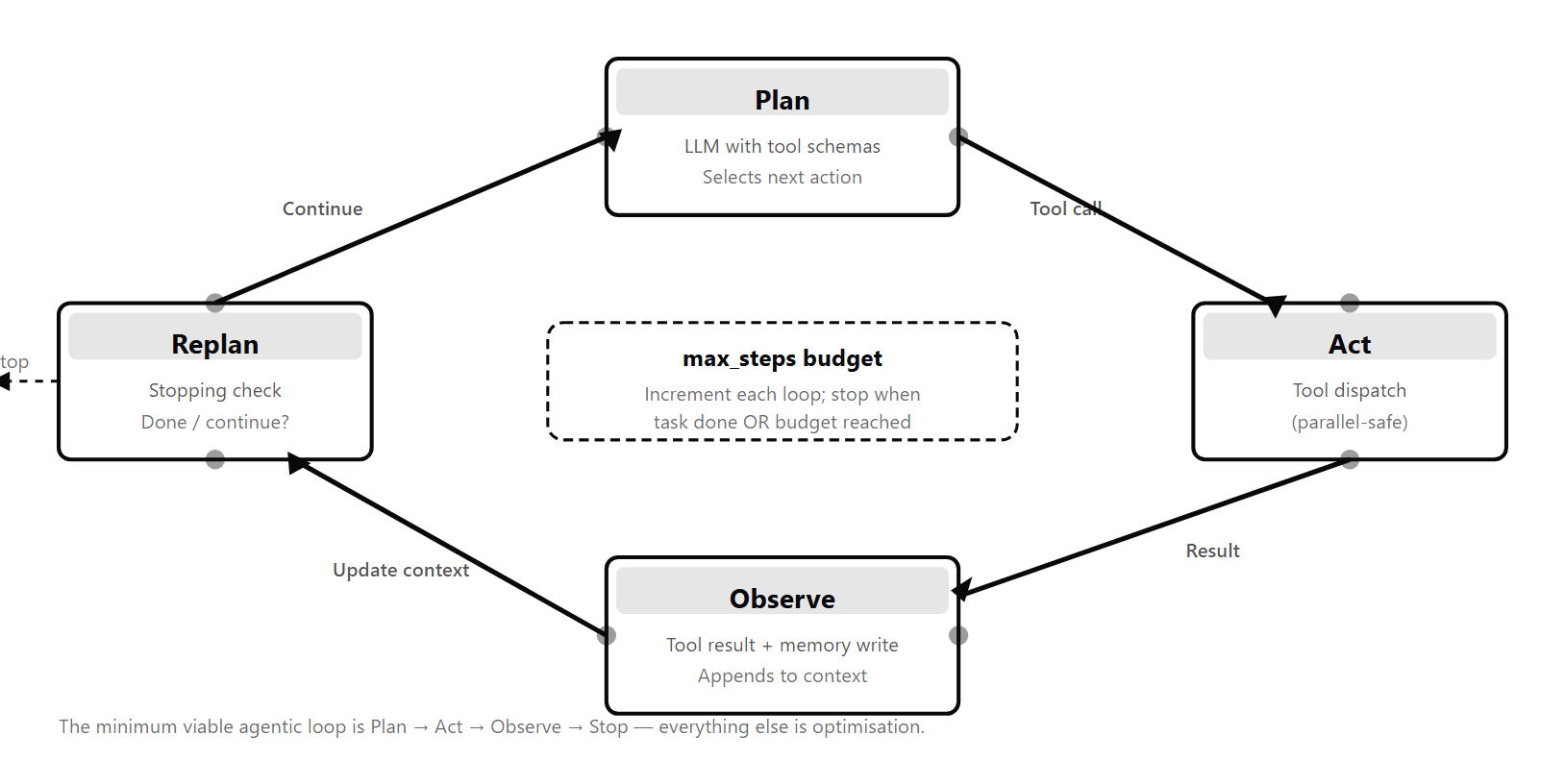
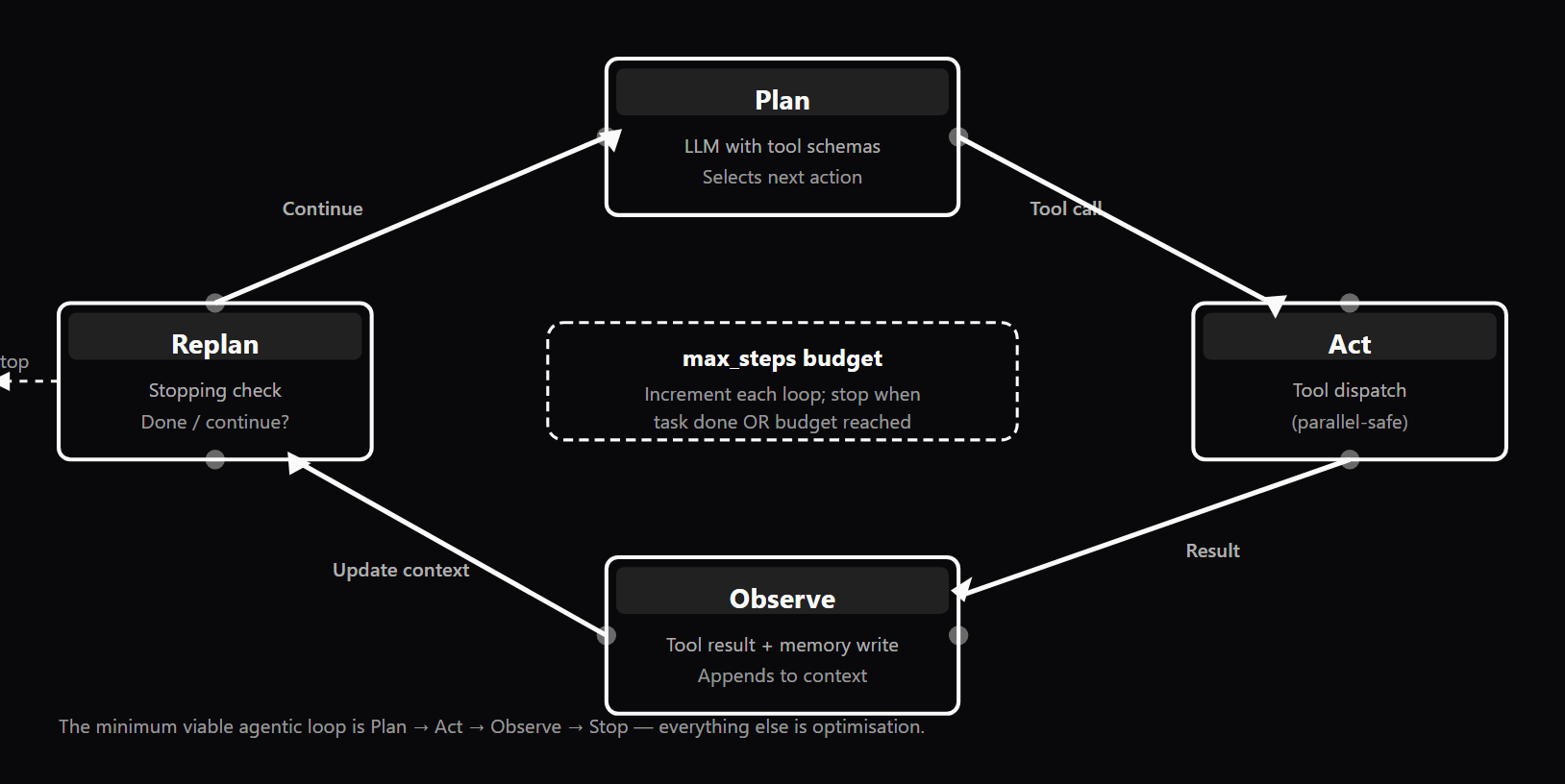
- The runtime loop sends the message history plus tool schemas to the model, checks the stop reason, dispatches every tool_use block (not just the first), appends tool_results, and repeats.
- The quality of a tool description field is the single largest determinant of whether the model picks the right tool with the right arguments.
- Skipping the Quality layer (verification before output reaches users) is the primary source of silent regressions in production.
- Major frameworks (LangGraph, Vercel AI SDK, Anthropic and OpenAI Agents SDKs) are built on this same ~40-line loop.
What it is
Building your first AI agent means implementing the minimum viable agentic loop — the repeating cycle that allows an LLM to accomplish multi-step tasks by calling external tools. The standard starting point is about 80 lines of Python: a small knowledge base, one tool, a raw-SDK for-loop, a hybrid quality checker, and an explicit stop condition. Every line maps to one of four layers (see /topics/agentic-ai-engineering-fundamentals). The **Knowledge layer** holds the system prompt (the agent's instructions, identical on every loop iteration), the tool registry (tool schemas — name, description, and a JSON Schema parameters block — that tell the LLM what tools exist and how to call them) (see /topics/structured-output-and-tool-calling-best-practices), memory stores (the messages array for short-term in-context history, and optionally an external database for long-term cross-session persistence), and any static reference data. The quality of the tool description field is the single largest determinant of whether the LLM selects the right tool with the right arguments. The **Runtime layer** is the agent loop itself — the `for` or `while` loop that drives the LLM-decides-then-tool-runs cycle. Each iteration: send the message history plus tool schemas to the LLM; append the response; check `stop_reason`; if `"end_turn"`, return the final answer; otherwise dispatch every `tool_use` block in the response (not just the first), append all `tool_result` blocks in a single user-role message, and loop. This 40-line loop is what all major frameworks — LangGraph, Vercel AI SDK, Claude Agent SDK, OpenAI Agents SDK — are built on top of. Building once at this raw layer means you can read any framework's source and immediately see what it is adding. The **Quality layer** enforces correctness the LLM cannot self-enforce. The whitepaper's minimal implementation uses a hybrid pattern: rule-based checks first (length bounds, citation marker presence), then an LLM judge for relevance on a 1–5 scale. The verdict combines all three into accept / review. In a fuller production system this layer grows into multi-dimensional rubric scoring with hierarchical gates, retry logic that returns structured errors to the LLM on tool failure, and guardrails screening inputs and outputs for policy compliance. Skipping the Quality layer is the primary source of silent regressions in production. The **Meta layer** is the control envelope: an explicit stop condition — at minimum a max-iterations cap, ideally also a token-budget cap and a wall-clock timeout, all three ANDed together — plus observability spans per LLM call and tool dispatch (per OpenTelemetry GenAI conventions) (see /topics/ai-agent-observability) and cost accounting per run. Without an explicit stop condition the loop runs indefinitely; developers who discover this in production rather than staging typically do so via an unexpectedly large API invoice. The recommended graduation path: start with the raw Anthropic or OpenAI SDK to learn the loop primitives. When you need stateful conditional branching and checkpointed resumability, graduate to LangGraph. For TypeScript-first streaming web agents, adopt Vercel AI SDK. For multi-agent coordination, evaluate CrewAI or AutoGen — only after a single-agent baseline works correctly.
Why interviewers ask
"Building your first AI agent" is a litmus-test topic for senior engineering roles at companies shipping AI products. The hiring signal is whether the candidate can implement an agent from scratch, explain what each framework is abstracting, and make deliberate graduation decisions rather than reflexively reaching for the most complex tool. Engineers who have only used high-level frameworks often cannot explain what happens inside the agent loop at the code level. They cannot describe the correct message-history sequence after a tool call, explain why a stop condition must be explicit and why one guard is not enough, or articulate the difference between short-term in-context memory and long-term external-store memory. These gaps become production incidents: an agent with no max-steps cap runs for 40 minutes burning hundreds of dollars; an agent that dispatches only the first `tool_use` block silently skips parallel work; an agent with a vague tool description calls the wrong tool on every ambiguous input. Interviewers probe this topic through conceptual, debugging, and architecture questions. Conceptual: "Walk me through the agent loop in code — what exactly happens after the LLM returns a tool_use block?" Debugging: "Your agent returns an empty response after the first tool call — what are the two most likely causes and how do you confirm which one?" Architecture: "When would you choose LangGraph over a raw-SDK while-loop?" Strong candidates can sketch the four-layer architecture from memory and explain what each layer enforces, describe the correct message-history sequence and name the pitfalls when it goes wrong, explain why production agents carry three stop conditions rather than one, articulate a testing strategy that accounts for non-determinism (tool unit tests, reference task set with LLM judge, shadow-mode deployment), and name the OSS ecosystem — Anthropic SDK, LangGraph, Vercel AI SDK, CrewAI, DSPy — with a principled view of when each is appropriate. The graduation rule of thumb — "stay on the raw SDK until you find yourself reimplementing what a framework already provides" — is a reliable signal that a candidate has actually shipped agents rather than just read about them.
Common mistakes
The most common mistake is building an agent with no stopping condition, testing it in a notebook where you manually stop execution, and deploying to production where the loop runs unbounded. This is Pitfall 1 in the agentic architecture literature and the #1 cause of runaway API cost incidents. The fix is mandatory: add a max-iterations cap, a token-budget cap, and a wall-clock timeout before any code touches production infrastructure. Use all three, ANDed — each guards against a failure mode the other two miss. The second most common mistake is dispatching only the first `tool_use` block (Pitfall 4). A single assistant response can request multiple tool calls in parallel. The correct pattern is to iterate over every block of type `tool_use` in `response.content`, execute each one, and return all results together in a single user-role message. Beginners who handle only `response.content[0]` silently skip parallel work, producing incomplete results and confusing loop behavior. A closely related error is forgetting to append the assistant's `tool_use` response to `messages` before sending the `tool_result` back (Pitfall 3). The message-history sequence must be `[user, assistant(tool_use), user(tool_result), assistant, ...]`. Skip the middle `assistant` step and the API receives an invalid sequence. The best case is a clear rejection; the worst case is an empty response that swallows the error and burns 30 minutes of debugging. The fourth mistake is writing vague tool schemas. Developers often write descriptions like "searches the web for information" without specifying: what kind of information? What format does the query argument expect? What does a failed search look like? The LLM uses the description to decide both when to call the tool and what to pass as arguments. The single most leveraged improvement in an underperforming agent is typically tightening the tool description — not switching models. The fifth mistake is skipping the Quality layer — treating agent output as correct by construction because it came from an LLM. Rule-based checks pass on structure, not substance: an answer that contains `[doc1]` satisfies a citation check even if it never uses the content of doc1. The Quality layer must include at minimum an LLM judge evaluating the dimension the rules cannot measure. A judge that scores "did the agent sound confident" is not the same as a judge that scores "was the agent correct" (Pitfall 6). Design the rubric against what the user would call good, sample 20 outputs by hand, label them, and verify that judge scores correlate with your labels.
Raw SDK vs LangGraph vs Vercel AI SDK vs CrewAI/AutoGen — Framework Trade-offs
| Approach | Control | Stateful Branching | Resumability | Learning Curve | Best Fit |
|---|---|---|---|---|---|
| Raw Anthropic / OpenAI SDK | Maximum — every decision is explicit in your code | Manual — implement conditional logic in your while-loop | None built-in — process restart means full replay | Low — learn the loop primitives directly; graduate when ready | Learning the agent-loop primitives; simple linear single-tool agents |
| LangGraph | High — explicit typed StateGraph with conditional edges | Native — first-class conditional routing between nodes | Built-in Checkpointer (MemorySaver / PostgresSaver) | Medium-High — graph mental model + state schema design | Complex multi-step agents with retry patterns, long-running workflows |
| Vercel AI SDK | Medium — generateText / streamText abstracts the loop | Limited — stopWhen: stepCountIs() + tool loop; no explicit graph edges | Vercel Workflow integration for durable execution | Low — familiar Next.js/TypeScript patterns, strong Zod integration | Web-native agents, streaming UI, TypeScript-first stacks |
| CrewAI / AutoGen | Lower — multi-agent roles and messaging are framework-owned | Framework-managed across agent handoffs | Variable — depends on framework version | High — multi-agent concepts; overkill until single-agent baseline works | Multiple specialized agents collaborating with distinct roles |
Sample interview questions
- What are the four layers of a production-grade AI agent and what does each layer own?
- A. Model layer (LLM), API layer (REST endpoints), UI layer (chat interface), storage layer (database)
- B. Knowledge layer (system prompt, tool schemas, memory, reference data), Runtime layer (agent loop, tool dispatcher, output parser), Quality layer (hybrid scoring, retry logic, guardrails), Meta layer (observability spans, cost accounting, stopping conditions) ✓
- C. Input layer (user messages), Processing layer (LLM calls), Output layer (text responses), Logging layer (audit trails)
- D. Fine-tuning layer (training), Inference layer (prediction), Evaluation layer (benchmarks), Deployment layer (hosting)
Option B captures the four-layer architecture from the agentic architecture literature. The **Knowledge layer** holds everything the agent needs before it makes a decision: the system prompt (the agent's instructions, constant across every loop iteration), tool schemas (name, description, and a JSON Schema parameters block for each tool), memory stores (short-term conversation history in the messages array and, optionally, a long-term external store for cross-session persistence), and any static reference data. The **Runtime layer** is the agent loop itself — the `for` or `while` loop that drives the LLM-decides-then-tool-runs cycle. It contains the loop controller, the tool dispatcher (which iterates over every `tool_use` block in the assistant's response, not just the first), and the output parser that routes on `stop_reason`. Most developers implement this as a raw-SDK while-loop before graduating to a framework like LangGraph or Vercel AI SDK. The **Quality layer** enforces correctness the LLM cannot self-enforce: a hybrid scorer (cheap rule-based checks first, then an LLM judge for dimensions rules cannot measure), retry logic that returns structured errors to the LLM on tool failure, and guardrails that screen inputs and outputs for policy compliance. Omitting this layer is the primary source of silent regressions in production. The **Meta layer** is the observability and control envelope: OpenTelemetry-compatible spans per LLM call and tool dispatch, cost accounting per run (token count × model pricing), and — most critically — an explicit stopping condition (`max_steps`, token budget, wall-clock timeout). Without a stopping condition the loop runs unbounded. Option A describes a web application. Options C and D describe generic software pipelines without agent-specific concerns. Production reality: Strong candidates map every line of their agent code to one of these four layers. Engineers who cannot do this typically have a Runtime-only implementation missing the Quality and Meta layers — the two layers responsible for most production incidents.
- What is a tool schema and what three components must it include for an LLM to call the tool correctly?
- A. A tool schema is a Python function signature; the LLM reads the source code and infers the arguments at inference time
- B. A tool schema is a JSON object containing: (1) name — a short unique identifier, (2) description — a natural-language explanation of what the tool does and when to use it, and (3) parameters — a JSON Schema block specifying each argument's name, type, description, and required status ✓
- C. A tool schema is an OpenAPI spec; the LLM downloads it at runtime and picks endpoints automatically
- D. A tool schema is optional; the LLM can figure out tool arguments from the conversation history alone
Option B is correct per the Anthropic SDK, OpenAI Agents SDK, and Vercel AI SDK tool-calling specifications. A tool schema has three required components: **1. name** — A short identifier the LLM emits in its `tool_use` response (e.g., `"search_kb"`, `"read_file"`). Must be unique within the tool set. **2. description** — The most important field. A natural-language explanation of what the tool does, when to use it, and critically what it does NOT do. This is the primary signal the LLM uses to decide whether to call this tool and what arguments to pass. A vague description ("does stuff with the web") causes wrong tool selection and hallucinated argument values. A strong description answers: "If I were a developer seeing this tool for the first time, would I know exactly how and when to use it?" **3. parameters (JSON Schema)** — A structured definition of every argument: `type` (string, number, boolean, array, object), `description` (specific and actionable), `required` array, and optionally `enum` (for restricted value sets). Each argument description should answer "what should I put here to get behavior X?" — not merely "this is a parameter." Option A is wrong: the LLM does not read source code at inference time. Option C is partially correct in that OpenAPI specs can be converted to tool schemas, but the LLM does not download them dynamically. Option D is the most dangerous misconception: without a schema, the LLM produces inconsistent output. Production reality: The single most leveraged improvement in an underperforming agent is usually tightening the tool description — not switching models.
- What is the correct message-history pattern after a tool call, and what is the most common beginner mistake that causes the next API call to fail silently?
- A. The pattern is [user, tool_result, assistant]; beginners forget to include the tool_result
- B. The pattern is [user, assistant, user(tool_result), assistant, ...]; beginners forget to append the assistant's tool_use response to messages BEFORE sending the tool_result back, causing an invalid message sequence ✓
- C. The pattern is [user, assistant, assistant(tool_result)]; beginners send tool results in an assistant role message
- D. The pattern is [user, assistant]; tool results are embedded in the next user message as plain text, not as structured tool_result blocks
Option B is correct and reflects one of the seven pitfalls named in the agentic architecture literature (Pitfall 3). The correct message-history sequence is: `[user, assistant(tool_use), user(tool_result), assistant(final answer), ...]` The sequence is: user sends the question → assistant responds with a `tool_use` block requesting a tool call → that assistant response is appended to `messages` → the tool is executed → a user-role message containing the `tool_result` block is appended → the loop continues with the next LLM call. The critical requirement: the assistant's `tool_use` response MUST be appended to `messages` BEFORE the `tool_result` is sent back. The messages list must always alternate role boundaries correctly. Skipping the middle `assistant` step sends an invalid sequence to the API, which either returns a clear rejection (best case) or produces an empty response that swallows the error (worst case, burns 30+ minutes of debugging). A related pitfall (Pitfall 4) is dispatching only the first `tool_use` block. A single assistant message may request multiple tool calls in parallel. The runtime must iterate over every block of type `tool_use` in `response.content` — not just `response.content[0]` — and return all `tool_result` blocks in a single user message. Production reality: These two pitfalls (wrong message order + dispatching only the first tool) account for the majority of "my agent breaks after the first tool call" bug reports. Read the trace — print `messages` after every iteration — before reaching for any other debugging strategy.
- What is a stop condition and why must every production agent carry at least three of them?
- A. A stop condition is optional; a well-prompted LLM will decide on its own when the task is done
- B. A stop condition is the rule that terminates the agent loop; production agents need three — a max-iterations cap, a token-budget cap, and a wall-clock timeout — because each guards against a failure mode the other two miss ✓
- C. A stop condition is only needed for multi-agent systems; single-agent loops terminate naturally when the LLM returns a non-tool response
- D. A stop condition is enforced by the tool provider; the tool will refuse to execute once a platform limit is reached
Option B is correct and reflects the "three stop conditions, ANDed" production standard from the agentic architecture literature. An LLM inside a loop cannot reliably self-terminate. It has no intrinsic awareness of how many iterations have run, how many tokens have been consumed, or how long the task has been executing. Trusting the LLM to stop is the #1 cause of runaway API cost incidents in production. The three standard guards and what each catches: **Max-iterations cap** (e.g., `MAX_ITERATIONS = 5`): Guards against logical loops where the agent keeps calling tools without converging. Fails when each iteration is slow — a 5-iteration cap still allows 5 minutes if each tool call takes 60 seconds. **Token-budget cap**: Guards against prompt-length explosions and runaway cost. A token budget set per run maps directly to a cost ceiling. Fails when iterations are fast — 200 quick tool calls may stay under a token budget while costing more than intended. **Wall-clock timeout**: Guards against latency blowouts and slow tools. Essential for user-facing agents where SLA is a requirement. Fails alone when a fast agent fires hundreds of cheap, rapid tool calls within the timeout window. Together, all three guard against each other's blind spots. The minimum viable implementation from the whitepaper uses only a max-iterations cap; production code adds all three. The `stop_reason` field in the Anthropic SDK response — `"end_turn"`, `"tool_use"`, or `"max_tokens"` — is the programmatic signal you check on each iteration to decide whether the loop should continue. Production reality: Developers test agents in notebooks where they manually stop execution. In production, no human is watching. Add all three stop conditions before any agent touches production infrastructure.
- You are building a research agent that must choose between LangGraph, Vercel AI SDK, and a raw-SDK implementation. The agent needs complex conditional branching (retry on tool failure, escalate to a different tool after 2 retries, checkpoint state for resumability). Which approach is most appropriate and why?
- A. Raw Anthropic SDK — frameworks add unnecessary abstraction for any agent use case
- B. Vercel AI SDK — generateText / streamText with stopWhen: stepCountIs() is simpler to reason about and sufficient for all agent patterns
- C. LangGraph — its stateful graph with explicit node/edge definitions, typed StateGraph, persistent checkpoints (MemorySaver / PostgresSaver), and conditional routing is designed exactly for complex retry patterns and resumable workflows ✓
- D. CrewAI / AutoGen — multi-agent frameworks handle retry logic automatically without explicit definition
Option C is correct for the described requirements. LangGraph is built around a directed graph of computation nodes where edges can be conditional. This is the right abstraction for complex retry patterns: **Conditional branching:** LangGraph edges route to different nodes based on current state. "If tool failed, go to retry node. If retried twice, go to escalation node. If succeeded, go to synthesis node." This is explicit graph structure, not application logic embedded in a while-loop. **Typed StateGraph:** LangGraph's `StateGraph` enforces a typed state schema. Every node reads from and writes to this state. You can track `retry_count`, `failed_tools`, and `last_error` without passing them as function arguments. **Checkpointing (resumability):** LangGraph has a built-in `Checkpointer` abstraction (MemorySaver, SqliteSaver, PostgresSaver). If a run is interrupted, you can resume from the last checkpoint with full state intact. This is essential for long-running research agents. The rule of thumb from the whitepaper: "Stay on the raw SDK until you find yourself reimplementing one of the above. The day you write your second state-machine-with-conditional-routing, install LangGraph." Vercel AI SDK (Option B) provides an excellent `generateText` with `stopWhen: stepCountIs()` (AI SDK v5+) and tool loop, but does not natively support persistent checkpoints or typed conditional graph structure. It is the right choice when the agent flow is linear (plan → tools → answer) with no complex branching. A raw SDK implementation (Option A) is the correct learning starting point and the right choice for simple linear agents — but does not provide built-in checkpointing or typed conditional routing. Production reality: Forcing a multi-agent framework (Option D) onto a single-agent branching problem adds coordination overhead without benefit.
- Your agent's quality layer runs rule-based checks (length OK, citation present) and an LLM judge (relevance 1–5). Both rule-based checks pass but the judge returns relevance = 2. What does this diagnosis tell you and where should you look first?
- A. The LLM judge is miscalibrated; retrain the judge model before investigating the agent
- B. Rule-based checks verify output structure, not substance; a length-OK and citation-present answer that scores relevance = 2 means the agent cited a document ID without using the document's content — look at the trace to compare the tool_result text with the final answer ✓
- C. The problem is model temperature; set temperature = 0 and re-run
- D. The quality layer is over-engineered; remove the LLM judge and rely on rule-based checks alone
Option B is the correct diagnosis and matches the self-check scenario in the agentic architecture whitepaper (Self-check Q3). Rule-based checks pass on structure, not substance. A 200-word answer that contains `[doc1]` satisfies both `length_ok = True` and `has_citation = True` — even if the answer doesn't quote, paraphrase, or use any content from doc1. This is the "hallucinated citation" failure mode: the agent emits a plausible-looking citation marker without grounding the answer in the retrieved content. **How to debug without retraining anything:** 1. Print the full `messages` trace after the run. 2. Find the `tool_result` block — the content returned by the `search_kb` (or equivalent) tool. 3. Compare the tool result text to the final answer text. 4. If the answer doesn't quote or paraphrase the tool result, the agent hallucinated the citation. **Root cause:** Usually lives in the system prompt or retrieval quality, not in the judge. Common causes: the system prompt doesn't instruct the agent to synthesize from retrieved content; the retrieval returned irrelevant documents; the agent called the tool but ignored the result. **Fix trajectory:** Tighten the system prompt ("Your answer must directly use text from the retrieved documents. Quote or paraphrase at least one passage."), improve retrieval quality, or add an intermediate check that the tool result is semantically relevant before the LLM synthesizes. Production reality: The adversarial critic pattern (a second critique pass that specifically looks for citation-without-grounding) is the systematic fix for this failure mode at scale.
- How do you test an AI agent before exposing it to real users, given that agent behavior is non-deterministic?
- A. You cannot test agents reliably; deploy directly and monitor for errors in production
- B. Use a three-phase approach: (1) unit-test individual tool functions in isolation with fixed inputs; (2) integration-test the full agent loop on a reference task set with expected tool sequences and output quality evaluated by an LLM judge with a rubric; (3) shadow-mode deployment where the agent runs in parallel with the existing system and outputs are scored before going live ✓
- C. Set temperature = 0 to make the agent deterministic and run standard unit tests
- D. Test by running the agent with a 100% human evaluation team reviewing every output before launch
Option B describes the standard three-phase approach that the agentic architecture literature recommends. **Phase 1 — Tool unit tests:** Each tool function is tested independently with fixed inputs and expected outputs. This is fully deterministic. Example: test that `search_kb("list comprehensions")` returns results that include the word "comprehension." Tool tests catch integration failures (API endpoint changes, authentication failures, malformed responses) without needing the LLM at all. **Phase 2 — Agent integration tests (reference task set + LLM judge):** Create 20–50 reference tasks representing real use cases. For each task define: the expected tool sequence (e.g., "should call search_kb at least once before answering") and an output quality rubric (e.g., "answer addresses the question and cites a source"). Because agent output is non-deterministic, use an LLM judge with a structured rubric to evaluate whether outputs meet the quality bar. Run this suite on every agent change and track pass rate — a drop signals a regression. **Phase 3 — Shadow mode:** Before replacing the existing system, run the agent in parallel. Real user requests go to both the old system (for the live response) and the new agent (for silent evaluation). Agent outputs are logged, scored, and reviewed. Only when shadow-mode quality meets the acceptance threshold does the agent go live. Setting temperature = 0 (Option C) reduces variance but does not eliminate non-determinism (hardware floating-point variance, context-window effects) and does not address tool failures or edge cases. Human evaluation only (Option D) is too slow and expensive for regression testing. Production reality: The reference-task set + LLM judge combination is the standard for agent quality regression testing across teams shipping agents at scale.
- When you run a first agent and the response after a tool call is an empty assistant message with no text and no further tool_use blocks, what are the two most likely root causes and how do you confirm which one it is?
- A. The model is hallucinating; switch to a more capable model and re-run
- B. Either (a) the assistant's prior tool_use response was not appended to messages before the tool_result was sent, causing the API to return an error that was swallowed, or (b) the LLM hit stop_reason: "max_tokens" mid-response; confirm by printing response.stop_reason and inspecting messages[-2]['content'] ✓
- C. The tool returned an empty string; add a non-empty check on tool results before appending them
- D. The system prompt is too long; truncate it to under 500 tokens and retry
Option B matches the self-check scenario in the agentic architecture whitepaper (Self-check Q1), which names these as the two leading suspects for an empty post-tool-call response. **Suspect A — Wrong message order (Pitfall 3):** If the assistant's `tool_use` response was not appended to `messages` before the `tool_result` was sent back, the API receives an invalid message sequence. In the best case, the API returns a clear error. In the worst case, an exception is swallowed by a bare `except` block and the loop continues with a corrupted message history, producing a silent empty response on the next LLM call. **Suspect B — max_tokens stop_reason:** If the LLM ran out of token budget mid-response, `stop_reason` will be `"max_tokens"` rather than `"end_turn"` or `"tool_use"`. The response content may be empty or truncated. This is easy to miss because most beginner loops only check for `"end_turn"`. **How to confirm:** Two steps: 1. Print `response.stop_reason` after every API call — this immediately distinguishes the two suspects. 2. Print `messages[-2]['content']` (or the full messages list) to inspect whether the assistant's tool_use block was correctly appended. The whitepaper notes that beginners "burn 30 minutes on this before checking stop_reason." The fix is to print both on every debugging session. Production reality: Add `assert response.stop_reason in ("end_turn", "tool_use")` as a guard in development builds. Unexpected stop reasons surface as immediate test failures rather than silent empty responses.
- What is the "graduate to a framework" rule of thumb, and what specific capability triggers a move from a raw-SDK while-loop to LangGraph?
- A. Always start with LangGraph; raw-SDK implementations are only for academic exercises
- B. Graduate when you need stateful conditional branching (different tool sequences based on intermediate results) that is hard to express as a flat while-loop, or when you need resumability (restart from a checkpoint without replaying all previous tool calls) ✓
- C. Graduate when your agent has more than 3 tools; raw-SDK loops cannot handle more than 3 tools correctly
- D. Graduate when the agent needs streaming output; raw-SDK implementations do not support streaming
Option B reflects the "rule of thumb" stated explicitly in the agentic architecture whitepaper (§7): "Stay on the raw SDK until you find yourself reimplementing what a framework already provides." The two specific triggers for graduating to LangGraph: **1. Stateful conditional branching:** When the agent's control flow requires routing to different nodes based on intermediate state — retry on tool failure, escalate to a different tool after N retries, take a different branch based on confidence in the tool result — this is hard to express cleanly as a flat while-loop. LangGraph's `StateGraph` with conditional edges is the natural fit. "The day you write your second state-machine-with-conditional-routing, install LangGraph." **2. Resumability (checkpointing):** When you need to restart a failed run from the last successful step without replaying all previous tool calls — essential for long-running tasks, expensive tool calls, or user-facing workflows that may be interrupted. LangGraph's built-in `Checkpointer` abstraction (MemorySaver, SqliteSaver, PostgresSaver) handles this. The raw-SDK loop has no checkpointing; if the process dies, the full run must restart from the beginning. Additional framework-specific triggers from the whitepaper: - **Vercel AI SDK** — when you want TypeScript-first streaming with `generateText`/`streamText` and structured output via Zod schemas. - **CrewAI / AutoGen** — when you are coordinating multiple specialized agents with distinct roles. - **DSPy** — when you want prompts compiled automatically against a metric rather than hand-tuned. Production reality: Starting on the raw SDK and graduating on demand is the recommended learning path — you understand exactly what the framework is abstracting when you switch.
Frequently asked questions
- What are the four layers of a production AI agent?
- The four layers are: Knowledge (system prompt, tool schemas, memory stores, reference data), Runtime (agent loop controller, tool dispatcher, output parser), Quality (hybrid scorer — rule-based checks plus LLM judge — retry logic, guardrails), and Meta (observability spans, cost accounting, stopping conditions). Most tutorials cover only the Knowledge and Runtime layers. The Quality and Meta layers are what distinguish a prototype agent from a production-ready one — and missing them is the primary source of production failures.
- What is the minimum viable agentic loop?
- The minimum viable loop has four steps in a for/while iteration: (1) LLM call — send the current message history plus tool schemas to the LLM; (2) append the LLM's response to the message history; (3) check stop_reason — if "end_turn", return the final answer; (4) otherwise dispatch every tool_use block in the response, append the tool_result blocks as a user-role message, and loop. That's the whole agent loop — roughly 40 lines in Python with the Anthropic SDK. Frameworks like LangGraph and Vercel AI SDK are abstractions over exactly this pattern. Building once at the raw layer means you know what every framework is adding.
- What is a tool schema and what must it include?
- A tool schema is a JSON object that tells the LLM what a tool does and how to call it. It must include: (1) name — a short unique identifier; (2) description — a natural-language explanation of what the tool does, when to use it, and what it does NOT do; and (3) parameters — a JSON Schema object specifying each argument's name, type, description, and whether it is required. The quality of the description field is the primary determinant of whether the LLM selects the right tool with the right arguments. A vague description causes wrong tool selection and hallucinated argument values.
- What is a stop condition and why does every production agent need three of them?
- A stop condition is the explicit rule that terminates the agent loop. Production agents carry three, each guarding against a failure mode the others miss: (1) max-iterations cap — guards against logical loops, fails when each iteration is slow; (2) token-budget cap — maps to a cost ceiling, fails when iterations are fast; (3) wall-clock timeout — guards against latency blowouts, fails alone against rapid cheap-tool loops. These three should be ANDed together. Without them, the loop runs until the platform timeout fires or the API bill arrives.
- How does the message history work in an agent loop?
- The message history (the messages list) is the agent's working memory. It is a structured list of {role, content} objects where content can be plain text or a list of typed blocks (text, tool_use, tool_result). The correct sequence after a tool call is: [user, assistant(tool_use), user(tool_result), assistant, ...]. The most common beginner mistake — Pitfall 3 in the agentic architecture literature — is forgetting to append the assistant's tool_use response to messages BEFORE sending the tool_result back. This produces an invalid message sequence that causes the next API call to fail or return an empty response.
- How do you add memory to an agent?
- Two patterns: (1) Short-term memory (in-context) — every tool call and its result is appended to the messages array, giving the LLM a full history of the current run. This is the default in most frameworks and requires no additional infrastructure. The limit is the context window size. (2) Long-term memory (external store) — important facts are written to a key-value store, relational database, or vector database at the end of each run and retrieved at the start of the next, enabling cross-session persistence. Start with short-term memory; add long-term memory only when cross-session continuity is a concrete user requirement.
- How do you test an agent before shipping to production?
- Three phases: (1) Unit-test each tool function in isolation with deterministic inputs and expected outputs — catches integration failures without involving the LLM. (2) Integration-test the full agent loop on a reference task set of 20–50 tasks; evaluate tool-call sequences and output quality using an LLM judge with a rubric; track pass rate as a regression signal on every agent change. (3) Shadow-mode deployment — run the agent in parallel with the existing system, log and score its outputs, and review before going live. Temperature = 0 reduces variance but does not make agents fully deterministic.
- What frameworks exist for building AI agents and when should I use each?
- The main options: Build from scratch using the Anthropic SDK or OpenAI Agents SDK — maximum control, best for learning loop primitives, appropriate for simple linear agents. LangGraph — stateful graph execution with conditional branching, persistent checkpoints, and resumability; best for complex multi-step agents with retry patterns and long-running workflows. Vercel AI SDK — TypeScript-first streaming with generateText/streamText and stopWhen: stepCountIs(); best for web applications with Next.js. CrewAI and AutoGen — multi-agent coordination; use when multiple specialized agents with distinct roles must collaborate. DSPy — declarative programs with prompts compiled automatically against a metric; best when you want the framework to tune prompts based on evaluation results.
- When should you upgrade from a raw-SDK agent loop to a framework?
- Move to a framework when you hit one of these friction points: (1) You need stateful conditional branching — different tool sequences based on intermediate results — that is hard to express as a flat while-loop. (2) You need resumability: the ability to restart a failed run from a checkpoint without replaying all previous tool calls. (3) You need built-in observability (span tracing, cost tracking) that you would otherwise instrument from scratch. (4) You are coordinating more than one specialized agent. The rule of thumb: stay on the raw SDK until you find yourself reimplementing what a framework already provides. The day you write your second state-machine-with-conditional-routing, install LangGraph.
- What is the most common reason a first agent fails in production?
- Missing or inadequate stop conditions (Pitfall 1). Developers test agents in notebooks where they manually stop execution; in production, no human is watching. The second most common failure is ambiguous tool schemas — the LLM cannot decide between two tools that do similar things and alternates between them. Third: not handling every tool_use block in the assistant's response — dispatching only the first tool call (Pitfall 4) when the LLM requests multiple in parallel causes the agent to loop or skip work. Fourth: no tracing — when something goes wrong, there is no record of what the LLM saw at each step.
- How do parallel tool calls work and when are they safe?
- Most LLM APIs (Anthropic, OpenAI) can return multiple tool_use blocks in a single assistant response when the LLM decides several tools should run simultaneously. The runtime must iterate over every tool_use block (not just the first), dispatch them concurrently, wait for all results, and append all tool_result blocks in a single user-role message before the next LLM call. Parallel dispatch is safe when the tools are independent — their inputs don't depend on each other's outputs. It is unsafe when one tool's output is the input to another (sequential dependency) or when two tools mutate shared state (write-write conflict). Frameworks like LangGraph and Vercel AI SDK handle parallel dispatch automatically; raw-SDK loops must implement it explicitly.
Related topics
Essential AI-Native Skills for Building Your First AI Agent: Production Architecture
Modern engineering work increasingly uses AI tools for design and code review, debugging, documentation, test and testbench generation, and workflow automation. The goal is not to let AI replace engineering judgment — it is to move faster while keeping verification discipline.
- Use AI to explain unfamiliar code, logs, waveforms, datasheets, or test failures.
- Break large problems into small, reviewable steps you can verify independently.
- Ask AI for hypotheses, then validate them against tests, measurements, simulations, or lab data.
- Version-control your analysis scripts, testbenches, and configs — keep changes small and reviewable.
- Document your assumptions, design tradeoffs, and debugging decisions.
- Verify AI output before trusting it: run the checks that fit the domain — unit tests, linters, simulations, or bench/lab measurements.
- Review AI output for correctness, edge cases, and real-world consequences.
Building Your First AI Agent: Production Architecture — coming to the question bank
The adaptive practice engine is already live for core wireless, RF, and ML systems. Building Your First AI Agent: Production Architecture isn't covered in the question bank yet — get notified when it's added.