LLM Structured Output Extraction Interview Prep
LLM structured output extraction — 5 constraint techniques, validate-and-retry, Instructor vs BAML vs Outlines vs native structured outputs, and production document pipelines.
Quick answer
Structured output extraction sits at the interface between unstructured prose and code: it is the practice of using an LLM to transform free-form documents — contracts, invoices, medical records, research papers, emails — into typed, schema-conforming records that downstream systems can process reliably.
Structured output extraction is where LLMs meet production data systems — the point where "the model says something useful" becomes "the record is in the database with the right schema." Every company processing documents at scale (contracts, invoices, medical records, research papers, support tickets) needs this capability, and the gap between a demo that works on 10 clean PDFs and a pipeline that handles 10,000 messy enterprise documents is exactly where engineering judgment is tested.
Editorial review
Written by
CompoundLearn editorial team
Wireless / RF / hardware engineering
Reviewed by
CompoundLearn editorial team
Wireless / RF / hardware engineering
Last reviewed
Built from curated topic maps, editorial validation, and subject-matter review so the page stays aligned with the interview intent and the current content pipeline.
Key points
- Structured output extraction uses an LLM to turn free-form documents into typed, schema-conforming records; the hard part is reliable schema conformance under missing fields, ambiguity, and malformed source text.
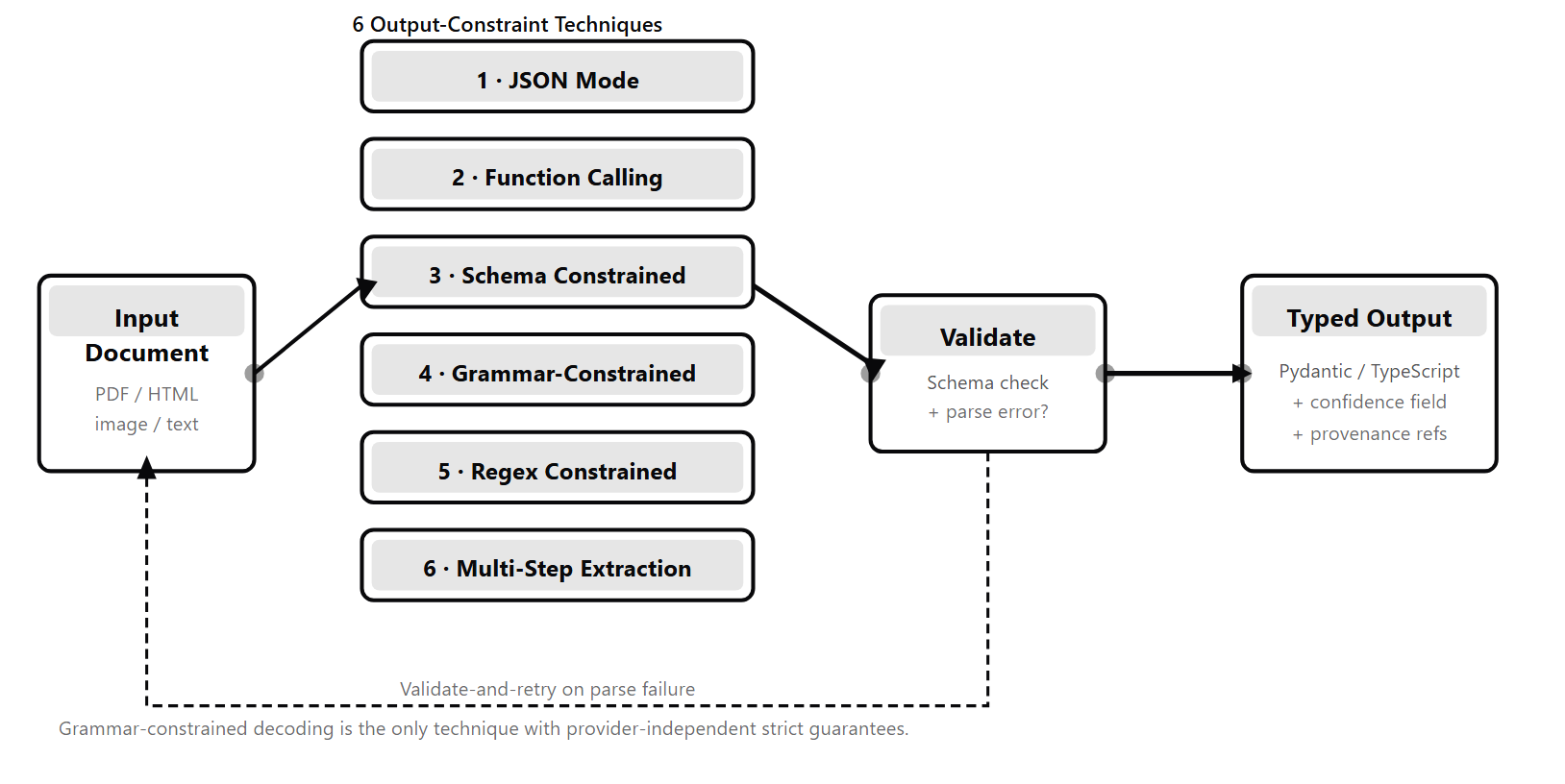
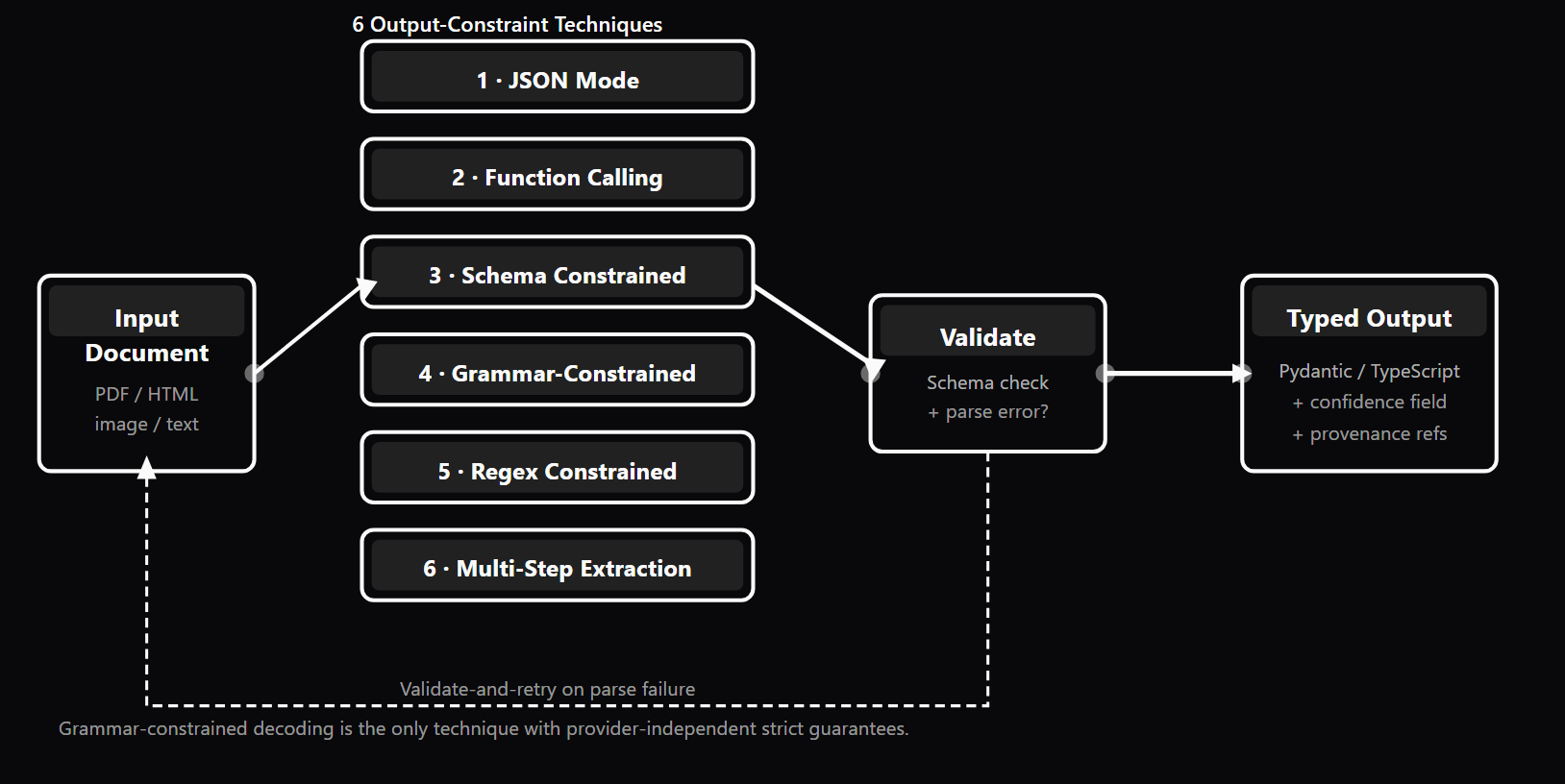
- Five output-constraint techniques run cheapest to strictest: prompt-and-parse, JSON mode, function calling, native structured outputs (the 95 percent production solution), and grammar-constrained decoding for local open-weight models.
- Validate-and-retry bridges all five: validate against a Pydantic or Zod schema and send the specific validation error back to the model before retrying — Instructor and BAML automate this.
- The production document pipeline has four stages: document parsing (often more important than the LLM choice), schema-constrained extraction, adversarial critic verification, and confidence routing to a human queue.
- Structural validity is not semantic validity: a schema-valid record can still contain wrong values (schema-conformant fabrication), which only a critic step — not a schema validator — can catch.
- Track value, confidence, and source span per field, version schemas with semver, and never let an extracted fact drive a side-effecting action without a deterministic cross-check or human review.
What it is
Structured output extraction sits at the interface between unstructured prose and code: it is the practice of using an LLM to transform free-form documents — contracts, invoices, medical records, research papers, emails — into typed, schema-conforming records that downstream systems can process reliably. The challenge is not making the LLM produce something that looks like JSON. The challenge is ensuring the output reliably conforms to a specific schema under real-world document conditions: missing fields, ambiguous values, conflicting information, merged cells in tables, and malformed source text. The field has converged on five core output-constraint techniques, ordered from cheapest to strictest. **Prompt-and-parse** is the tutorial approach — tell the LLM the schema in the prompt and parse with json.loads. Brittle and not production-correct. **JSON mode** adds a provider flag that constrains the model to emit syntactically valid JSON, but enforces no schema — the LLM may omit required fields or return wrong types. **Function calling / tool use** is the dominant production mechanism since 2023: the LLM emits arguments conforming to a declared function schema, validated at the API level before the response is returned. **Native structured outputs** (OpenAI Structured Outputs with constrained decoding, Anthropic structured output mode) guarantee schema compliance and are the 95% solution for production pipelines. **Grammar-constrained decoding** (Outlines, llama.cpp grammars, XGrammar) constrains token sampling at runtime to a regex, JSON schema, or context-free grammar — making parse failures structurally impossible. This requires running the model locally and is the last 5% for open-weight deployments where absolute reliability matters. Bridging all five is **validate-and-retry** (Instructor's canonical pattern): generate output, validate against a Pydantic or Zod schema including application-level validators, and on failure send the specific validation error back to the LLM as a correction prompt before retrying. The Instructor library implements this automatically for Python; BAML compiles to Python and TypeScript clients with similar retry semantics; Marvin and Pydantic AI follow the same pattern. For document extraction, the full production pipeline has four stages. Stage 1 is the **document-parsing layer** — converting PDFs, images, and HTML into clean text that preserves layout. This often matters more than the LLM choice. PyMuPDF, pdfplumber, Marker, MinerU, Docling, Unstructured.io, and Camelot / Tabula each handle different document types and table complexities. Stage 2 is **schema-constrained LLM extraction** via the tools above. Stage 3 is **critic verification** — an adversarial critic that checks whether each extracted field is faithful to the source document, catching schema-conformant fabrication that Pydantic validation cannot detect. Stage 4 is **confidence routing**: high-confidence records flow to the downstream system; low-confidence records go to a human review queue. The OSS ecosystem supporting this includes Pydantic AI (full agent framework with type-safe extraction), Vercel AI SDK generateObject (TypeScript-first), LlamaIndex PydanticProgram, and layout-aware extraction models LayoutLMv3 and Donut for complex forms and tables.
Why interviewers ask
Structured output extraction is where LLMs meet production data systems — the point where "the model says something useful" becomes "the record is in the database with the right schema." Every company processing documents at scale (contracts, invoices, medical records, research papers, support tickets) needs this capability, and the gap between a demo that works on 10 clean PDFs and a pipeline that handles 10,000 messy enterprise documents is exactly where engineering judgment is tested. Interviewers ask about this topic to determine whether a candidate understands the distinction between structural validity (the output matches the schema shape) and semantic validity (the output contains the correct values from the source). This distinction is operationally critical: a Pydantic validator that passes every field of the correct type tells you nothing about whether the model extracted the right date from a contract containing six different dates. Schema-conformant fabrication — the LLM returning a structurally valid record with plausible-looking but wrong values — is the most common production failure mode, and detecting it requires a critic step, not just a schema validator. The hiring signal is: does this candidate know the five-tier constraint ladder and when each tier earns its cost? Can they explain what validate-and-retry does that plain function calling does not? Can they design a document extraction pipeline with field-level confidence scores and provenance references so that human reviewers handle uncertain cases efficiently? Do they know when multi-step extraction is warranted? Do they know the eight common pitfalls including schema versioning and schema drift between extractor and consumer? Strong candidates can describe the five output-constraint techniques in order of strictness, explain the validate-and-retry loop and its retry bound, choose between Instructor, BAML, Outlines, and native structured outputs for a given scenario, describe a multi-layer PDF extraction pipeline with table handling, and explain why an adversarial critic is needed beyond schema validation alone.
Common mistakes
**Pitfall 1: Treating JSON mode as schema enforcement.** JSON mode produces syntactically valid JSON — it does not produce JSON that matches your schema. If downstream code assumes fields are present, a JSON-mode pipeline fails silently on any document where the LLM omits or renames a field. Use native structured outputs or function calling in production; JSON mode is only appropriate for prototyping or loose free-form responses. **Pitfall 2: No validation-error feedback on retry.** Validation fails silently; retry sends the same prompt; the LLM produces the same broken output. Sending the specific error message back ("Field effective_date must be before expiry_date; you returned these values") is what makes validate-and-retry converge. Instructor and Marvin do this automatically — manual retry loops without error feedback are a common source of wasted tokens and persistent extraction errors. **Pitfall 3: Mixing extraction with reasoning in a single call.** Asking the LLM to extract fields AND score them AND draft a response AND recommend an action in one call. The output schema grows, accuracy on every field drops, and the call is slow. Fix: separate extraction (one schema, one focused call) from downstream reasoning (a second call that consumes the extracted record). **Pitfall 4: Forgetting the document-parsing layer.** Passing raw PDF bytes to the LLM and hoping it handles tables, multi-column layouts, and merged cells. Tables get flattened to gibberish, multi-column text interleaves incorrectly, equations vanish. Use pdfplumber, Marker, Unstructured.io, or Docling to parse the document first; pass clean text with preserved structure to the LLM. The document-parsing layer often matters more than the LLM choice. **Pitfall 5: No field-level confidence or provenance.** Without confidence, every extracted record looks equally certain to downstream consumers. Without provenance, when a reviewer needs to verify or correct an extraction, they must scan the entire document. Store (value, confidence, source_span) per field. Expose provenance in any user-facing surface. **Pitfall 6: Schema drift between extractor and consumer.** The extractor produces phone_number: str; the database expects phone: str. Code crashes on the first row. Define extraction schema and downstream schema as the same Pydantic class, or generate them from the same source, and assert compatibility in CI. **Pitfall 7: Treating extracted facts as ground truth without verification.** The extractor said the invoice total is $4,728. It was wrong; the actual total is $4,278. The agent paid $4,728 anyway. Cross-verify extracted facts against deterministic checks (do line items sum to the total?), against an adversarial critic, or against human review — especially for any extracted fact that drives a downstream action with side effects. **Pitfall 8: Skipping schema versioning.** Schema v1 had experiences: list[Experience]. Schema v2 added Experience.salary. Old extractions in the database lack the field; new code crashes on the missing field. Version schemas with semver; migrate stored data on schema change; default missing fields to None when reading old records.
Instructor vs BAML vs Outlines vs Native Structured Outputs — Trade-offs
| Tool | Validation Depth | Provider Support | Schema Expressiveness | Error Handling | Best Use Cases |
|---|---|---|---|---|---|
| Instructor | Deep — Pydantic validators, @model_validator, cross-field rules; validate-and-retry with ValidationError feedback | Very broad — Anthropic, OpenAI, Gemini, Cohere, any OpenAI-compatible endpoint | High — full Pydantic model power; nested models, discriminated unions, conditional validators | Automatic retry with error feedback to LLM on ValidationError; configurable max_retries (default 3) | Complex schemas with conditional validation; teams already using Pydantic; multi-provider deployments |
| BAML | Strong — schema + prompt co-located in typed DSL; type-checked at compile time | Good — major providers via generated client; TypeScript and Python from same source | High — own DSL with unions, optionals, enums; cross-language portability | Retry logic in generated client; structured error reporting per field | Teams wanting prompt + schema co-location; TypeScript-first or cross-language codebases |
| Outlines | Structural guarantee — grammar constraint at token-sampling level; zero parse failures | Hard guarantee needs logit access (vLLM, Transformers, llama.cpp); also wraps hosted providers via their native modes | Medium — JSON Schema + regex; complex nested schemas slow decoding due to large state space | No retry needed for structure; semantic errors still possible; no provider-side fallback | Flat schemas with tight constraints; self-hosted open-weight models; zero-tolerance for parse failures |
| Native Structured Outputs | Schema compliance guaranteed by provider — OpenAI uses constrained decoding; Anthropic tool use with strict schemas | Provider-specific — Anthropic tool use; OpenAI response_format json_schema; Google Vertex responseSchema | Standard JSON Schema — no Pydantic validators or cross-field rules; strictly structural | Provider handles structural failures internally; application-level validators require wrapper code | Production default when framework overhead is undesirable and schema is expressible in standard JSON Schema |
| JSON Mode | Minimal — syntactically valid JSON guaranteed; no schema enforcement | Universal — all major APIs support it | None — output structure is ad-hoc; fields may be missing or wrongly typed | Manual — caller must catch parse errors, missing fields, and type mismatches | Prototyping; simple free-form JSON where schema is loose; quick experiments before adding a schema layer |
Sample interview questions
- What are the five core output-constraint techniques for structured LLM output, ordered from cheapest to strictest structural guarantee?
- A. JSON mode, function calling, schema-constrained decoding, grammar-constrained decoding, regex-constrained decoding
- B. Prompt-and-parse, JSON mode, function calling / tool use, native structured outputs, grammar-constrained decoding ✓
- C. Temperature reduction, top-p filtering, repetition penalty, stop sequences, token masking
- D. Pydantic validation, JSON schema, OpenAPI spec, protobuf, Avro
Option B lists the five core techniques from cheapest to strictest, as defined in the WP-11 structured-output taxonomy. **Prompt-and-parse (cheapest, least reliable):** Tell the LLM the schema in the system prompt and parse the response with json.loads. Fails on every model-format variation, JSON-embedded prose, and escaped quote. Used in tutorials; not correct in production. **JSON mode:** Provider flag (e.g., response_format={"type": "json_object"}) constrains the model to emit syntactically valid JSON. Does NOT constrain the schema — fields may be missing, wrongly typed, or have unexpected keys. Useful as a baseline requirement; insufficient alone. **Function calling / tool use:** The dominant mechanism since 2023. You declare a function schema; the LLM emits arguments conforming to it; the provider validates before returning. Tighter than JSON mode because the schema is API-level enforced. **Native structured outputs:** Both Anthropic and OpenAI ship explicit structured-output modes (OpenAI Structured Outputs uses constrained decoding internally; Anthropic has an equivalent structured-output mode). These guarantee schema compliance and are the 95% solution for production pipelines. **Grammar-constrained decoding (strictest):** Outlines, llama.cpp grammars, XGrammar. Constrains token selection at sampling time to match a regex, JSON schema, or context-free grammar. The zero-parse-failure guarantee requires a logit-accessible backend (vLLM / Transformers / llama.cpp); Outlines also wraps hosted providers, but then defers to their native structured-output modes. Zero parse failures; highest cost; best for open-weight models in regulated settings. Validate-and-retry (Instructor's pattern) is a bridging meta-technique composable over any of the above — not a sixth independent tier but a retry loop that sends validation errors back to the LLM. Production reality: Most teams operate at function calling (Tier 3) and escalate to native structured outputs (Tier 4) for high-stakes fields.
- What is the difference between JSON mode and native structured outputs in the Anthropic and OpenAI APIs?
- A. They are identical; "native structured output" is just marketing language for JSON mode
- B. JSON mode instructs the LLM to produce syntactically valid JSON with no schema enforcement; native structured outputs (function calling / tool use, or response_format with a JSON schema) constrain the output to match a specific schema, validated at the API level before the response is returned ✓
- C. JSON mode is slower because it uses a separate parsing pass; native structured output is faster because it skips JSON formatting
- D. JSON mode is only available in the Anthropic API; native structured output is only available in the OpenAI API
Option B correctly distinguishes the two approaches. **JSON mode (instruction-level):** You add a provider flag or system-prompt instruction to produce valid JSON. The LLM is trained to emit syntactically valid JSON when instructed. Guarantees: the output parses as JSON. Does NOT guarantee: field presence, field types, or any specific schema structure. If your schema has 10 required fields, JSON mode may return 7 — correct JSON syntax with missing fields. This is the most common source of silent downstream failures. **Native structured outputs / function calling:** The API accepts a schema (JSON Schema format) and validates the model output against it before returning the response. In the OpenAI API, response_format with type "json_schema" enables constrained decoding under the hood. In the Anthropic API, tool use is the equivalent mechanism — you define a tool with an input schema, and the model returns a tool call matching that schema with API-level validation. The caller always receives a structurally-compliant response. However, the API does not validate the semantic correctness of values — the model may return the right fields with wrong values. In practice: use JSON mode only for prototyping or loose free-form JSON. Use native structured outputs or function calling for any production pipeline where downstream code depends on schema compliance. Production reality: OpenAI's Structured Outputs uses constrained decoding internally, providing the strongest provider-side guarantee. Anthropic's tool use with strict input schemas is the Anthropic equivalent. Both are the recommended production defaults over plain JSON mode.
- You need to extract structured data from contracts. The output is a deeply nested Pydantic schema with optional fields and conditional validators (e.g., effective_date must be before expiry_date). Instructor, BAML, and Outlines are available. Which is most appropriate and why?
- A. JSON mode — simpler and avoids framework overhead for complex schemas
- B. Instructor — Pydantic-native validation with automatic validate-and-retry handles complex nested schemas with conditional validators naturally; the retry mechanism sends validation errors back to the LLM as correction prompts, and provider-agnostic support allows escalation to stronger models ✓
- C. Outlines — grammar-constrained decoding guarantees structural compliance with zero retry overhead, even for deeply nested schemas
- D. BAML — the BAML DSL is designed for simple flat schemas; deeply nested schemas with conditional validation should use a database instead
Option B is correct for this scenario. **Instructor** is the right choice when: - The schema is complex (deeply nested Pydantic models with @model_validator and field-level validators) - Validation is conditional (effective_date < expiry_date, total_value == sum(line_items)) - You need validate-and-retry: when a Pydantic validator raises ValidationError, Instructor automatically constructs a correction message ("Field effective_date must be before expiry_date; you returned these values...") and re-calls the LLM, up to max_retries - You need provider flexibility (Instructor supports Anthropic, OpenAI, Gemini, Cohere, and any OpenAI-compatible endpoint) **Outlines** (Option C): Grammar-constrained decoding guarantees structural compliance but becomes slow for deeply nested schemas with many optional fields, because the constraint state space is large. It is best for flat schemas with tight enumeration constraints (status codes, classification labels). Its hard structural guarantee requires a logit-accessible backend (vLLM / Transformers); it can also call hosted providers but then relies on their native structured-output modes. **BAML** (Option D): The distractor claim that BAML is only for flat schemas is incorrect — BAML's DSL supports nested types, unions, and optional fields and is a legitimate option for complex schemas. However, for teams already using Pydantic throughout their Python codebase, Instructor is a more natural fit because the schema is expressed directly in Pydantic rather than a separate DSL. Production reality: Instructor's max_retries=3 default is sensible. A schema the LLM cannot satisfy after 3 attempts is unlikely to converge on attempt 7. Failed extractions after retry belong in a human review queue, not an infinite retry loop.
- How do you add field-level confidence and provenance to extracted records, and why do both matter for production document extraction pipelines?
- A. Confidence and provenance are post-processing steps that do not affect the extraction itself
- B. Field-level confidence is a per-field score (0–1) the LLM assigns to each extracted value indicating certainty; provenance is a source reference (page number, character offset, or chunk ID) linking each value back to the document region it was extracted from. Both are essential: confidence enables human review routing (low-confidence fields go to a review queue) and provenance enables verification and audit ✓
- C. Field-level confidence is only available with grammar-constrained decoding; other techniques do not support it
- D. Provenance tracking requires a separate information retrieval system and cannot be part of the structured output schema
Option B describes the production-standard approach. **Field-level confidence:** Instead of a single confidence score for the entire extracted record, each field carries its own confidence value. The LLM is prompted to self-report confidence based on how clearly each value appears in the source: 0.9+ for verbatim unambiguous appearances, 0.5–0.8 for interpreted or partially visible values, below 0.5 for inferred values. Note that classifier-based confidence (a trained model scoring each field) is more reliable than LLM self-reported confidence when precision matters. **Why confidence matters:** In a production extraction pipeline, routing every record to human review defeats the automation benefit. Confidence enables tiered routing: records where all fields exceed a threshold (e.g., 0.85) flow directly to the downstream system; records with any field below the threshold go to a human review queue. This achieves high automation rates while ensuring uncertain extractions receive human verification. **Provenance:** The source reference linking each extracted value back to its origin in the document — page number, paragraph index, character offset, or chunk ID. Provenance enables: (1) verification — a reviewer can navigate directly to the source region, (2) auditability — in regulated industries (healthcare, finance, legal), every extracted value must be traceable, (3) debugging — when extraction errors occur, provenance pinpoints which document region caused the model to extract the wrong value. WP-11 identifies no-confidence-or-provenance as Pitfall 6: "A field is wrong. You can't tell whether it was extracted with high confidence or low. You can't show the user which paragraph the field came from." Production reality: Most OSS extractors do not wire (value, confidence, source_span) per field by default — this must be added explicitly. It is worth the effort for any high-stakes extraction domain.
- Your extraction pipeline produces schema-valid records where all fields pass Pydantic validation, but downstream users report consistently wrong values — for example, the wrong date from contracts containing multiple dates. What is broken and how do you fix it?
- A. Schema-valid output means the extraction is correct; the downstream users are misinterpreting the data
- B. The pipeline has a semantic validity gap: schema validation enforces shape (correct types, required fields) but not faithfulness (correct values from the source). Fix by: (1) building a labelled evaluation set and measuring per-field accuracy, (2) improving field descriptions to disambiguate (e.g., "the date on which terms first take legal effect — not the signing date or amendment date"), (3) adding cross-field consistency validators, (4) pairing extraction with an adversarial critic that compares each field to the source document ✓
- C. The Pydantic model needs stricter field types; switch from str to datetime to catch date format errors
- D. The issue is the PDF parser; switch to a different document parser to improve text extraction quality
Option B correctly identifies the semantic validity gap — the most common production failure mode in structured extraction. **Schema-valid does not mean semantically correct.** Schema validation checks that the output has the right structure: field X is a string, field Y is a non-negative integer, field Z is a valid ISO date. It does NOT check that field X contains the correct string from the source document. If a contract has 5 dates (execution date, effective date, notice date, termination date, amendment date), schema validation cannot determine which one the model should have returned for the effective_date field. **Diagnosis:** Build a labelled evaluation set with documents where you know the correct extracted value for each field. Measure per-field accuracy — not just "does the model return a date" but "does it return the correct date." Identify systematic per-field mismatches. **Fix 1 — Field description improvement:** The most effective fix is usually improving the Field(description=...) text. Instead of "effective_date: The effective date of the contract," use "effective_date: The date on which contract terms first take legal effect (often labeled Effective Date or Commencement Date). Do NOT extract the execution/signing date or any amendment date." **Fix 2 — Cross-field consistency validators:** Add Pydantic @model_validator checks: effective_date < expiry_date, total_value == sum(line_items). Violations are treated as extraction errors and trigger validate-and-retry. **Fix 3 — Adversarial critic:** Pair extraction with a critic step that receives both the source document and the extracted record and checks whether each field is faithful to the source. This catches schema-conformant fabrication that Pydantic validation cannot. Production reality: WP-11 Pitfall 7 is "treating LLM-extracted facts as ground truth." The fix is cross-verifying extracted facts against deterministic checks, critic agents, or human review — especially for any extracted fact that drives a downstream action with side effects.
- How do you extract structured data from PDF documents with complex table layouts, merged cells, and tables spanning multiple pages?
- A. Use JSON mode with a single LLM call receiving the full PDF as base64; the LLM handles table structure automatically
- B. Use a multi-layer pipeline: (1) parse the PDF with a structure-preserving library (Docling for complex layouts, Marker for clean Markdown output, pdfplumber for strong table support), (2) identify table regions, (3) extract each table with a schema-constrained LLM call, (4) handle multi-page tables with overlapping chunking — include the last 2 rows of the previous page at the start of the next chunk to avoid losing rows at page boundaries ✓
- C. Avoid PDFs; require users to upload CSV or Excel files instead
- D. Use raw OCR on the PDF images; OCR naturally handles table layouts
Option B describes the production-standard multi-layer approach for complex PDF table extraction. **Why a single LLM call fails on complex tables:** Vision-capable LLMs can read simple tables but struggle with: (1) merged cells — the model may misassign a merged cell to the wrong column, (2) multi-page tables — the model typically sees one page at a time, (3) long tables — models may skip rows or duplicate values at high row counts. **Layer 1 — Document parsing (often the most important layer):** Use a specialised PDF parsing library that preserves table structure: - **pdfplumber:** Python PDF parsing with strong table support via explicit cell-boundary detection. - **Marker:** Converts PDFs to clean Markdown with table formatting; well-suited for research papers and multi-column layouts. - **Docling (IBM):** Open-source parser designed for complex enterprise documents; handles merged cells and multi-page tables by tracking cell spans in the underlying PDF structure. - **MinerU:** Open-source PDF-to-structured-data with table and equation handling. - **Unstructured.io:** Cloud service returning structured document elements including table objects with row/column structure. - **Camelot / Tabula:** Specialised PDF table extraction tools for when table extraction is the primary task. **Layer 2 — Table identification:** Once parsed, identify table regions by element type (if using Unstructured/Docling) or by heuristic pattern matching on Markdown. **Layer 3 — Schema-constrained extraction per table:** Pass each table to the LLM with the target schema. One call per table keeps context focused and the schema specific. **Layer 4 — Multi-page table handling:** Implement overlapping chunking: include the last 2 rows of the previous page at the start of the next chunk, flagged as "overlap context, do not re-extract." Option D (raw OCR) loses table structure entirely — OCR outputs a flat string of characters without column/row relationships. Production reality: The document-parsing layer often matters more than the LLM choice for complex layouts.
- What is multi-step extraction and when does single-shot extraction justify switching to it?
- A. Multi-step extraction is just running the same LLM call multiple times with higher temperature to get diverse results
- B. Multi-step extraction breaks a complex schema into sequential stages — e.g., (1) classify document type, (2) extract top-level entities, (3) extract nested details — each with its own schema, prompt, and possibly model. Switch when: single-shot quality plateaus on a large schema (15+ fields typically degrades accuracy), different document sections contain different fields, or some fields are conditional on values from a prior extraction step ✓
- C. Multi-step extraction is only useful for medical records; other document types should use single-shot extraction
- D. Multi-step extraction requires fine-tuning a separate model for each step; it is not feasible with general-purpose LLMs
Option B correctly defines multi-step extraction and the escalation triggers. **What it is:** Multi-step extraction decomposes a complex document extraction task into a sequence of simpler schema-constrained LLM calls. Each call extracts a smaller portion of the final schema, and the results are assembled into the final composite record. The stages can vary: 1. **Document classification** — what type of document is this? (contract, invoice, medical record, etc.) 2. **Top-level entity extraction** — who, what, when, where? 3. **Nested detail extraction** — line items, sub-records, conditional sections. Each stage has its own schema, its own prompt, and possibly a different model (a cheaper model for classification, a stronger model for complex nested fields). **Why it works better than single-shot for complex schemas:** Asking the LLM to fill a 50-field schema in one shot produces lower accuracy than breaking the task into 2–3 focused steps. Each step has a narrower context, a simpler schema, and fewer competing fields to confuse the model. **When to switch:** - Single-shot extraction quality plateaus — accuracy stops improving with prompt improvements. - Large schema: more than 15–20 fields in a single call typically degrades per-field accuracy. - Different document sections contain different fields — matching sections to steps improves focus. - Conditional fields: some fields are only extractable after earlier fields have been established. - Complex nested details require more focused context than the top-level extraction. Production reality: Medical record extraction, legal contract extraction, and financial statement extraction almost all use multi-step pipelines in production. The error rate per field and the debugging clarity both improve with decomposition.
- What does validate-and-retry do that plain function calling does not, and what is the correct retry bound?
- A. Validate-and-retry adds grammar-constrained decoding on top of function calling, making it structurally impossible to produce invalid output
- B. Validate-and-retry adds a post-generation validation step (Pydantic / Zod schema check) and, on failure, sends the validation error message back to the LLM as a correction prompt before retrying. Plain function calling validates schema shape at the API level but does not re-prompt with the specific error. The retry bound should be 2–3; a schema the LLM cannot satisfy after 3 attempts is unlikely to converge on attempt 7 — failed extractions belong in a human review queue ✓
- C. Validate-and-retry is identical to function calling; Instructor just exposes it with a different API
- D. Validate-and-retry only works with OpenAI; Anthropic requires a manual implementation
Option B correctly explains the mechanism and the retry bound. **What plain function calling does:** The API validates that the model output matches the declared tool schema structure before returning the response. If the model produces a structurally non-conforming response, the provider may retry internally. What it does NOT do: run your application-level validators (cross-field constraints, business rules, range checks) and send failure messages back to the LLM. **What validate-and-retry adds:** 1. The LLM produces output via function calling or native structured outputs. 2. The output is validated against a Pydantic / Zod schema — including application-level validators, @model_validator rules, and cross-field constraints that the provider API cannot express. 3. If validation fails, the ValidationError message ("Field effective_date must be before expiry_date; you returned effective_date=2024-06-01, expiry_date=2024-01-01") is sent back to the LLM as a correction prompt in a new message. 4. The LLM is retried with the error context. The correction prompt materially improves convergence because the LLM knows exactly what was wrong. **Instructor's implementation:** Instructor implements this automatically. When a Pydantic validator raises ValidationError, Instructor constructs the correction message and re-calls the LLM, up to max_retries (default: 3). **Retry bound:** WP-11 explicitly states: "Don't set it to 10 — a schema the LLM can't satisfy after 3 attempts is unlikely to satisfy on attempt 7, and you've paid 7x the tokens." Failed extractions after max_retries belong in a human review queue. Production reality: Without error-message feedback, retry sends the same prompt and produces the same broken output. Sending the specific validation error is what makes validate-and-retry converge.
- What is active extraction and when should a production pipeline use it?
- A. Active extraction means using a larger, more powerful model to extract fields that smaller models fail on
- B. Active extraction is a pattern where the agent asks the user to disambiguate uncertain fields rather than guessing. Use it in conversational or form-filling contexts where extraction is uncertain and the user is present to answer a clarifying question — for example, "I see two possible interview dates: March 5 and March 6. Which is correct?" Do not use it in fully automated batch pipelines where no user is present ✓
- C. Active extraction means running extraction in parallel across multiple LLM providers and taking the majority vote
- D. Active extraction is another name for agentic RAG — the LLM actively retrieves relevant document sections before extracting
Option B correctly defines active extraction and its appropriate use context. **Active extraction** (canonical definition from WP-11/GLOSSARY): A pattern where the agent asks the user to disambiguate uncertain fields rather than guess. When the LLM is uncertain about a field value — because multiple plausible values appear in the source, or the source is ambiguous — instead of selecting one and marking it as low-confidence, the agent surfaces the ambiguity to the user with a clarifying question. **Example use cases:** - Conversational onboarding: the agent extracts fields from user input in real time and asks for clarification when multiple interpretations exist. - Form-filling agents: the agent partially fills a form from uploaded documents and prompts the user for fields it could not confidently extract. - Interview scheduling: "I found two possible dates in your email — March 5 and March 6. Which is the correct interview date?" **When to use it:** - The user is present and available to respond (conversational or interactive context). - The cost of a wrong extraction is high enough to justify the friction of asking. - The ambiguity is genuine and not resolvable from the document alone. **When NOT to use it:** - Fully automated batch pipelines where no user is present (route low-confidence fields to a human review queue instead). - When the clarifying question would require more domain knowledge than the user has. - When the ambiguity rate is so high that asking becomes the dominant interaction pattern (fix the upstream source or schema instead). Production reality: WP-11 notes that the conversational pattern for active extraction is well-understood but no OSS package currently wraps it end-to-end. It is implemented in some commercial extraction products.
- What does schema versioning solve in a long-running extraction pipeline, and what breaks if you skip it?
- A. Schema versioning is only needed for distributed systems; single-process extraction pipelines do not need it
- B. Schema versioning tracks changes to the Pydantic / Zod schema over time so that stored extractions from older schema versions can be read safely by newer consumer code. Without it: when a new field is added to the schema, old extractions in the database lack the field and new code crashes on the missing field; when a field is renamed, old records have the old name and joins silently return nulls; downstream consumers have no way to assert they are reading a compatible schema version ✓
- C. Schema versioning means using semantic versioning on the LLM model (e.g., pinning claude-haiku-4-5-20251001) to ensure consistent extraction behavior
- D. Schema versioning is handled automatically by Pydantic; no additional tooling is needed
Option B correctly explains the schema versioning problem and what breaks without it. **The problem (WP-11 Pitfall 8):** "Schema v1 had experiences: list[Experience]. Schema v2 added Experience.salary. Old extractions in the database lack the field. New code crashes on the missing field." This is a silent, hard-to-detect failure mode in production extraction pipelines that run continuously over months or years. **What schema versioning addresses:** 1. **Field addition:** When a new required field is added to the schema, old stored extractions lack it. New consumer code crashes or silently returns None. Fix: default new fields to None in old records; run a migration to backfill or mark records as schema_version=1. 2. **Field removal:** When a field is removed from the schema, old records still have it and new extractors no longer populate it. Downstream code referencing the removed field must be updated. 3. **Field renaming:** A rename is a removal + addition; old records have the old name. Joins silently return nulls. 4. **Type changes:** phone_number: str → phone: PhoneNumber. Old records have raw strings; new code expects typed objects. **Implementation pattern:** - Add a schema_version field to every extracted record. - Use semver for the schema: schema_version="2.1.0". - Write a migration when the schema changes: update stored records or add a compatibility layer. - Assert schema_version compatibility in consumer code (fail loudly, not silently). - Treat the consumer's expected schema as the contract; reverse-engineer the extractor schema from it so schema drift between extractor and consumer is caught in code review rather than in production. Production reality: Hand-rolled schema migration is the current state of the art — no OSS framework packages this end-to-end for LLM extraction pipelines.
Frequently asked questions
- What are the five core output-constraint techniques for structured LLM output, and when does each apply?
- From cheapest to strictest: (1) Prompt-and-parse — instruct via prompt, parse with json.loads; brittle, prototype-only. (2) JSON mode — provider flag that constrains output to syntactically valid JSON; no schema enforcement; use for loose free-form JSON or prototyping. (3) Function calling / tool use — the dominant production mechanism since 2023; provider validates that the model output matches the declared tool schema. (4) Native structured outputs — Anthropic and OpenAI both ship modes that guarantee schema compliance via constrained decoding; the 95% production solution for strict schemas. (5) Grammar-constrained decoding (Outlines, llama.cpp grammars, XGrammar) — constrains token sampling to a regex/JSON schema/context-free grammar at sampling time; requires running the model locally; zero parse failures; use for open-weight models where absolute reliability matters. Validate-and-retry (Instructor's pattern) is a bridging meta-technique composable over any of the above.
- What is the difference between JSON mode and native structured outputs?
- JSON mode instructs the LLM (via prompt or API flag) to return syntactically valid JSON, but enforces no schema — fields may be missing, have wrong types, or have unexpected keys. Native structured outputs (function calling, tool use, or response_format with a JSON schema) pass the schema to the API, which validates the model output against it before returning the response. OpenAI Structured Outputs uses constrained decoding internally. Anthropic tool use with strict input schemas is the equivalent. Use JSON mode only for prototyping; use native structured outputs for production pipelines where downstream code depends on schema compliance.
- What is grammar-constrained decoding and why is it the strictest technique?
- Grammar-constrained decoding uses a formal context-free grammar that defines all valid output strings. At each decoding step, only tokens that are valid continuations of the grammar are sampled — invalid tokens are masked out. This means the model can never produce an output that violates the grammar, regardless of model capability or prompt quality. Libraries like Outlines, llama.cpp grammars, and XGrammar implement this. It is the only technique that provides a provider-independent, zero-parse-failure structural guarantee. The tradeoff: it requires running the model locally (vLLM, Transformers, llama.cpp) and becomes slow for deeply nested schemas with many optional fields due to large constraint state spaces.
- What is validate-and-retry and how does it work in Instructor?
- Validate-and-retry is the pattern of: (1) call the LLM with the schema, (2) attempt to parse and validate the output against a Pydantic / Zod schema including application-level validators, (3) if validation fails, send the specific validation error message back to the LLM as a correction prompt ("Field effective_date must be before expiry_date; you returned these values"), (4) retry the LLM call. Instructor implements this automatically: when a Pydantic validator raises ValidationError, Instructor constructs the correction message and re-calls the LLM, up to max_retries (default: 3). The retry bound matters: a schema the LLM cannot satisfy after 3 attempts is unlikely to converge on attempt 7. Failed extractions after max_retries belong in a human review queue.
- When do you use Instructor vs BAML vs Outlines vs native structured outputs?
- Use **Instructor** when: your schema is complex (nested Pydantic models, conditional validators, cross-field rules), you need automatic validate-and-retry with error feedback, you want provider flexibility (Anthropic, OpenAI, Gemini, etc.), and your team already uses Pydantic. Use **BAML** when: you want prompt and schema co-located in a typed DSL, you need strong cross-language type safety (TypeScript + Python from the same source), and you want the schema to drive prompt generation explicitly. Use **Outlines** when: your schema is flat with tight enumeration constraints, you control the model deployment (vLLM / Transformers), you need zero-parse-failure guarantees, and API provider access is not an option. Use **native structured outputs** (Anthropic / OpenAI) when you need guaranteed schema compliance without framework overhead and your schema is expressible in standard JSON Schema.
- What is multi-step extraction and when do you need it?
- Multi-step extraction breaks a complex document extraction task into sequential stages — typically (1) document classification, (2) top-level entity extraction, (3) nested detail extraction — each with its own schema, prompt, and possibly model. Switch to multi-step when: the full schema exceeds 15–20 fields (single-shot accuracy degrades), different document sections contain different fields, some fields are conditional on prior extraction results, or single-shot quality plateaus despite prompt improvements. Each stage has lower error rate, is easier to debug, and is more interpretable than a monolithic single-shot extraction.
- How do you add field-level confidence and provenance to extracted records?
- Extend the Pydantic schema to include a confidence (float, 0–1) and provenance (string — page number, paragraph index, or chunk ID) alongside each extracted value. Prompt the LLM to assign confidence based on how clearly the value appears in the source. Use confidence for tiered routing: high-confidence records flow to downstream systems; low-confidence records go to a human review queue. Use provenance to link each extracted value back to its document location for verification and audit. Note that classifier-based confidence (a trained model scoring each field) is more reliable than LLM self-reported confidence for high-stakes domains.
- What is the most common extraction failure mode in production?
- Semantic invalidity — the extracted record passes schema validation (correct types, required fields present) but contains wrong values. Examples: extracting the wrong date when a contract has five different dates, extracting the wrong party name, or a line-item total that does not match sum of items. Schema validation enforces shape; it cannot verify that the LLM selected the correct value from the source. Diagnosis: build a labelled evaluation set and measure per-field accuracy. Fixes: (1) improve Field(description=...) text to disambiguate ambiguous fields, (2) add cross-field consistency validators, (3) pair extraction with an adversarial critic that checks each field against the source document.
- How do you extract structured data from complex PDFs with merged cells and multi-page tables?
- Use a multi-layer pipeline: (1) parse the PDF with a structure-preserving library — pdfplumber for strong table support, Marker for clean Markdown output, Docling for complex enterprise layouts with merged cells, MinerU for tables and equations, Camelot or Tabula for PDF-table-specific extraction; (2) identify table regions in the parsed output; (3) extract each table with a schema-constrained LLM call per table; (4) handle multi-page tables with overlapping chunking — include the last 2 rows of the previous page at the start of the next chunk to avoid losing rows at page boundaries. Raw OCR is insufficient — it loses column/row relationships. The document-parsing layer often matters more than the LLM choice for complex layouts.
- What is schema versioning and what breaks without it?
- Schema versioning tracks changes to the extraction schema (Pydantic / Zod) over time using semver, so stored extractions from older versions can be read safely by newer consumer code. Without it: adding a new required field crashes code reading old records that lack the field; renaming a field causes silent null joins; changing a field type breaks consumers. The fix: add a schema_version field to every extracted record; write migrations when the schema changes; default missing fields to None when reading old records; assert schema compatibility in consumer code. Treat the downstream consumer's schema as the contract and reverse-engineer the extractor schema from it — so schema drift is caught in code review rather than in production.
Related topics
Essential AI-Native Skills for LLM Structured Output Extraction
Modern engineering work increasingly uses AI tools for design and code review, debugging, documentation, test and testbench generation, and workflow automation. The goal is not to let AI replace engineering judgment — it is to move faster while keeping verification discipline.
- Use AI to explain unfamiliar code, logs, waveforms, datasheets, or test failures.
- Break large problems into small, reviewable steps you can verify independently.
- Ask AI for hypotheses, then validate them against tests, measurements, simulations, or lab data.
- Version-control your analysis scripts, testbenches, and configs — keep changes small and reviewable.
- Document your assumptions, design tradeoffs, and debugging decisions.
- Verify AI output before trusting it: run the checks that fit the domain — unit tests, linters, simulations, or bench/lab measurements.
- Review AI output for correctness, edge cases, and real-world consequences.
Next up: LLM Structured Output Extraction practice
The adaptive practice engine is already live for core wireless, RF, and ML domains. LLM Structured Output Extraction questions — covering production realities, not just framework syntax — are in active development. Join the early-access list to get them first.