LLM Routing and Caching Interview Prep
LLM routing and caching for production — 5 routing axes, 4 cache layers, cascade routing, cache stampedes, and AI gateway selection for interview prep.
Quick answer
LLM routing and caching is the operational layer between application code and LLM provider APIs that controls which model handles each request and whether the call is made at all.
Production LLM costs follow a power law — they look manageable during development and become company-defining at scale.
Editorial review
Written by
CompoundLearn editorial team
Wireless / RF / hardware engineering
Reviewed by
CompoundLearn editorial team
Wireless / RF / hardware engineering
Last reviewed
Built from curated topic maps, editorial validation, and subject-matter review so the page stays aligned with the interview intent and the current content pipeline.
Key points
- LLM routing and caching is the operational layer that decides which model handles each request and whether to call the API at all; without it a naive agent costs 5 to 10x more than a well-routed, well-cached one for the same outputs.
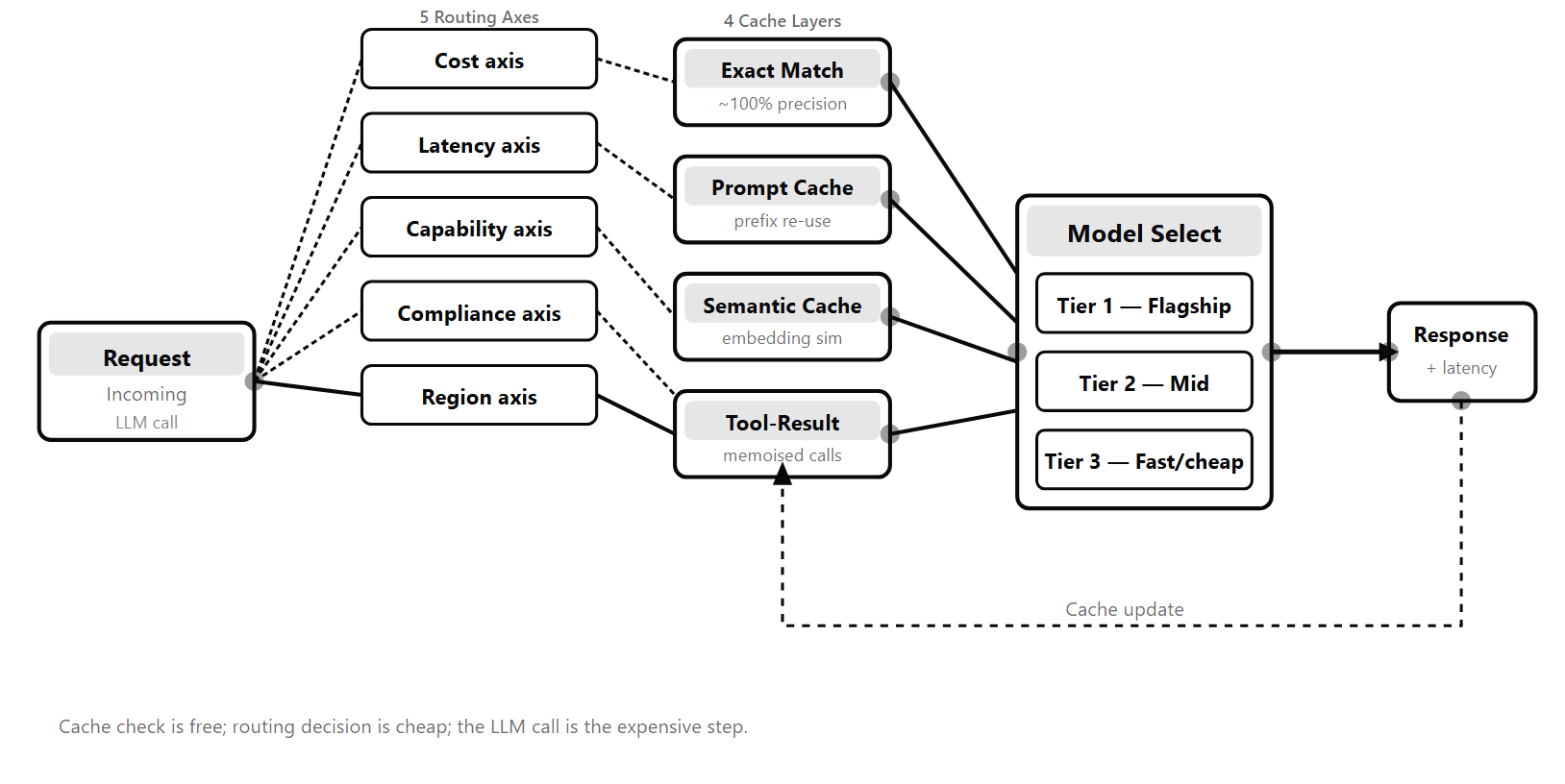
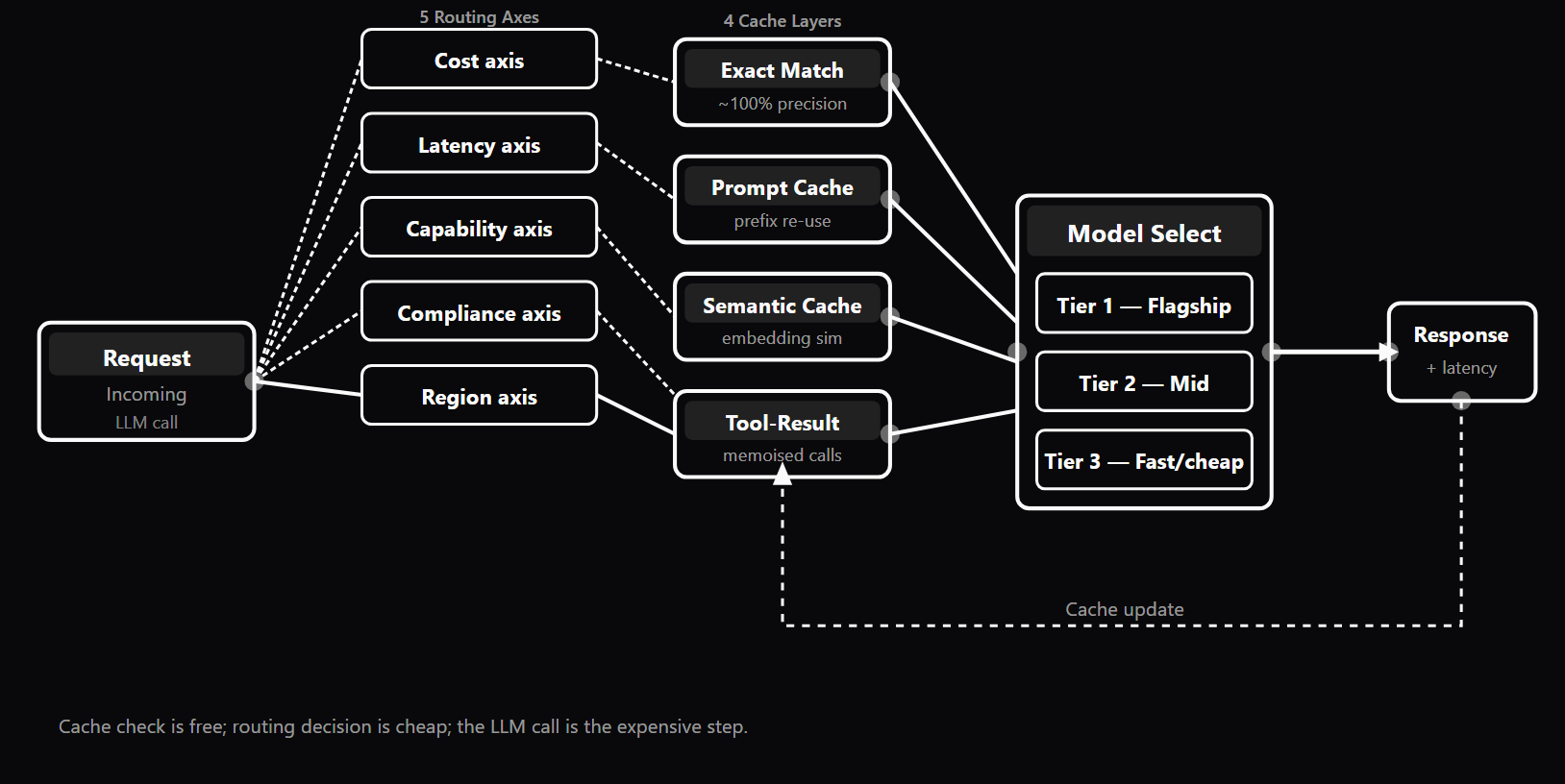
- Routing happens along five axes: cost (cheap-first cascade with quality escalation), capability, latency, content/domain (semantic intent routing), and regulation/privacy, which overrides all others.
- Cascade routing — try a small fast model first and escalate only on low confidence — cuts average LLM cost 60 to 80 percent when easy queries dominate.
- The cache has four layers checked in order: exact-match (hash the prompt), provider prompt cache (KV-prefix reuse, 50 to 90 percent token discount), semantic cache (nearest paraphrase by cosine similarity), and tool-result cache.
- Activate prompt caching by structuring prompts stable-part-first (system, tools, static instructions, RAG chunks, variable user query last) so the cacheable prefix is byte-identical across requests.
- Cache only outputs that pass a quality gate — a cached wrong answer is returned to every similar future query, turning the cache into an error multiplier — and route non-interactive work to batch APIs for a 50 percent discount.
What it is
LLM routing and caching is the operational layer between application code and LLM provider APIs that controls which model handles each request and whether the call is made at all. Without this layer, every request goes to a single model at full real-time price — acceptable at development scale, economically unworkable in production where LLM spend follows a power law: a naive agent costs 5–10× more to operate than a well-routed, well-cached version producing the same outputs. Routing decisions are made along 5 axes. The **cost axis** uses a cascade pattern: try a small fast model first; if it expresses low confidence or fails a quality check, escalate to a stronger model. On workloads where easy queries are the majority — which they usually are — this reduces average LLM cost by 60–80%. The **capability axis** routes based on what the request requires: a code-heavy query goes to a code-specialist model; a vision query must go to a vision-capable model. The **latency axis** picks faster models for interactive paths (sub-2-second requirements) and lets stronger models handle background tasks where throughput matters more than speed. The **content/domain axis** is semantic routing: classifies the query intent and dispatches to the matching sub-pipeline — a KB-lookup template for a simple FAQ, a RAG pipeline for open-domain questions, or a direct LLM call for generative tasks. The **regulation/privacy axis** overrides all others: healthcare data must not leave an on-prem boundary, GDPR-restricted data must stay in an approved region, compliance requirements specify the endpoint regardless of cost or latency. The router itself must stay cheap — a small classifier or rule-based dispatch — because routing every query is the cost you cannot escape. The cache architecture has four layers to check in order before making a live LLM call. The **exact-match cache** is the cheapest: hash the full prompt and return the cached response if it exists. Hit rates are 10–20% but lookup is sub-millisecond with near-zero overhead. The **prompt cache** (provider-native KV reuse) is the most powerful for long-context tasks: providers cache the computed key-value representations of repeated token prefixes, delivering 50–90% discounts on cached tokens. Activating it requires structuring prompts with stable parts first (system → tools → static instructions → RAG chunks → variable user query last) so the cacheable prefix is byte-identical across requests. The **semantic cache** embeds the incoming query and finds the nearest cached response by cosine similarity — enabling hits across paraphrases. Hit rates reach 20–40% on conversational workloads; calibrate the threshold (0.90–0.93 is a common production sweet spot) against a sample set before exposing to production traffic. The **tool-result cache** caches the outputs of external tool calls (database queries, API lookups, search results) so agent loops avoid redundant external calls. Running these layers stacked — exact first, semantic on miss, LLM with prompt caching on full miss — reduces effective LLM call rate by 30–70% at no quality cost. OSS ecosystem: **LiteLLM** (Python-first OpenAI-compatible proxy for 100+ providers, self-hostable, built-in fallback routing and cost tracking), **Vercel AI Gateway** (TS-native, edge-deployed, provider failover, Vercel AI SDK integration), **OpenRouter** (hosted routing with single billing), **Portkey** (gateway + observability), **Cloudflare AI Gateway** (edge proxy), **RouteLLM** (academic cost-vs-quality router), **GPTCache** (open-source semantic cache), **semantic-router** (embedding-based intent routing). Batch APIs from Anthropic, OpenAI, and Google deliver 50% cost reduction for non-interactive workloads. Case study: an agent running 20 iterations against a 100K-token document, with 500 daily users asking semantically overlapping questions, can go from paying for 100M input tokens per day (naive) to roughly 15M (prompt caching on the document + semantic caching on the user queries) — a 6.7× cost reduction with zero change to output quality.
Why interviewers ask
Production LLM costs follow a power law — they look manageable during development and become company-defining at scale. Engineers who do not understand routing and caching build systems that work in demos but fail economically at 100× user volume. Interviewers at companies running LLM-powered products probe this topic to distinguish candidates who understand the full operational cost structure of production AI from those who only understand model quality. The core hiring signal is production readiness under economic constraints. "Your LLM bill quadrupled this week — walk me through how you would diagnose the cause" is a systematic-thinking test. A strong candidate works through all 4 cache layers — exact-match hit rate, provider prompt cache metrics, semantic cache threshold and embedding model version, tool-result cache TTL — and identifies which layer change corresponds to the timing of the cost spike. A second signal is knowing when to use batch inference. Strong candidates identify which parts of a system are non-interactive (eval runs, content generation, retrospective scoring) and route them to batch APIs at 50% discount — without being prompted. Candidates who default all traffic to real-time APIs are leaving half the budget on the table. A third signal is understanding cascade routing (cost-aware routing) trade-offs: cheap-first with quality escalation achieves 60–80% savings when easy queries dominate, but caching a low-confidence output from the cheap model multiplies the error across all future similar queries. The quality gate before caching is as important as the routing decision itself. The most senior signal is awareness of failure modes that are invisible until they cost you: cache stampedes on cold start or popular-entry expiry, routing decisions that go stale as the model landscape changes, and single-provider lock-in that converts a 30-second outage into a full product outage. Candidates who can name and mitigate these without prompting demonstrate production experience, not just design familiarity.
Common mistakes
**Caching low-confidence or incorrect outputs** is the most consequential mistake. A wrong answer in the cache is returned to every future semantically similar query — the cache becomes a multiplier for errors. The fix: cache only outputs that passed a quality gate (confidence threshold, rubric check, format validator). The cache should be a curated "we know this is good" memory, not a write-through buffer. **Stale cache after policy or KB changes** is the second major failure. A cached customer-support answer that references the old refund policy is actively harmful — confidently wrong at scale. When the underlying document changes, cached answers referencing it must be invalidated. Production teams build invalidation hooks tied to document-version hashes; TTL caps bound staleness when invalidation hooks miss an update. **Prompt structure that defeats caching** is a one-time refactor that teams skip. A prompt structured with the variable user query first and system prompt last caches nothing — the prefix changes on every request. Restructuring to put stable content first (system → tools → static instructions → RAG chunks → variable user query last) is a permanent savings with no quality trade-off. **Routing on a coin flip** — random or hash-based distribution across providers "for load balancing" — means randomly using the worst-for-this-query model on a fraction of requests. Load balancing belongs at the gateway level, after the routing decision has picked the right model. **Single-provider lock-in** converts a 30-second provider outage into a full product outage. Wire a gateway with multi-provider failover before you need it. The setup overhead is far lower than the cost of a mid-traffic migration. **Under-using batch inference** — defaulting non-interactive pipelines (eval runs, synthetic data generation, retrospective scoring) to real-time APIs — pays 2× unnecessarily. The batch API exists for exactly this use case; adopt it for any pipeline where no user is waiting. **Cache keys that include random nonces** — timestamps, request UUIDs, conversation IDs, or trailing whitespace in the cache key — mean every request is a cache miss. Cache keys must hash only the semantic input: system prompt, tools, user query, never transport metadata. **No cost-per-task observability** hides the real cost structure. Per-call dashboards mislead: an agent making 1 expensive call may look cheaper than an agent making 5 cheap calls, but if the 1-call agent produces wrong answers that get re-tried, the real cost is higher. Track end-to-end cost per user-facing task with cache hit rate and escalation rate broken out.
Exact-Match Cache vs Prompt Cache vs Semantic Cache vs Tool-Result Cache — 4 Cache Layer Trade-offs
| Cache Layer | Hit Rate | Lookup Cost | Staleness Risk | Setup Complexity |
|---|---|---|---|---|
| Exact-Match Cache | Low (10–20%) — requires byte-identical requests | Near zero — hash lookup, sub-millisecond | Minimal — key is the full request; stale only on TTL expiry | Very low — any KV store (Redis, Memcached, in-memory dict) |
| Prompt Cache (Provider KV) | High for long stable prefixes — 50–90% discount on cached prefix tokens | Cache write = standard input price; cache read ≈ 10% of input price (Anthropic) | Low — provider evicts on prefix change; no stale data risk from KV reuse | Low — add cache_control header; stable-parts-first prompt structure required |
| Semantic Cache | Medium (20–40%) on conversational traffic — similarity threshold 0.90–0.93 | Embedding call + vector search (~10ms overhead per request) | Medium — responses can become outdated when facts change; add TTL and invalidation hooks | Medium — embedding model + vector store (Redis VSS, pgvector, Qdrant, GPTCache) |
| Tool-Result Cache | High for stable external data — depends on data freshness and TTL | Negligible — standard KV cache for tool call outputs | High if TTL too long — tool data changes; match TTL to data freshness window | Medium — instrument each tool call with a cache wrapper; manage invalidation per data source |
Sample interview questions
- What are the 5 routing axes for LLM selection and what does each axis optimise for?
- A. Temperature, top-p, frequency penalty, presence penalty, and max tokens
- B. Cost (cheap model for easy queries, expensive for hard), Capability (match query type to model strength), Latency (sub-2s interactive vs overnight batch), Content/domain (semantic routing to sub-pipelines), and Regulation/privacy (on-prem vs cloud per data class) ✓
- C. Context window, reasoning depth, multimodal support, fine-tuning availability, and batch throughput
- D. API reliability, rate limits, SLA uptime, burst capacity, and fallback availability
Option B lists the 5 routing axes from the production LLM routing literature (WP-14). **Cost axis:** Route to the cheapest model tier that can handle the task. The standard cost-aware routing pattern is cheap-first cascade: try a small fast model; if it expresses low confidence or fails a quality check, escalate to a stronger model. This alone typically reduces average LLM spend by 60–80% when easy queries dominate — which they usually do. **Capability axis:** Some models excel at code, others at vision, multilingual tasks, or structured reasoning. A coding agent routes code-heavy queries to a code-specialist model; a vision query must go to a vision-capable model. Capability-aware routing maps query types to model strengths. **Latency axis:** A user-facing chatbot needs sub-2-second first-token latency; an overnight batch job does not. Latency-aware routing picks faster (smaller or non-thinking-mode) models for interactive paths and lets the strongest models handle background tasks. **Content/domain axis:** Semantic routing classifies the query and sends it to a domain-specific sub-pipeline. "How do I get a refund?" routes to a KB-lookup template; "Explain quantum entanglement" routes to a general-purpose RAG pipeline. Different sub-pipelines carry different model choices, cost profiles, and latency budgets. **Regulation/privacy axis:** Healthcare data must not leave an on-prem boundary; consumer data may. Multi-region deployments route by user location. Some queries must hit a specific provider endpoint for compliance reasons. The regulation axis is a gate — it overrides all other axes. Options A, C, and D describe model parameters and infrastructure metrics, not routing decision axes. Production reality: the router itself must stay cheap — a small classifier or rule-based dispatch — because routing every query is the cost you cannot escape. Never route with a flagship LLM.
- What is the fundamental difference between semantic caching and exact-match caching for LLM responses?
- A. Exact-match caching stores responses in memory; semantic caching stores them in a database
- B. Exact-match caching returns a cached response only when the incoming request hash is byte-identical to a previously cached request; semantic caching embeds the incoming query and returns a cached response when cosine similarity to a previously cached query exceeds a threshold — even if the wording differs ✓
- C. Exact-match caching works for all LLM APIs; semantic caching only works with Anthropic models
- D. Semantic caching is faster because it skips the embedding step; exact-match caching is slower because it has to compare strings
Option B correctly defines the fundamental difference between the two caching techniques. **Exact-match caching:** A hash of the complete request (system prompt + user message + model parameters) is used as the cache key. A cache hit occurs only when the exact same request is repeated — including identical whitespace and punctuation. Cache lookup is O(1) and sub-millisecond. Hit rate is 10–20% on production workloads because real user queries rarely repeat verbatim. Primary use case: repeated API calls in automated pipelines (tests, CI, batch jobs) where the same exact prompt is issued repeatedly. **Semantic caching:** The incoming user query is embedded (converted to a dense vector representation) and compared against cached query embeddings using cosine similarity. A cache hit is declared when similarity exceeds a threshold (typically 0.90–0.93 for production English text). This means "What is the capital of France?" and "Which city is France's capital?" and "France's capital?" all hit the same cache entry. Hit rate is 20–40% on conversational workloads. Tools: GPTCache (Python, multiple storage backends), Redis Semantic Cache (Redis Stack), pgvector. Use stacked: exact first (sub-millisecond), semantic only on miss (~10ms for embedding + vector search). **The stacking property:** exact ~10–20% hit rate, semantic adds another 20–40%, provider prompt caching adds 30–50% on the remaining misses. Total reduction: 30–70% LLM-call rate at no quality cost. Option D reverses the relationship: semantic caching is SLOWER than exact-match because it requires an embedding call plus a vector search before determining a cache hit. Exact-match is just a hash lookup. Production reality: calibrate the semantic threshold against a 100-pair sample set to measure the false-hit rate before production traffic finds it. 0.90–0.93 is the common sweet spot for English.
- What is cost-aware routing (cascade routing) and what savings does it typically achieve?
- A. Routing all requests to the cheapest model regardless of query complexity
- B. A cascade pattern: try a small fast model first; if it expresses low confidence or fails a quality check, escalate to a stronger model — saving 60–80% on average LLM cost when easy queries are the majority ✓
- C. Randomly distributing requests across models to balance load
- D. Routing by provider price list and switching to a cheaper provider each month
Option B correctly defines cost-aware (cascade) routing. **The cascade pattern:** A small fast model (e.g., Haiku-class) handles every incoming request. The response is evaluated against a quality signal — the model's self-reported confidence, a lightweight rubric check, or an output-format validator. If the quality signal exceeds a threshold, the cheap model's answer is accepted and cached. If it falls below the threshold, the request is escalated to a stronger (more expensive) model. **Why 60–80% savings:** In most production workloads, easy queries heavily outnumber hard ones. FAQ answers, factual lookups, simple summaries — the cheap model handles 70–80% confidently. Only the remaining 20–30% escalates to the flagship model. If the flagship costs 10× the cheap model, routing 80% to cheap and 20% to flagship yields average cost ~2.8× the cheap model vs 10× for all-flagship — a 72% reduction. **RouteLLM** (academic, lm-sys) trains a dedicated router on preference judgments to learn which model is right for which query type. Production deployments typically use bespoke classifiers because team-specific data outperforms generic preference data. **Why not route all to cheap (Option A)?** Cheap models fail on complex tasks, producing low-quality answers that get re-tried — eliminating the savings and creating worse outputs. The quality-check step before caching is essential: do not cache outputs that failed the quality gate. Production reality: track end-to-end cost per task (user-facing unit), not per call. An agent making 1 call that produces a wrong answer that gets re-tried costs more than an agent making 3 calls that produced a correct answer on the first try.
- Prompt caching (provider-side KV cache reuse for repeated prefixes) vs semantic caching (application-side embedding similarity match): which reduces cost more for long-context tasks with stable system prompts?
- A. Semantic caching always reduces cost more because it avoids the LLM call entirely
- B. Prompt caching reduces cost more for long-context tasks with stable system prompts — it caches the KV representation of the repeated prefix tokens at the provider level, cutting input-token cost by 50–90% on the cached segment; semantic caching is more effective when different users ask semantically identical questions in varied wording ✓
- C. They are equivalent; both reduce token costs by the same amount
- D. Prompt caching is only effective when the system prompt is under 1,000 tokens
Option B correctly identifies that provider-native prompt caching is more powerful for long-context repeated-prefix tasks. **Prompt caching mechanics (Anthropic):** Add `cache_control: {type: "ephemeral"}` (5-min TTL) or `{type: "ephemeral", ttl: "1h"}` to the system prompt or tool-definition blocks. The provider caches the computed KV representations of those blocks. Subsequent requests that share the same prefix reuse the cached KV state. Cache write costs the standard input-token price; cache read costs roughly 10% of the standard price — a 90% discount on cached tokens. **OpenAI automatic prompt caching:** No configuration required on supported models; cached input tokens are discounted (50% at the 2024 launch for older models, up to ~90% on newer ones — check current pricing). Anthropic's explicit cache_control markers give more predictable control over exactly what is cached. **When prompt caching wins:** A 100K-token document with 20 questions asked against it. Without caching: 20 × 100K = 2M input tokens. With prompt caching: 1× 100K (write) + 20 × 10K (read at 10%) = 300K equivalent — an 85% reduction on that prefix segment. Also powerful for agent loops that send the full tool schema on every iteration. **When semantic caching wins:** Conversational applications where many users ask semantically equivalent questions in different words. Prompt caching does not help here because the user-turn content differs across requests; semantic caching matches "What is the capital of France?" against a cached "France's capital?" answer — avoiding the LLM call entirely. **The combination:** Production systems use both. Prompt caching for the long stable prefix (system prompt → tools → retrieved context); semantic caching for the user-turn matching. Structure prompts with stable parts first to maximise cache hits: system → tools → static instructions → RAG chunks → conversation history → variable user query. Production reality: a prompt structured with the variable user query first and system prompt last defeats provider-side caching entirely because the prefix is never the same.
- Your LLM API costs spiked by 400% this week. Walk through the 4 cache layers and describe how you would audit each to identify the cost driver.
- A. Reduce the max_tokens limit on all API calls to cut costs immediately, then investigate later
- B. Audit each cache layer in order: (1) exact-match — check cache hit rate; a drop means a system prompt change invalidated all entries or cache keys now include dynamic nonces; (2) prompt cache — check provider cache-read-token metrics; drop to zero means prefix order changed or a cache_control marker was removed; (3) semantic cache — check similarity threshold and embedding model version; threshold raised or model changed makes every entry a miss; (4) tool-result cache — check TTL and invalidation events; expired TTL means every agent step makes a live external call ✓
- C. Increase the semantic cache similarity threshold to 0.99 to reduce stale cache hits
- D. Switch to a cheaper model tier immediately; cost spikes are always caused by routing failures
Option B describes a systematic audit of the 4 cache layers — the correct production diagnostic approach. **Layer 1 — Exact-match cache audit:** Check the cache hit rate as a time-series. A sudden drop usually means a system prompt change invalidated all cache entries, or dynamic content (timestamps, request UUIDs, conversation IDs) ended up in the cache key. Cache keys must hash only the semantic input — system prompt, tools, user query — never transport metadata. A 0% hit rate on a high-repetition workload is almost always a bad cache key. **Layer 2 — Prompt cache audit:** Check provider-side cache metrics (Anthropic Dashboard → Cache Read Tokens; OpenAI → prompt_tokens_details.cached_tokens). A drop to zero cached tokens means the KV cache is invalidated on every call. Common causes: prompt block order changed (even whitespace changes break the prefix match), a cache_control marker was removed during a refactor, or the provider evicted the cache due to inactivity (Anthropic ephemeral TTL is 5 minutes; upgrade to 1h for system prompts that survive across sessions). **Layer 3 — Semantic cache audit:** Check the embedding similarity distribution of recent requests. If the threshold was raised (e.g., from 0.92 to 0.96), legitimate semantic matches are rejected. Also check whether the embedding model version changed — embeddings are not cross-model comparable; a model change invalidates the entire semantic index. Rebuild the index before raising traffic back. **Layer 4 — Tool-result cache audit:** For agentic pipelines, check whether tool calls are returning uncached results. If a tool that was previously cached lost its cache entry due to TTL expiry or an invalidation event, every agent loop iteration makes a live external call. Restore the cache or extend TTL. Production reality: log per-task cost AND cache hit rate as dashboard tiles. Regressions in either metric should trigger an alert — cost spikes are always preceded by a cache hit rate drop, which is visible before the bill arrives.
- What is a cache stampede in LLM infrastructure and how is it mitigated?
- A. A cache stampede occurs when the semantic similarity threshold is too low, causing too many cache hits
- B. A cache stampede occurs when N concurrent requests for the same expired cache key all trigger simultaneous backend LLM calls; it is mitigated by the singleflight pattern — where concurrent requests for the same key wait on a single shared backend call rather than each launching an independent one ✓
- C. A cache stampede is when the cache grows too large and evicts entries prematurely
- D. A cache stampede happens when the vector index becomes inconsistent and returns stale results
Option B correctly defines the cache stampede failure mode and its mitigation. **Cache stampede mechanics:** A popular query — say, a common FAQ question that 500 users send simultaneously — has its cache entry expire. All 500 concurrent requests arrive, find a cache miss (the entry just expired), and each independently dispatches an LLM call. The LLM provider is suddenly hit with 500 simultaneous requests for the same prompt. Effects: provider rate-limiting, cost spike proportional to concurrent users, latency spike as all 500 wait for their individual LLM calls. **The singleflight mitigation:** When request 1 finds a cache miss and dispatches a backend call, requests 2–500 that arrive for the same key are held in a wait queue rather than dispatching their own backend calls. When request 1's backend call returns, all 500 waiting requests receive the same result. Only 1 LLM call is made, not 500. **Implementation:** Redis Stack has singleflight built into its cache primitives. For custom caches, implement a key-level mutex or a distributed lock (e.g., Redis SETNX with a short TTL as the lock key) so only one goroutine/thread dispatches the backend call per key. **Cold-start stampede:** A related failure mode at deploy time — the cache is empty after deployment, and the first wave of production traffic (often high volume) all miss and dispatch LLM calls simultaneously. Mitigation: cache warming on deploy (pre-populate with the most common queries) and rate-limiting the request handler while the cache is cold. Production reality: singleflight is most important for semantic caches serving user-facing features. Exact-match caches in automated pipelines rarely face stampedes because request concurrency is lower and queries are less concentrated.
- When does batch inference save 50% or more on LLM API costs, and when is it inappropriate?
- A. Batch inference always saves 50%; it is appropriate for all use cases including real-time chat
- B. Batch inference saves 50% when requests can be queued and processed with 24-hour turnaround (Anthropic/OpenAI/Google offer batch APIs at half price for async jobs); it is inappropriate for real-time user interactions, streaming responses, or any workflow with data dependencies between calls ✓
- C. Batch inference only applies to image generation models; LLMs do not support batch processing
- D. Batch inference requires running your own model deployment; it is not available through commercial APIs
Option B accurately describes when batch inference is appropriate and when it is not. **When batch inference saves 50%:** Anthropic (Message Batches API), OpenAI (Batch API), and Google (Vertex AI Batch Prediction) all offer async batch processing at 50% off real-time pricing with 24-hour turnaround SLA. Ideal use cases: - **Eval runs and regression testing:** Scoring 10,000 outputs overnight in CI is a batch job. At 50% off, eval infrastructure costs drop by half. - **Synthetic data generation:** Producing 100,000 training examples where cost matters more than speed (WP-12 pattern). - **Content generation at scale:** Product descriptions, metadata tags, or summaries for large catalogues that do not need real-time updates. - **Retrospective scoring:** Re-scoring historical outputs against a new rubric. - **Dataset re-labeling:** Classifying a backlog when the classifier prompts are finalized. **When it is inappropriate:** Any user-facing feature requiring a response within seconds. A chat interface cannot use batch inference — the user is waiting. A code completion feature cannot use it — the developer is actively editing. A real-time content moderation system cannot use it — the content would be live before the check completes. Also inappropriate when calls have data dependencies (one output feeds the next); batch jobs are parallelized across independent requests. **The heuristic:** If no human is waiting and the requests are independent, batch inference should be the default — not the exception. Most teams under-use the batch API because the per-request SDK UX is shaped around real-time chat. Production reality: eval runs that cost $500 per execution could be $250 with batch. Identify all non-interactive pipelines and migrate them to batch endpoints.
- How should you structure a prompt to maximise provider-native prompt cache hits?
- A. Put the variable user query first, followed by the system prompt, to give the model context about the user's intent before the instructions
- B. Structure the prompt with stable parts first: system prompt → tool definitions → static instructions → RAG chunks → conversation history → variable user query last; provider-side KV caching keys on prefix match, so the stable prefix must come first to be cached across requests ✓
- C. Prompt structure does not affect cache hits; the provider caches any repeated block regardless of position
- D. Use a random nonce at the start of every system prompt to prevent prompt injection attacks; this has no effect on caching
Option B correctly describes the prompt structure discipline required for provider-native cache hits. **Why prefix order matters:** Provider-native prompt caching (Anthropic, OpenAI) keys on prefix match. The provider caches the computed KV representations of the first N tokens of the request. For a cached prefix to be reused on the next request, the request must start with an identical sequence of tokens. If the variable user query comes first, the prefix changes on every request — no caching occurs. **The correct ordering:** system prompt → tool definitions → static instructions → retrieved context chunks → conversation history → variable user query. This structure puts everything that is stable across requests at the front where it gets cached, and pushes the per-request variable content to the end where it invalidates only the uncached tail. **Anthropic prompt-fragment caching:** Explicitly mark specific blocks with `cache_control: {type: "ephemeral"}` (5-minute TTL) or `{type: "ephemeral", ttl: "1h"}` (1-hour TTL). The 1-hour TTL is worth the higher upfront cost when traffic is sustained across sessions. Cache write costs the standard price; cache read costs ~10% — the break-even point is about 1.1 requests with the same prefix. **Concrete example:** An agent that sends a 5,000-token tool schema on every iteration of its loop. Without caching: 5,000 × N iterations × full input price. With prompt caching (schema first, then variable user message): 5,000 tokens at full price once, then 5,000 × 0.1 on every subsequent call in the session. For 20 iterations: 20× cost → ~1.95× cost — an 87% reduction on the schema tokens. **Pitfall:** A system prompt that includes a timestamp, user ID, or other dynamic content defeats caching entirely. The first thing the prompt caching system checks is whether the prefix is byte-identical to a previously cached entry. Production reality: prompt restructuring is a one-time refactor with permanent savings. Any agent with a stable system prompt or tool schema should have prompt caching enabled as the first cost-reduction step.
- What is speculative decoding and what latency improvement does it provide?
- A. Speculative decoding routes requests to a speculative (draft) provider before confirming with the primary provider
- B. Speculative decoding uses a small fast model to draft K candidate tokens, which the large target model then verifies in parallel; when the draft tokens match what the large model would produce, they are accepted and generation skips ahead — achieving 2–4× faster token generation at no quality cost ✓
- C. Speculative decoding predicts future user queries and pre-generates responses during idle time
- D. Speculative decoding is a routing strategy that speculatively assigns requests to models and reverses the assignment if quality is low
Option B correctly defines speculative decoding. **Mechanism:** A small "draft" model generates K candidate tokens cheaply. The large "target" model then evaluates all K tokens in a single forward pass (because transformers process sequences in parallel). If the draft model's predictions match what the target model would have produced, all K tokens are accepted — effectively producing K tokens in the time it would normally take to produce 1. If a draft token is rejected at position i, generation falls back to the target model's token at that position and the process restarts. **Latency improvement:** 2–4× faster token-by-token generation on tasks where a smaller model can often predict the next tokens correctly — code completion, structured output, templated responses, and question-answering where the answer is a common phrase. The improvement is smaller on open-ended generation where the draft model diverges frequently. **No quality cost:** The target model's verification step ensures the output is identical to what the target model would have produced alone. Speculative decoding is a pure latency optimization, not a quality trade-off. **Infrastructure requirement:** Requires simultaneous access to both the draft and target models in the serving stack. Built into vLLM (PagedAttention), llama.cpp, TensorRT-LLM, and SGLang. Some provider-side support exists at Anthropic and OpenAI for selected models. Not available as a user-configurable option on most commercial API endpoints — it is an inference-server property. **When it matters:** High-volume, latency-sensitive user-facing features where token-generation speed is the bottleneck. For batch workloads or tasks where quality matters more than per-token speed, speculative decoding is irrelevant. Production reality: speculative decoding requires control over the model-serving infrastructure. It is a self-hosted or managed-cluster concern, not a commercial API feature you can turn on with a flag.
- What is the single most important rule for quality-gated caching, and why?
- A. Cache every LLM response immediately to maximise hit rate, then review cached responses periodically
- B. Cache only outputs that passed a quality gate; caching a low-confidence or incorrect output means every future semantically similar query inherits that wrong answer — the cache becomes a multiplier for errors, not just correct answers ✓
- C. Cache only exact-match responses; semantic caching should never cache any output because similarity matching introduces risk
- D. Cache all outputs but add a flag marking low-confidence responses so consumers can decide whether to use the cached answer
Option B states the load-bearing rule: cache only outputs that passed a quality gate. **Why this is critical:** The cache is a memory layer that returns stored answers to future similar queries. If a low-confidence or incorrect output is cached, every subsequent request that semantically resembles the original will receive the wrong answer — multiplied across all users and all future requests until the cache entry expires or is manually evicted. The more effective the semantic cache (high hit rate), the more damaging the wrong cached answer. **Quality gate before caching:** In a cost-aware cascade routing system, the quality check happens at the routing decision point. The cheap model's output is evaluated (confidence score, format validator, rubric check). If it passes, it is accepted and cached. If it fails, the request escalates to the strong model, whose output is evaluated again. Only passing outputs enter the cache. **Practical implementation:** Any output with a rubric score below a threshold (e.g., < 4.0 on a 5-point scale) should not be cached. Outputs produced under time pressure, with truncated context, or with malformed tool calls are also exclusion candidates. **The audit requirement:** Even with a quality gate at write time, cache-hit accuracy should be audited periodically. Cache a sample of hits and evaluate them against the current quality standard — the answer may have been correct when cached but now fails against an updated rubric or changed domain knowledge. This is the cache-invalidation problem specific to LLM workloads. **Stale cache after KB or policy changes:** A cached customer-support answer that references the old refund policy is actively harmful — confidently wrong. When the underlying KB document changes, invalidate cache entries that referenced it. Production teams build invalidation hooks tied to document-version hashes; TTL caps bound staleness when invalidation hooks miss an update. Production reality: treat the cache as a curated "we know this is good" memory, not a write-through buffer. The cache quality floor determines user experience quality at scale.
Frequently asked questions
- What are the 5 routing axes for LLM selection?
- The 5 axes are: (1) Cost — route to the cheapest model tier that can handle the request complexity, using a cheap-first cascade that escalates on low confidence; (2) Capability — match the query type to the model's strength (code, vision, multilingual, long context, complex reasoning); (3) Latency — pick faster models for interactive paths, allow stronger models for background tasks; (4) Content/domain — semantic routing classifies the query intent and dispatches to the matching sub-pipeline (KB-lookup vs RAG vs direct LLM); (5) Regulation/privacy — override all other axes: healthcare data must not leave an on-prem boundary, consumer data must route by user region, compliance requirements specify the endpoint. In production, regulation is checked first, then capability, then cost/latency with the content classifier on top.
- What are the 4 cache layers for LLM infrastructure and how do they stack?
- The 4 layers, stacked cheapest to most expensive: (1) Exact-match cache — hash of the full prompt as cache key; sub-millisecond lookup; 10–20% hit rate on production workloads; (2) Prompt cache (provider-native KV reuse) — provider reuses computed KV representations for repeated prefixes; 50–90% discount on cached tokens; activated by structuring prompts with stable parts first; (3) Semantic cache — embed the query, vector-search for similar cached queries, return a hit above a similarity threshold (0.90–0.93); adds 20–40% hit rate on conversational workloads; (4) Tool-result cache — caches individual tool-call outputs (search results, DB queries, API responses) so agent loops avoid redundant external calls. Running exact first (sub-ms), semantic only on miss (~10ms), then LLM with prompt caching on full misses reduces effective LLM call rate by 30–70% at no quality cost.
- What is cost-aware routing and what savings does it typically achieve?
- Cost-aware routing is the cascade pattern: try a small fast model first; evaluate the output against a quality signal (model self-confidence, rubric check, output-format validator); if the quality signal passes, accept and cache the response; if it fails, escalate to a stronger model. In production workloads where easy queries dominate (70–80% of traffic), this reduces average LLM cost by 60–80% compared to routing everything to a flagship model. The router itself must be cheap — a small classifier or rule-based dispatch. Using the flagship LLM to decide which LLM to call is a routing tax that defeats the purpose.
- What is the difference between semantic caching and exact-match caching?
- Exact-match caching uses a hash of the complete request as the cache key and returns a hit only when the exact same request is repeated. It is O(1) lookup with very low hit rates (10–20%) on conversational workloads. Semantic caching embeds the incoming query and finds the closest cached query by cosine similarity, returning a hit when similarity exceeds a threshold (typically 0.90–0.93 for English). It achieves 20–40% hit rates on conversational workloads but requires an embedding call (~10ms overhead) on every request to check for hits. Tools: GPTCache (Python, multiple storage backends), Redis Semantic Cache, pgvector. Use stacked: run exact first, semantic only on miss.
- How does provider-native prompt caching work and when does it save the most money?
- Provider-native prompt caching (Anthropic's cache_control markers, OpenAI's automatic prefix caching) re-uses the computed KV-cache state for repeated prompt prefixes. Cache read costs roughly 10% of the standard input-token price (Anthropic). It saves the most when a long, stable prefix — a large system prompt, a retrieved context, a full tool schema — is sent with every request. Structure the prompt with stable parts first (system → tools → static instructions → RAG chunks → variable user query last) so the cacheable prefix comes before the variable tail. For a 100K-token document queried 20 times: without caching that's 2M input tokens; with prompt caching it's roughly 300K equivalent — an 85% reduction on the prefix segment. Anthropic's ephemeral TTL is 5 minutes (upgrade to 1h for system prompts shared across sessions).
- What is a cache stampede and how do you prevent it?
- A cache stampede occurs when a popular cache entry expires and N concurrent requests for the same key all find a miss simultaneously, each dispatching an independent backend LLM call. With 500 concurrent users, that's 500 simultaneous LLM calls for the same prompt — causing a provider rate-limit spike, a cost spike, and a latency spike. Prevention: the singleflight pattern — when the first request finds a miss and dispatches a backend call, all subsequent requests for the same key are held in a wait queue until the first call returns, then all receive the same result. Redis Stack has this built in. For cold-start scenarios (cache empty at deploy), use cache warming: pre-populate the most common queries before routing production traffic.
- What is batch inference and when should it be used?
- Batch inference uses the async batch processing APIs from Anthropic, OpenAI, and Google Vertex AI, which process independent requests offline at 50% off real-time pricing with a 24-hour turnaround SLA. Use batch for any non-interactive pipeline: eval runs, regression tests, synthetic data generation, content generation for large catalogues, retrospective scoring, dataset re-labeling. Do not use batch when a user is waiting, when calls have data dependencies (one output feeds the next), or when latency is user-observable. Most teams under-use the batch API because the per-request SDK UX is shaped around real-time chat — but any non-interactive pipeline that defaults to real-time APIs is paying 2× unnecessarily.
- What is the right AI gateway to pick for your stack?
- For Vercel-deployed TypeScript/Node apps: Vercel AI Gateway — native integration with the Vercel AI SDK, unified billing, automatic provider failover, per-region caching. For Python-first or framework-agnostic setups: LiteLLM — 100+ provider APIs behind one OpenAI-compatible interface, self-hostable via LiteLLM Proxy, built-in cost tracking and fallback routing. For a hosted multi-model gateway with single billing: OpenRouter. For edge-deployed proxy: Cloudflare AI Gateway. For observability + gateway combined: Portkey. Single-provider deployments are a single point of failure — wire a gateway with at least 2 providers before you need it; migrating during an outage is more painful than the upfront setup.
- What are the main pitfalls in LLM routing and caching implementations?
- The 10 pitfalls from production (WP-14): (1) Caching low-confidence or incorrect outputs — the cache multiplies errors; cache only quality-gated outputs. (2) Stale cache after policy/KB changes — invalidation hooks tied to document versions are required. (3) Prompt structure that defeats caching — variable content first means the prefix never repeats; put stable content first. (4) Routing on a coin flip — random load-balancing without quality calibration. (5) Single-provider lock-in — one provider outage takes down the product; wire multi-provider failover. (6) Under-using batch — non-interactive pipelines defaulting to real-time APIs at 2× cost. (7) Cache keys that include random nonces — timestamps or UUIDs in the key mean every request is a miss. (8) No cost-per-task observability — per-call dashboards mislead; track end-to-end cost per user-facing task. (9) Treating routing as static — model landscape changes; routing config needs periodic re-evaluation. (10) Cache stampede on cold start — warm the cache at deploy, apply singleflight for concurrent misses.
Related topics
Essential AI-Native Skills for LLM Routing and Caching
Modern engineering work increasingly uses AI tools for design and code review, debugging, documentation, test and testbench generation, and workflow automation. The goal is not to let AI replace engineering judgment — it is to move faster while keeping verification discipline.
- Use AI to explain unfamiliar code, logs, waveforms, datasheets, or test failures.
- Break large problems into small, reviewable steps you can verify independently.
- Ask AI for hypotheses, then validate them against tests, measurements, simulations, or lab data.
- Version-control your analysis scripts, testbenches, and configs — keep changes small and reviewable.
- Document your assumptions, design tradeoffs, and debugging decisions.
- Verify AI output before trusting it: run the checks that fit the domain — unit tests, linters, simulations, or bench/lab measurements.
- Review AI output for correctness, edge cases, and real-world consequences.
Next up: LLM Routing and Caching practice
The adaptive practice engine is already live for core wireless, RF, and ML domains. LLM Routing and Caching questions — covering production realities, not just framework syntax — are in active development. Join the early-access list to get them first.